Executive summary
On 7 December 2023, National Treasury release MFMA Budget Circular No 126, which include the A, B, C, D, E and F Schedules, as well as mSCOA version 6.8 to be used in the 2024/2025 financial year.
This update will add all these new requirements to your existing CaseWare file. Furthermore, this update will incorporate the subsequent impact of mSCOA version 6.8 on the mSCOA Specimen Financial Statement (mSCOA AFS). The mSCOA Specimen Financial Statement will also be updated to aligned to the latest released version of the AFS Specimen from National Treasury (released on 30 June 2023) and incorporate features clients have requested during the last reporting cycle.
The latest version of Caseware Working Papers (Version 2023.00.156 R2) is also available now and is the version used for this update. Users will be required to update to the new version of Caseware Working Papers 2023 and will have access to new features included in that release.
Contents
- MSCOA 2023.13.01 (Specimen AFS)
- MBRR 2023.02 (SEC71 2024.01)
- Previous releases - MBRR 2023.02 (SEC71 2023.02)
- Caseware Working Papers 2023.00.056 R2
MSCOA 2023.13.01 (Specimen AFS)
1. Alignment to latest Specimen:
The following areas have been updated to align to the latest released AFS Specimen:
- Statement of Financial Position:
- Renamed "Receivables from exchange transactions" to "Trade and other receivables from exchange transactions".
- Added a new line item for "Current portion of Non-current Receivables".
- Renamed "Vat control" to "Value added tax".
- Renamed "Long-term receivables" under Non-current assets to "Trade and other receivables from exchange transactions".
- Added a new line item for "Non-current receivables from non-exchange transactions" and related note.
- Renamed "Borrowings" to "Financial Liabilities".
- Added a new line item for "Other" under "Community Wealth / Equity:".
- Statement of Financial Performance:
- Added a new line for "Operation revenue" under "Revenue from non-exchange transactions".
- Added line item for "Debt Impairment".
- Rename "Bad debts written off" to "Irrecoverable debts written off".
- Added a new line item for "Rent on land".
- Statement of Comparison of Budget and Actual information to align to the Schedule A.
- Users have options to align to either A1Sum or A4 from Schedule A version 6.7 and 6.8.
- Property, Plant and Equipment note to present Machinery and Equipment as a separate asset class.
- Updated the "Trade and other payables from non-exchange transactions – Transfers and subsidies Unspent" to present now separately the movements for "Transferred to revenue" And "Repayment Unspent Grants" in all the different sections of the note.
- Updated the Financial Liabilities note to show separately the Carrying value of non-current financial liabilities and Carrying value of current financial liabilities.
- Updated the cover page to refer to "Consolidated Financial Statements" when the group option is enabled.
2. Incorporating mSCOA version 6.8:
- Updated the following:
- Mapping database
- Added 165 new Item segment codes.
- Change 81 Item segment codes descriptions.
- Function grouping database with 1 new Function segment code.
- Fund grouping database with 1 new Fund segment code.
- Project grouping database with 1 new Project segment code.
- Regional grouping database:
- Added 4 new Regional segment codes.
- Changed 7 Regional segment codes.
- Update all the auto assign logic with these new codes added.
3. User requested features:
The following features requested by users have been included in this update:
- Added an alternate layout for the Property, plant and equipment (PPE) note.
- The default version of the PPE note presents the asset classes as columns and the movements as rows. The new alternate layout the user to present the assets classes as rows and the movements as columns.
- Added an option to the financial liabilities note to split the note in Borrowings and Lease liabilities in separate notes:
- The default version of the note has a Financial liabilities which ties up with one line item on the Statement of Financial Position.
- The alternative option splits this line item on the Statement of Financial Position into Borrowings and Lease liabilities, each with its own note.
- Added an option to show Impairment loss / (reversal) of impairment separately from Depreciation, amortisation and impairment.
- Move the options in the Settings and Format for the Statement of Financial Position to the notes for Provisions and Financial Liabilities.
4. Technical improvements:
- Updated the "Rounding relations" feature to better allocate rounding differences to Trade payables.
- Added under Document|Data retention view the option to filter the item listed In the Document map (if enabled) to filter for:
- Content updated after update
- Content inserted after update
- Paragraphs changed after update
- Content not updated due to being protected before updated'
- *Note some of these functions above can take between 5 to 10 minutes to complete.
- Improved the Optimizer feature to remove sections not being used from the Financial Statements.
- Improved the Notification manager in Caseware Working Papers which will notify users when a new version of mSCOA is available.
- On the Statement of Financial Performance corrected the feature under Settings and format to "Show operating expenses without brackets".
- Updated the Leadsheets in the document manager to better align to the line items in the Statement of Financial Position and Statement of Financial Performance.
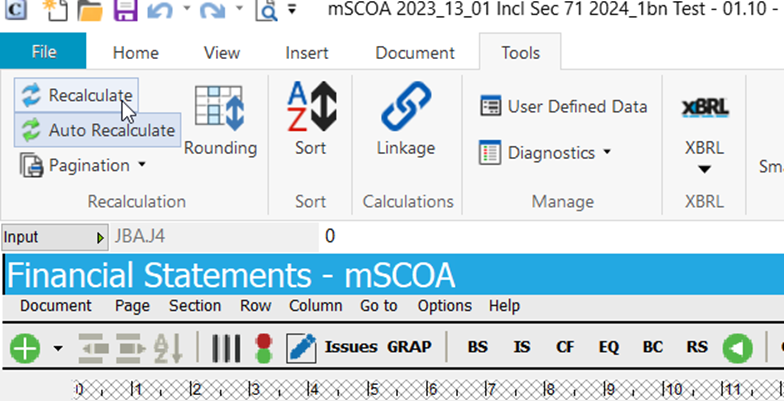
- Link Cashflow Statement to Excel. We notice users will rather input values in the Cashflow statement as the a working paper, which does the Cashflow statement calculation is used, which also serves as supporting evidence provided to Auditors. In order to help this process, the Cashflow statement cells have a link to excel option. It works as follows:
- Users can access the link to excel by "Double click" on any input cells on Cashflow statement:
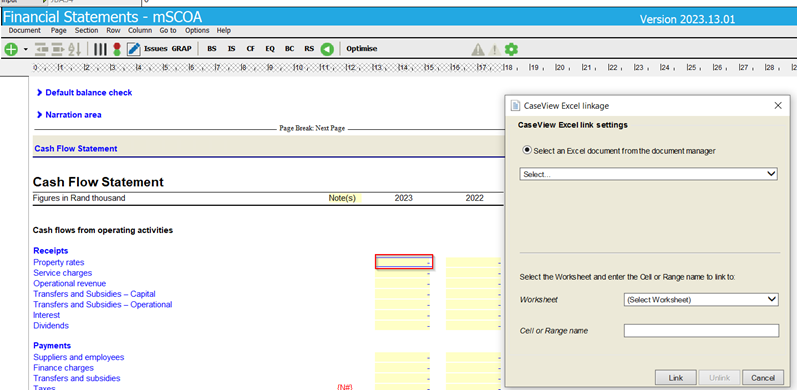
- To use first add the excel Cashflow working paper you are using to the document manager.
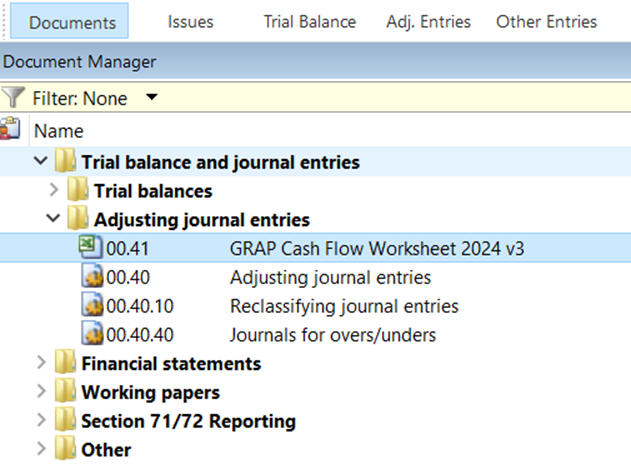
- Go back to Cashflow statement and double click on input cell in Cashflow Statement. Now you can select the excel document, select the sheet and select a cell or a cell name.
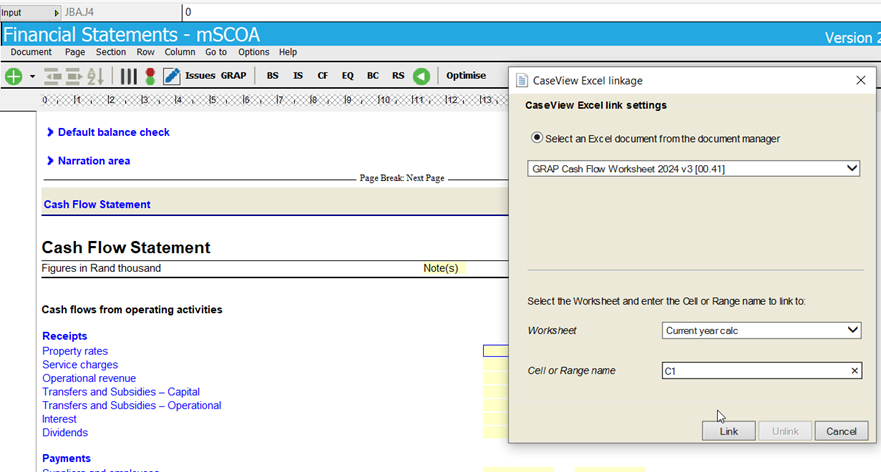
- Cell will be linked. To update the values, you can go to Tools|Recalculate:
MBRR 2024.01 (SEC71 2024.01)
1. Update to Schedules A, B, C, D, E and F:
- Updated the Function segment codes used in Schedule A, B and C.
- Updated the versions of Schedule A, B, C, D, E and F.
Previous releases - MBRR 2023.02 (SEC71 2023.02)
1. MBRR 2023.12 (SEC 2023.02)
1.1 Update to Schedules B, C, E and F.
- The new versions of Schedules B, C, E, & F on mSCOA version 6.7 have been added to the Caseware file during this update
- Added new rows to the following notes as new line items were introduced by version 6.7:
- This new version of the schedules will be added to your document manager.
- Note only the Caseview versions of these schedules will be updated and not the Excel versions.
- The Excel version of these schedules have been discontinued as National Treasury only requires a PDF version of these schedules to be submitted.
- Updated versions of Schedule A and D have been added to the Caseware file during this update with improvements in the following areas:
- A7 - Cashflow
- SA30 - Detailed Cashflow
- SA18 - Transfers and grant receipts
2. MSCOA 2022.13.02 (Specimen AFS)
2.1 Improvements to AFS Specimen
- Update to the following notes:
- Payables from non-exchange transactions '
- Financial liabilities
- Heritage assets
- Intangible assets
3. MSCOA 2022.13.01 (Specimen AFS)
3.1 Align Specimen AFS to the mSCOA version 6.7
- Link Living Resources note to the new Item codes introduced by version 6.7.
- Update the Heritage assets note with Revaluation model changes.
- Added new rows to the following notes as new line items were introduced by version 6.7:
- Receivables from Non-exchange Transactions
- Trade and other Receivables from Exchange Transactions
- Provision and Impairment
- Trade and Other Payable Exchange Transactions
- Trade and Other Payable Non-exchange Transactions
- Long term Trade and other Payables
- Provisions
- Ordinary Shares
- Exchange Revenue
- Non-exchange Revenue
- Contracted Services
- Depreciation and Amortisation
- Transfers and Subsidies
3.2 Improvements requested by users
- Added a new option to show VAT separately on the face of the Statement of Financial Position. This option will also net-off all the different mSCOA Vat accounts.
- Added 5 "Other revenue" lines to the face of the Statement of Financial Performance and related mapping numbers. This enables users to show items separately due to materiality requirements.
- In order to comply with the requirements of GRAP 18 Segmental Reporting, users in the mSCOA Specimen have an option to present this information in either the Report named Reportable Segments or in a note named Segmental Information. Both these options are now automated via the Function and Item segments.
- Add option to show Accessibility charges on the face of the Statement of Financial Performance.
3.3 Update to mSCOA version 6.7
- The following mapping and grouping databases have been updated due to changes in mSCOA version 6.7:
- Item (mapping)
- Project
- Fund
- Cost
- Regional
- Created a new coding structure for MBRR reporting (Group 10)
- Please refer to the MBRR section below for more information.
- The following auto assign logic have been updated due to the changes in mSCOA version 6.7:
- Item
- Project
- Fund
- Cost
- Regional
- MBRR
- The freeze in the mSCOA specimen have been updated to present new menu buttons.
- When importing datastrings users identified the need to clear out the balances in the Caseware file before a new version of a datastring is imported. The option is now available under Import|Accounting Systems| mSCOA Datastring import|Reset M12 Actuals, and will clear out the following datastings:
3.4 Technical improvements
- The freeze in the mSCOA specimen have been updated to present new menu buttons.
4. MBRR 2023.01 (SEC71 2023.01)
4.1 Update to A and D Schedule version 6.7.
- The new version of Schedule A and D on mSCOA version 6.7 have been added to the Caseware file during this update
- This new version of Schedule A and D on mSCOA version 6.7 will be added to your document manager.
- Note only the Caseview versions of Schedule A and D will be updated and not the Excel version.
- The Excel version of schedule A and D have been discontinued as National Treasury only requires a PDF version of the Schedule A and D to be submitted.
4.2 New MBRR codes for group 10
- With the new version of Schedule A 6.7 National Treasury aligned it to the mSCOA specimen. This resulted in presentation changes on the Statement of Financial Performance and Statement of Financial Position.
- To implement these changes a new version of MBRR grouping code in Caseware was created. This update will add this new grouping structure to the Caseware file. However, previous versions of the MBRR schedules on version 6.6, will not work. A update to Schedule B,C, E and F on version 6.7 will be release before 30 June 2023.
- We also recommend that for Schedule B, C, E and F on version 6.6 should be continued to be used in your Caseware file before this update. This will mean that you will need to maintain two Caseware files, one for reports on version 6.6 and updated version for Schedule A and D on version 6.7.
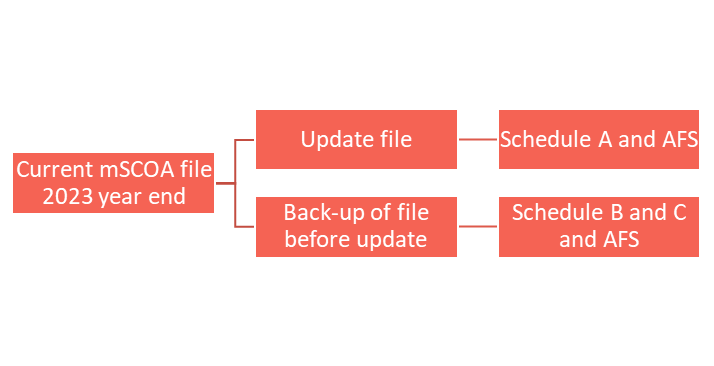
4.3 New MBRR codes for group 10
- When importing datastrings users identified the need to clear out the balances in the Caseware file before a new version of a datastring is imported. The option is now available under Import|Accounting Systems| mSCOA Datastring|Reset M12 for CY Actuals, and will clear out the following datastings:
Caseware Working Papers 2023.00.056 R2
1. History and milestones
- Added a history event for manually relocking a previously locked down engagement file. You can enable tracking for this event in your file’s history settings.
2. IDEA integration
- Template authors can now embed IDEA analytics from their installed IDEA SmartAnalyzer workflows into CaseView paragraphs, enabling them to standardize which tests to run and when. Users can perform analytics on the engagements and receive results without having to leave the Working Papers interface.
3. Imports and exports
- Working Papers now supports imports from the following software packages:
- Sage 50 Accounts 2023 (UK)
- Working Papers now supports exports to the following software packages:
4. Interface
- The Caseware Cloud search menu in the Consolidation | Properties, Consolidation | New | Existing File, Connect to SmartSync Copy... and Locate Parent of... dialogs has been modernized to improve performance and functionality.
- The SmartSync Server menu on the Working Papers File | Open page can now be automatically hidden when you connect to a Caseware Cloud site.
- Improved the wording in the Rename File confirmation dialog to clarify that Cloud-integrated files can be renamed, but Cloud-published files cannot.
5. Print and save
- When exporting a CaseView document that contains external documents to a PDF, the PDF copies of the external documents can now be read by a screen reader and the text can be copied and pasted.
6. Fixes
-
Caseview:
- Fixed an issue where text copied from external PDFs in CaseView would appear distorted when pasted into other text editors.
- Fixed an issue where document sections with a sort group name that exceeds 256-characters would cause the document to stop responding.
- Compression:
- Fixed an issue that prevented some files with special characters in the file name from being compressed.
-
Hybrid Cloud
- Fixed an issue where Cloud-integrated files with accented characters in the file name would fail to open when a sync copy was downloaded from the File | Open | Caseware Cloud menu.
- Fixed an issue (Error code: 0x8007001d) that prevented Cloud-integrated engagement files from being converted from the Working Papers interface.
- Fixed an issue where the Year-End Close Performed column in the Working Papers app on Cloud would not update with the correct year-end close status for each file.
-
Imports and exports
- Fixed an issue where imports from Fortune Acomba would exclude some transactions if Use the posting date if it is different than the effective date was selected.
- Fixed an issue that prevented the completion of E-conomic Online Accounting imports.
-
Interface
- Fixed an issue where upon opening an engagement file, the messages “Updating balance sheet account balances” and “Processing registration” would display, but not progress, preventing access to the file’s contents.
If you are a firm champion, you will have access to your unique download package by accessing the My Software page and clicking on the download packager icon top right. If you are responsible for managing updates and have not received login details for the CaseWare Africa Success Community, click on Login top right and then choose the Register Now option.
If this is not successful contact our admin team at info@casewareafrica.com
Kindly find the links to our previous releases here:
Rate this article:
|vote=None|
Processing...
(Popularity = 0/100, Rating = 0.0/5)
Login to access this download.
Release Notes
For more detailed information on these and other enhancements to the software, please go through our Release Notes.
Download Release Notes
Related Articles
mSCOA Latest Release (Version 2025_13_01 Incl Sec 71 2026_1)
ISRS Agreed-Upon | Latest release
ISAE Attestation | Latest release
Audit International Latest Release
SME Latest Release Version 2025.01.01 Insl. IFRS vir KMO's 2025.01.01AFR
view all...
Search Results
How do I know the client signer has authorized the auditor to send requests? (New Version of Confirmation)
I can’t request authorisation from a client signer as the name is greyed out (cannot be selected)?
Can my client signer give authorisation to multiple companies at the same time?
Editing Authorised Signer Details
Who is an authorised signer?
view all...