Executive summary
On 13 June 2025, National Treasury release the mSCOA Specimen Annual Financial Statements for the 2024/25 municipal financial year. This update will add these changes to your current mSCOA specimen file.
It is the National Treasury’s intention to regulate the specimen consolidated and municipality AFS from the 2025/26 financial year and municipalities are therefore encouraged to use the specimens (as applicable) in 2024/25 and inform us of any challenges encountered during the process.
Municipalities are reminded that it is their responsibility to ensure that the AFS is consistent with the Municipal Budget and Reporting Regulations (MBRR) and GRAP. Therefore, where information and disclosures required in terms of legislation are omitted in the specimen AFS, the municipality must ensure that such information is included and disclosed in their 2024/25 AFS.
This update is based on the latest version of Caseware Working Papers (Version 2024.00.162) which will give users all the improvements on the core Caseware Working papers application.
Contents
1. mSCOA 2024.13.02 (Specimen AFS)
1.1. Alignment to latest Specimen
1.2. User request improvements/Additional Content
2. Previous release: mSCOA 2024.13.01 (Specimen AFS)
3. Previous release: MBRR 2025.01 (Sec71 2025.01)
4. Caseware Working Papers 2024.00.162
mSCOA 2024.13.02 (Specimen AFS)
1.1. Alignment to the latest Specimen:
The following areas have been updated to align to the latest released AFS Specimen:
- Index:
- Reorder statements as per latest specimen.
- Add year/period reference to report headers.
- General Information page:
- Add Information section for Area of Jurisdiction.
- Accounting Officer's Responsibilities and Approval:
- Add new paragraph regarding B-BBEE responsibilities.
- Add option to switch references in paragraphs between singular and plural.
- Accounting Officer's report:
- Statement of Financial Position:
- Update report header to show year/period reference.
- Added new line items and related lead sheets:
- "Short Term Investments" under current assets, separate from "Cash and Cash Equivalents".
- "Non-current deposits". under current assets.
- Statement of Financial Performance:
- Update report header to show year/period reference.
- Added new line items and related lead sheets:
- Construction Contract Revenue.
- Development Charges.
- Cashflow Statement:
- Update report header to show year/period reference.
- Add new line item for "Short Term Investments"
- Statement of Comparison of budget and actual amounts:
- Update report header to show year/period reference.
- Added row for "Special rating levies" as per MBRR reports.
- Statement of Changes in Net Assets:
- Update calculations that "Prior period errors" refers to the previous years Prior Period Item segment account.
- Reporting Segments:
- Update to align to specimen.
- Add new column for Total Allocated.
- Accounting Policies:
- Updated the Introduction section of the accounting policies.
- Notes to the financial statements:
- Added new notes for:
- Construction contract revenue.
- Development charges.
- Discontinued operations
- Risk management note
- Updated the following notes:
- Sale of Goods and Rendering of Services.
- Operational revenue.
- Rent from fixed assets
- Gains and losses on disposal
- Debt impairment
- Taxation
- Revaluation reserve
- Property plant and equipment:
- Add new table for change in estimates
- Add new table for Construction work in progress
- Add new table for Construction work in progress - Projects halted during the current or previous financial year.
- Defined benefit obligations note
- Remuneration of councilors
- Municipal staff costs
- Financial Instruments
- Segmental information
- Heritage assets
- Intangible asset
- Investments
- Current portion of non-current receivables
1.2. User request improvements/Additional Content:
The following areas have been updated to provide users with more flexibility with presentation and disclosure options:
- Statement of Financial Position:
- Vat receivable
- Disclosure options available:
- Show VAT Accrual (Output) as part of Trade and other receivables from exchange transactions notes
- Show VAT Control as part of Trade and other receivables from exchange transactions
- Show VAT Accrual (Output) and VAT Control separately in its own note
- Show VAT Control separately in its own note and show VAT Accrual part of the Trade and Other Receivable from exchange transactions note
- Show VAT Control (Net of VAT Control debit and VAT Control credit) in its own note and show VAT Accrual part of the Trade and Other Receivables from exchange transactions note
- Vat payable:
- Disclosure options available:
- Show VAT Accrual (Input) as part of Trade and Other Payables from exchange transactions
- Show VAT Control as part of Trade and Other Payables from exchange transactions
- Show VAT Accrual (Input) and VAT Control separately in its own note
- Show VAT Control separately in its own note and show VAT Accrual (Input) part of the Trade and Other Payables from exchange transactions note
- Show VAT Control (Net of VAT Control debit and VAT Control credit) in its own note and show VAT Accrual (Input) part of the Trade and Other Payables from exchange transactions note.
- Short Term Investments:
- An option to show "Short Term Investments" as part of Cash and Cash Equivalents is now also available.
- Statement of Financial Performance:
- Add option to show "below" the line for the following line items:
- Gains/Loss on disposal
- Transfers and Subsidies - Capital
- The following line items are shown separately as Specimen requires Gain/Losses on disposal only for Intangible and Fixed Assets:
- Inventory Losses/Write-Offs
- Fair Value Adjustments
- Foreign Exchanges Losses
- Gains/(Losses) on discontinued Operations and Disposals of Non-current assets
- Cashflow Statement:
- If users select to show "Short Term Investments" separately, the balance check will only include Cash and Cash Equivalents. If users select to show "Short Term Investments" as part of "Cash and Cash Equivalents, the balance check will refer to both.
- Notes to the Financial Statements:
- Added the following notes:
- Inventory Losses/Write-Offs
- Fair Value Adjustments
- Foreign Exchanges Losses
- Gains/(Losses) on discontinued Operations and Disposals of Non-current assets
- Updated the following notes:
- Property plant and equipment:
- Add a reconciliation table for Construction work in progress, to unpack the values of Construction work in progress included in the main reconciliation table.
- Receivables from Exchange transactions
- Add option to show base the Age analysis on the Gross or Net amount
- Receivables from non-exchange transactions
- Add option to show base the Age analysis on the Gross or Net amount
- Current portion of non-current receivables
- Added additional mapping numbers to show current portion of receivables from exchange transaction part of this note.
- Cashflows from operations
- Added option to link to Excel for this note.
2.1. Alignment to the latest Specimen:
The following areas have been updated to align to the latest released AFS Specimen:
- Statement of Financial Position:
- Added new line items:
- "Operating Lease receivable" under current and non-current assets.
- "Construction Contracts and Receivables". under current assets.
- "Deposits" under current assets.
- "Income tax receivable" under current assets.
- "Defined Benefit Asset" under non-current assets.
- "Deferred Tax Assets" under non-current assets.
- "Investment in Associate" under non-current assets.
- "Investment in Joint Venture" under non-current assets.
- "Investment in Subsidiary" under non-current assets.
- "Intercompany/Parent-subsidiary transactions" under non-current assets.
- "Income tax payable" under current liabilities.
- "Deferred tax liabilities" under current and non-current liabilities.
- "Intercompany/Parent-subsidiary transactions" under current liabilities.
- "VAT payable" under current liabilities.
- "Long term trade and other payables" under non-current liabilities.
- Removed the following line items:
- "Interest in other entities" under non-current assets.
- "Other non-current assets" under non-current assets.
- "Other current liabilities" under current liabilities.
- "Other non-current liabilities" under non-current liabilities.
- Renamed the following line items:
- "Other non-current assets 2" to "Other non-current assets 1".
- "Other non-current assets 3" to "Other non-current assets 2".
- "Other current liabilities 2" to "Other current liabilities 1".
- "Other current liabilities 3" to "Other current liabilities 2".
- "Other non-current liabilities 2" to "Other non-current liabilities 1".
- "Other non- current liabilities 3" to "Other non-current liabilities 2".
- Statement of Financial Performance:
- Added new line items:
- "Interest" under Revenue from exchange transactions.
- "Dividends" under Revenue from exchange transactions.
- "Rent on land" under Revenue from exchange transactions.
- "Special rating levies" under Revenue from exchange transactions.
- "Intercompany/Parent-subsidiary transactions under Revenue from exchange transactions.
- "Fuel levy" under Revenue from non-exchange transactions.
- Statement of Comparison of Budget and Actual information:
- Added a new line item for "Special rating levies" under Revenue from exchange transactions.
- Reportable segments
- Update the categories to align with the new specimen.
- Accounting policies:
- Update the "Basis of preparation" note.
- Update the "New standards and interpretations note." Also moved this note to be before the notes to the financial statements.
- Update the "Property plant and equipment" accounting policy.
- Added a new accounting policy for "Service concession arrangements".
- Notes to the financial statements:
- Added new notes for:
- Operating Lease Receivable. Added an option to show current and non-current Operating lease receivables separately.
- Construction Contracts and Receivables.
- Income tax receivable. Added an option to combine Income tax receivables and Income tax payables into one note.
- Deposits.
- Defined Benefit Asset. Added an option to show Defined benefits assets and Defined benefits liabilities as one note.
- Deferred Tax Assets. Added an option to show Deferred Tax Assets and Deferred Tax Liabilities in one note.
- Investment in Associate.
- Investment in Joint Venture.
- Investment in Subsidiary.
- Intercompany/Parent-subsidiary transactions.
- Income tax payable. Added an option to combine Income tax receivables and Income tax payables into one note
- Deferred tax liabilities. Added an option to show Deferred Tax Assets and Deferred Tax Liabilities in one note.
- Vat payable.
- Long term trade and other payables. Add option to show current and non-current Trade and other payables in one note.
- Interest.
- Dividends.
- Rent on land.
- Fuel levy.
- Special rating levies.
- Irrecoverable debt written off.
- Updated the following notes:
- Vat receivable.
- Other current assets.
- Employee benefits.
- Provisions.
- Trade and other receivables from exchange transactions.
- Trade and other receivables from non-exchange transactions.
- Operational revenue.
- Transfers and subsidies received.
- Surcharges and taxes.
- Intercompany/Parent subsidiary transactions.
- Depreciation and amortisation.
- Updated the following:
- Mapping database
- Added 257 new Item segment codes.
- Change 113 Item segment codes descriptions.
- Cost grouping database with 3 new Costing segment code.
- Fund grouping database with 21 new Fund segment code.
- Project grouping database with 6 new Project segment code.
- Regional grouping database:
- Added 11 new Regional segment codes.
- Changed 79 Regional segment codes.
- Update all the auto assign logic with these new codes added.
- Updated the Function segment codes used in Schedule A, B and C.
- Update to Schedule A:
- Add "Special levies rates" to A4.
- Add new section A6 Inventory.
- Add "Vat control (receipts) to SA30.
- Change description of Transfers and subsidies - capital (in kind) on A5.
- Add rows for prior period errors under Inventory section on SA3.
- Add "Special levies rates" to SA2.
- Add "Special levies rates" to SA25.
- Update to Schedule B:
- Add "Special levies rates" to B4.
- Add "Vat control (receipts) to SB15.
- Change description of Transfers and subsidies - capital (in kind) on B5.
- Update to Schedule C:
- Add "Special levies rates" to C4.
- Add "Vat control (receipts) to SC9.
- Change description of Transfers and subsidies - capital (in kind) on C5.
- Update to Schedule D:
- Add "Special levies rates" to D2.
- Add "Vat control (receipts) to SD6.
- Change description of Transfers and subsidies - capital (in kind) on D5.
- Update to Schedule E:
- Add "Special levies rates" to E2.
- Add "Vat control (receipts) to SE5.
- Change description of Transfers and subsidies - capital (in kind) on E5.
- Update to Schedule F:
- Add "Special levies rates" to F2.
- Add "Vat control (receipts) to F3.
Caseware Working Papers 2024.00.162
The following describes the features and fixes included in Working Papers 2024 and related products.
4.1. Features
4.1.1. Xero online (Direct) import
Working Papers now fully supports imports from Xero Online. You can import your Xero trial balance and general ledger details from the Import - Accounting Software dialog without having any licencing errors using the “Xero Online(Direct)” option.
4.1.2. Protection setup
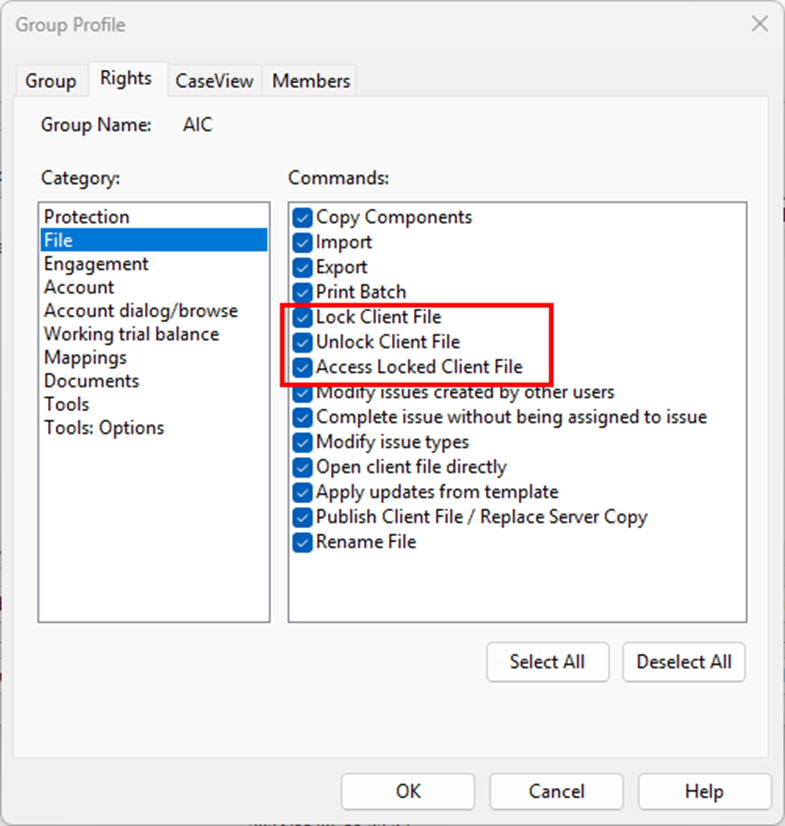
Split the Lock Client File/Unlock Client File group right into separate Lock Client File and Unlock Client File rights to provide more control over these operations.
4.1.3. Licencing
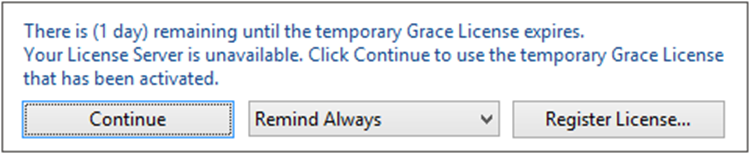
Added a warning dialog that displays when a Working Papers license is nearing its expiration date.
4.1.4. Hybrid cloud
Increased the duration that Working Papers will attempt to communicate with Cloud to prevent the process from timing out before completion.
4.1.5. XBRL
CaseView now supports multiple XBRL entry points. In the new Select Entry Points dialog, you can add taxonomies and select the applicable entry points to use from the list.
4.2. Improvements
- Attempting to access a computer’s system drive through Caseview causes Caseview to close unexpectedly.
- After performing a silent installation to a newer version of Working Papers, the older version is uninstalled, but the shortcut folder remains in the Windows 10 Start menu.
4.3. Fixes
4.1.1. Imports
Importing data from AccountView into an engagement that was rolled forward does not clear the previous year-to-date (YTD) value.
4.3.2. SmartSync
Documents locked for exclusive use may not indicate that they are ‘Locked’ when opened by the exclusive user, or ‘Read-only’ when opened by other users. The locked/read-only status were still applied, however.
4.3.3. Licencing
Working Papers reports a time tampering issue and locks the application when the system time has not been modified.
4.3.4. XBRL
Inline XBRL and non-XBRL-tagged HTML files do not preserve optional hyphens (also known as soft hyphens, which are used to break words across lines) in the export file.
4.3.5. User Interface
Some Working Papers fonts and Caseview icons do not properly scale to monitor resolution.
If you are a firm champion, you will have access to your unique download package by accessing the My Software page and clicking on the download packager icon top right. If you are responsible for managing updates and have not received login details for the CaseWare Africa Success Community, click on Login top right and then choose the Register Now option.
If this is not successful contact our admin team at info@casewareafrica.com
Kindly find the links to our previous releases here:
Rate this article:
|vote=None|
Processing...
(Popularity = 3/100, Rating = 0.0/5)
Login to access this download.
Release Notes
For more detailed information on these and other enhancements to the software, please go through our Release Notes.
Download Release Notes
Related Articles
mSCOA Latest Release (Version 2025_13_01 Incl Sec 71 2026_1)
mSCOA | Release | March 2024 | Version 2023.13.01 Incl Sec 71 2024_1
GRAP | How to import mSCOA from your accounting software
mSCOA | How to automate mSCOA Specimen Annual Financial Statements as per National Treasury
view all...
Search Results
Privacy and Security Summary
Where to find information about Caseware’s security, privacy, and compliance practices?
XBRL | How to change security settings for Caseware and when iXBRL "hangs" on CIPC validation
ISO 27001 Certification
SOC 1 and SOC 2 Examinations
view all...