
Welcome to the #GetAhead 2026 Intake Training Series
Caseware Africa is excited to launch our #GetAhead 2026 Intake Training Series! Created to empower new intakes and experienced professionals to achieve more with Caseware solutions.
- Registration
- #GetAhead 2026 Track Schedule
- What's new in #GetAhead 2026
- How does #GetAhead 2026 work
- FAQs
- eLearning Courses
- Learner Resources
Get Ahead 2026 Learner Files (Zipped Downloads)
Learner resources are located under the session resources column in the track schedule, please download the relevant learner file before your session begins to prepare for your Get Ahead 2026 training track.
These files contain the practical working papers, engagement templates, case studies, and exercise material that will be used throughout the training. Having them ready in advance ensures you can follow along in real time, participate fully in the hands-on activities, and gain the most value from the session.
Please ensure that you download the correct file for your selected track and level, extract the contents of the zipped folder, and save the files locally on your device before the session starts.
| Session | Date | Time | eLearning Files | Live Session Resources |
|---|
| Intro & Cloud Series | | |
| Introduction to Caseware | 6 February 2026 | 09:00 – 11:00 | - |
Introduction to Caseware - Recording
|
| Introduction to Caseware Cloud | 12 February 2026 | 09:00 – 10:30 | - |
Caseware Cloud - Session Slides
Caseware Cloud Intro - Recording
|
| Getting started with cloud apps | 26 February 2026 | 13:00 – 14:00 | - | Caseware Cloud Apps - Resources |
| Financial Statements | | |
| Complete eLearning for Caseware Working Papers Level 1 & Financial Statements Level 1 | 6 February 2026 - 25 February 2026 | | Refer to eLearning portal | - |
| Getting started with engagement file | 26 February 2026 | 09:00 – 12:00 | - | Financial Statements Level 1 - Session Resources |
| Draft a set of financial statements – 1 of 2 | 5 March 2026 | 09:00 – 12:00 | - | Coming soon |
| Draft a set of financial statements – 2 of 2 | 12 March 2026 | 09:00 – 12:00 | - | Coming soon |
| Consolidations & iXBRL | 19 March 2026 | 09:00 – 12:00 | - | Coming soon |
| Audit Level 1 | | |
| Complete eLearning Module 1 of Audit Level 1 | 6 February 2026 - 19 February 2026 | |
|
-
|
| Performing fieldwork (session 1 of 3) | 20 February 2026 | 09:00 – 11:00 | - |
Audit Level 1 - Session 1 Probe Slides
Audit Level 1 - Session 1 Audit International Slides
|
| Complete eLearning Module 2 of Audit Level 1 | 21 February 2026 - 12 March 2026 | | Use same material from module 1 | |
| Performing fieldwork (session 2 of 3) | 13 March 2026 | 09:00 – 12:00 | - | Coming soon |
| Complete eLearning Module 3 of Audit Level 1 | 14 March 2026 - 19 March 2026 | | Use same material from module 1 | |
| Performing fieldwork (session 3 of 3) | 20 March 2026 | 09:00 – 12:00 | - | Coming soon |
| Audit Level 2 | | |
| Complete eLearning Module 1 of Audit Level 2 | 6 February 2026 - 12 February 2026 | |
|
-
|
| Planning the audit (session 1 of 3) | 13 February 2026 | 09:00 – 12:00 | - |
Audit Level 2 - Session 1 - Probe Slides
|
| Complete eLearning Module 2 of Audit Level 2 | 14 February 2026 - 5 March 2026 | |
Use same material from module 1
| |
| Planning the audit (session 2 of 3) | 6 March 2026 | 09:00 – 12:00 | | Coming soon |
| Complete eLearning Module 3 of Audit Level 2 | 7 March 2026 - 26 March 2026 | | Use same material from module 1
|
|
| Planning the audit (session 3 of 3) | 27 March 2026 | 09:00 – 12:00 | - | Coming soon |
| Audit Level 3 | | |
| Finalising the audit engagement (session 1 of 3) | 20 February 2026 | 13:00 – 16:00 | - |
Audit Level 3 - Session 1 - Probe Slides
Audit Level 3 - Session 1 - Audit International Slides
|
| Auditing disclosure (session 2 of 3) | 13 March 2026 | 13:00 – 16:00 | - | Coming soon |
| Reviewing the audit engagement (session 3 of 3) | 20 March 2026 | 13:00 – 16:00 | - | Coming soon
|
| Probe Review | | |
| Performing independent reviews using Probe Review (session 1 of 2) | 13 February 2026 | 13:00 – 16:00 | - | Probe Review - Session Slides |
Complete the quiz on the eLearning Module for
Probe Review | 14 February 2026 - 5 March 2026 | | Refer to eLearning portal | |
| Performing independent reviews using Probe Review (session 2 of 2) | 6 March 2026 | 13:00 – 16:00 | - | Coming soon |
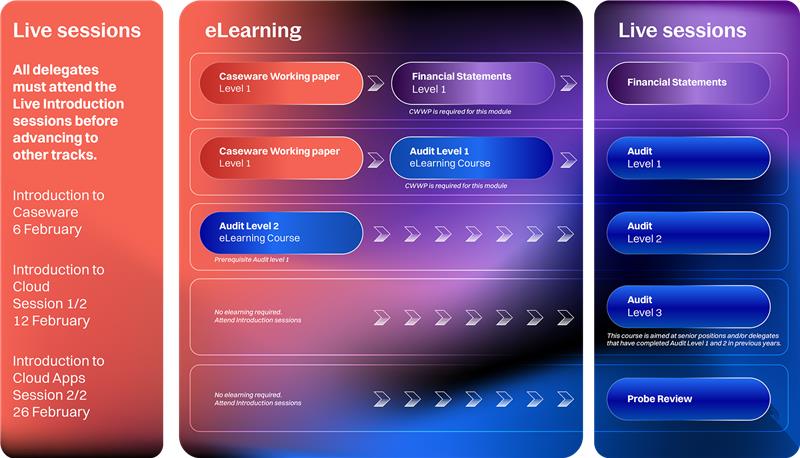
- Audit Level 3: We have included more topics relevant to staff in more senior positions for those delegates who have completed Audit Level 1 and 2 in previous years.
- Probe Review: Delegates performing Independent Review engagements using the Probe Review methodology have a new track to learn about the theory and practical application thereof in the product.
- New Webinar Platform: We are now hosting our webinars on Microsoft Teams
How does #GetAhead 2026 work?
Step 1: Select you track
- Please select your preferred track. You will then be automatically registered for all sessions in that track, including the introductory sessions.
- Joining links for the Introduction to Caseware session will be shared by the end of the week upon registration, with track-specific links sent closer to each session.
Step 2: Attend the Introduction to Caseware Sessions
- These 3 introductory sessions Introduction to Caseware, Caseware Cloud session 1 and 2 are essential as they provide an overview of the series and provide key tips to help you get the most out of your learning experience.
Step 3: Complete eLearning Modules
- Engage with our on-demand video content at your convenience.
- Modules include:
- Caseware Working Papers – Level 1: Prerequisite for Financial Statements first live session on 5 March 2026.
- Financial Statements – Level 1: Prepares you for live sessions starting 5 March 2026
- Audit - Level 1: Three modules to be completed before the following live sessions:
- Module 1: Complete before attending the live session on 20 February 2026
- Module 2: Complete before attending the live session on 13 March 2026
- Module 3: Complete before attending the live session on 20 March 2026
- Audit - Level 2: Three modules to be completed before the following live sessions:
- Module 1: Complete before attending the live session on 13 February 2026
- Module 2: Complete before attending the live session on 6 March 2026
- Module 3: Complete before attending the live session on 27 March 2026
- Probe Review: Complete the quiz after attending the first live session on 13 February 2026, in preparation for the second session on 6 March 2026. The quiz is intended to test your understanding of the theory before the practical application session.
Step 4: Join Live Track Sessions
-
- Participate in live, interactive sessions facilitated by our expert Product Management team.
- Use dual monitors for an optimised learning experience.
Step 5: Earn Your CPD Certificates
- Receive CPD certificates upon successful completion of live sessions and eLearning courses.
- Ensure your unique joining link is used, full attendance and complete quizzes where applicable to qualify.
Caseware Africa is excited to launch our #GetAhead 2026 Intake Webinar Training Series! Created to empower new intakes and experienced professionals to achieve more with Caseware solutions.
- Do I need to attend all live sessions?
It’s recommended to attend all live sessions in your selected track, the Introduction to Caseware session is mandatory to proceed with other tracks. - Can I register for multiple tracks?
Yes, you can select multiple tracks during registration. - Will recordings be available?
Yes, recordings of live sessions will be made available after the webinars on this page. - Will CPD certificates be available?
Yes! CPD certificates are issued after attending all live sessions and completing the eLearning modules. Please refer back to Step 5 for details on how to earn your CPD points. - Who can I contact for additional assistance?
For further support, email our team at caseware.getahead@adaptit.com - What are the technical requirements for participating in live webinars?
To ensure a smooth learning experience, participants are encouraged to use a stable internet connection and 2 screens. - What happens if I miss a live session?
Recordings of live sessions will be available on this #GetAhead 2026 community page for you to catch up at your convenience. However, live attendance is encouraged for an interactive experience and to qualify for CPD certificates. - Can I switch tracks after registration?
Track selections are final upon registration. If you need assistance with your selection, contact us before the sessions begin. - What are the pre-requisites for Audit Level 2 and Audit Level 3?
Audit Level 2 is designed for participants who have previously completed Audit Level 1 or for more senior audit staff that want to learn how to plan the audit using the Probe Audit Premium+ or Audit International methodologies. Audit Level 3 is designed for participants who have previously completed Audit Level 2 or for more senior audit staff that want to learn more about the specific topics included in this track. - How do I access the eLearning modules?
After registering, you will receive an email with instructions on how to access the eLearning portal and complete your modules before live sessions.
Rate this article:
|vote=None|
Processing...
(Popularity = 1/100, Rating = 0.0/5)
Related Articles
Caseware Working Papers | What to do when opening a Caseware Working Papers file and you get the error code -200 or error code -70 message?
How do I get rid of the Statement of Financial Position entity warning?
How to get a new version from library in the financial statements
Caseware Time | How do I correct the error I get when opening statements?
How do I get my directors’ names to display on the general information page or Directors Report?
view all...
Search Results
Guide ZA-Cash Management Form
Confirmation Billing Guide (Effective 1 Nov 2025)
Guide ZA-Liability Form
Guide ZA-Asset form
Guide ZA-Bills Form
view all...