Executive summary
This release contains the latest technical enhancements, minor content changes and other improvements.

Contents
1. SME template
1.1 Tax computation
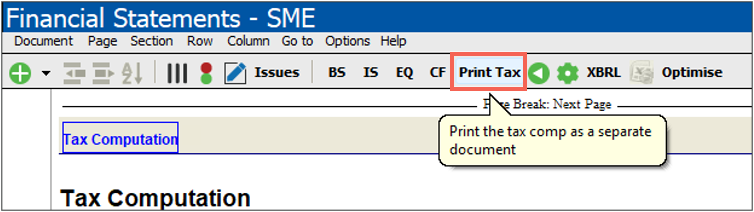
1.1.1 New “Print Tax” button
A new “Print Tax” icon has been added to the toolbar, positioned after the Cash Flow button. Clicking it opens the Tax Computation (if it isn’t already open), sets it to page 1, and launches the “Save as PDF” dialog. Once you close the dialog, the Tax Computation returns to whatever state it was in before you clicked the button (open or closed). [Freeze]
1.1.2 Tax reference number now shown in the header
The tax reference number captured in the Info Store now displays in the Tax Computation’s page header, underneath the registration number. A new display option has been added to the Tax Computation’s Settings and Format (enabled by default) so you can turn this off if you don’t need it.
1.1.3 New standard line items for non-deductible/non-taxable items
The Permanent differences (Non-deductible/Non-taxable items) table now includes additional standard mapping numbers so common items are picked up automatically, including: [TAX_001_04]
- Repairs and maintenance
- Legal expenses
- Consulting and professional fees (including “other” consulting fees)
- Donations
- Fines and penalties
- Travel – overseas
- Other farming expenses
These new rows are added at the bottom of the existing table and can be sorted as needed.
1.1.4 More flexible row insertion in Tax Computation tables
You can now insert any of the standard row types into the tables within the Tax Computation, with the super insert function. [TAX_COMP1]
1.1.5 Updated Small Business Corporation (SBC)
The SBC tax table was updated to include the 2027 rates as well as the 2028 input row.
1.1.6 Assessed loss – Tax limitation rule (80/20) now applied for Close Corporations
When a Close Corporation is selected on the Info Store, the 80/20 tax limitation rule is now applied to the assessed loss calculation, in line with the South African Income Tax Act. Previously this rule was only enforced for Companies.
1.1.7 Undefined difference – Body Corporate
Corrected a sign discrepancy between the Balance Sheet and the Tax Computation note for Body Corporate entities, where the Tax Computation showed a negative value against a positive value on the Balance Sheet, triggering an incorrect “undefined difference” flag.
1.2 Assurance reports
The following assurance reports have been updated with new content, wording and abbreviation changes, and conditional-display improvements:
1.2.1 Independent auditor’s report
- Wording and abbreviation updates throughout (IASB, ISA, ISAs).
- Two new radio-button options were added, providing the auditor with the option to early adopt revisions to the audit report as a result of revisions to the ISAs. These revisions include changes to ISA 240 (Revised), ISA 570 (Revised 2024) as well as narrow-scope amendments to ISA 700 as a result of changes to the definitions of ‘Listed entity’ and ‘Public Interest Entity’ in the IESBA and IRBA Codes.
The user now has the option to either:
- continue using the currently effective standards, which are still aligned to the IRBA’s currently effective SAAPS 3 (Revised September 2025) or
- use the newer versions of the independent auditor’s report, which are aligned to the draft illustrative reports in the IRBA’s Exposure Draft: Proposed SAAPS 3 (Revised XXXX 2026), dated June 2026.
When choosing to use the newer versions of the independent auditor’s report, the auditor is effectively early adopting ISA 240 (Revised), ISA 570 (Revised 2024) and the narrow-scope amendments to ISA 700.
It is therefore essential that the documentation in the audit engagement file also reflects evidence of compliance with the standards that have been early adopted.
- The Body Corporate assurance-engagement limitation paragraph has been reworded to state that the engagement does not meet the preconditions for an assurance engagement, and that the practitioner could not accept the engagement due to the absence of suitable books of account or records, without implying fault by the trustees.
1.2.2 Independent reviewer’s report
- Wording and abbreviation updates [IRR]
1.2.3 Practitioner’s compilation report
- Wording and punctuation updates [PCR]
1.2.4 Accounting officer’s and compilation (combined) report
- Wording and punctuation updates in the Compilation Engagement paragraph, abbreviation changes (IASB), and a restricted-distribution wording addition for entity-specific reports. [AAC]
1.3 Improvements
1.3.1 Simplified right-click menus
The right-click menus used throughout the SME template have been reorganised to make configuring your financial statements easier:
- Table, row and column menus have been grouped together consistently, with an improved “Change description” option and clearer greyed-out options for toggle input cells.
- Column options are now clickable when selecting input cells, including on tables with an Excel link.
- The outdated “Properties”, “Section” and “Page” menu options have been removed and replaced with a single, consistent option that opens a proper settings screen.
- On the Notes and ACPs, the old “Properties” option on tables, text sections, and note/ACP headings has also been replaced with the same consistent option.
Refer to Appendix – Right click menu.
1.3.2 New HTML (pop-up menus)
The pop-up dialogs used throughout the templates have been redesigned to be more aligned with our cloud apps, streamlined look, making them easier and more intuitive to navigate.
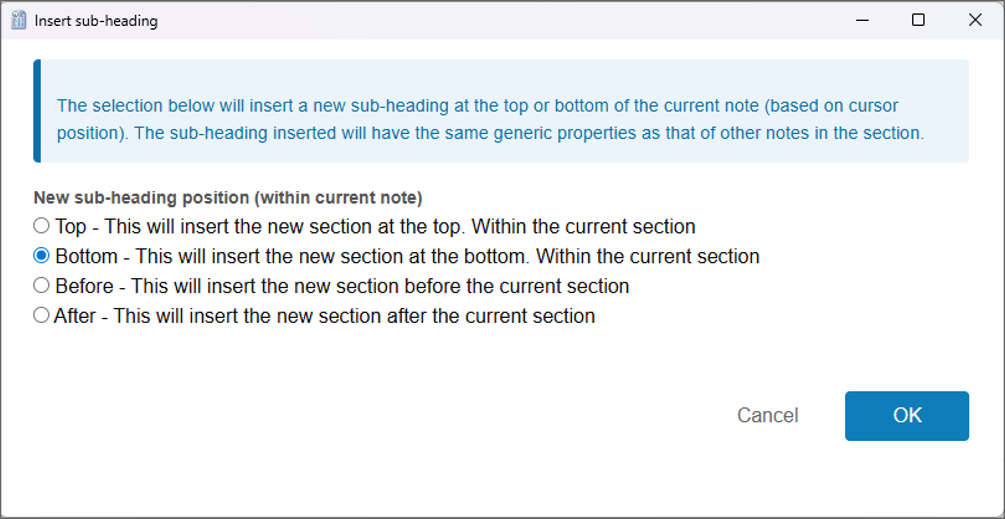
1.3.3 New super insert option
A new super insert option is available when you are on the sub-heading of a main note/ACP.
1.3.4 Basis of preparation warning removed
The warning message that previously appeared in the Info Store when selecting a Basis of Preparation has been removed.

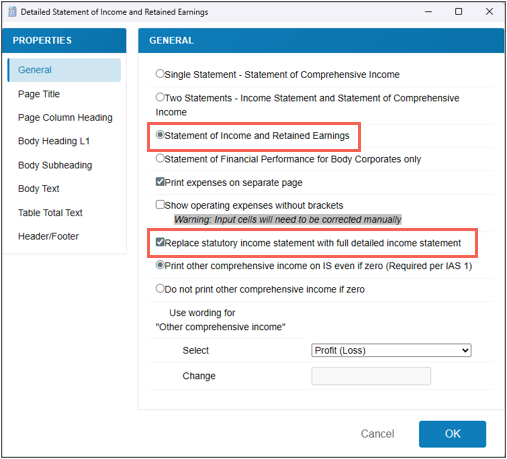
1.3.5 Trust entities now show the full detailed Statement of Income and Retained Earnings
When “Replace statutory income statement with full detailed income statement” is selected in the Income Statement settings, Trust entities now display the same detailed Statement of Income and Retained Earnings as Close Corporations and Companies. [DETIS_IRE]
1.3.6 Other
- Updated Companies Act for Namibia to be - Companies Act 28 of 2004 as amended.
- Corrected an incorrect XBRL tag on the General accounting policies (Property, Plant and Equipment) accounting policy in the ACPs. To implement this change you will have to clear and restore tags. [ACP_001]
- The total line at the end of the Equity Statement was not displaying in a specific scenario — namely, a first year of operations with the “Do not print OCI if zero” setting selected. This has been corrected. [CHGEQ]
- The Director’s Report Auditors section was incorrectly printing when it was set not to show, for entities where a country other than South Africa was selected on the Info Store. Only the correct sections now print.
2. Caseware Working Papers 2026.00.058
The following describes the features and fixes included in Working Papers 2026 and related products.
2.1 Features
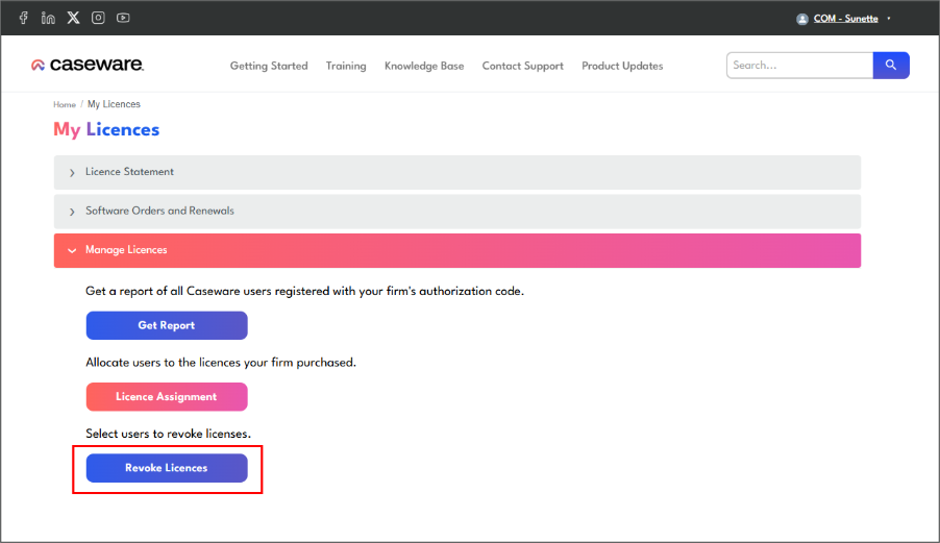
- You can now revoke Caseware Working Papers licences from the Success community.
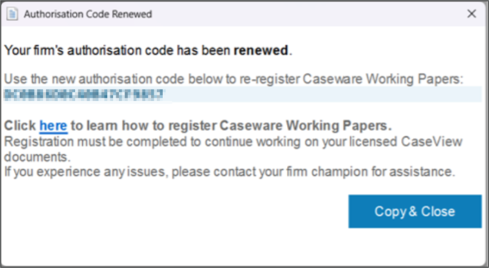
- You are able to send in-app notifications to all users in your firm to register Caseware Working Papers with the organisation's new authorisation code. This is helpful when you renew your Caseware licences and all users need to be moved to the new authorisation code.
- From the Success community licence management screen, you will be able to control when to send the notification out to users.
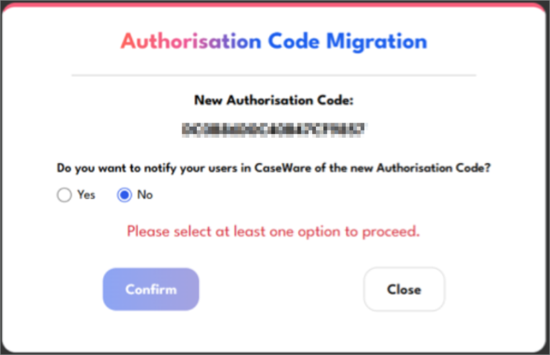
- Users will get this notification with steps to follow when they open Caseware Working Papers.
- You are able to view all issues in a Caseware file as tasks in Caseware Cloud.
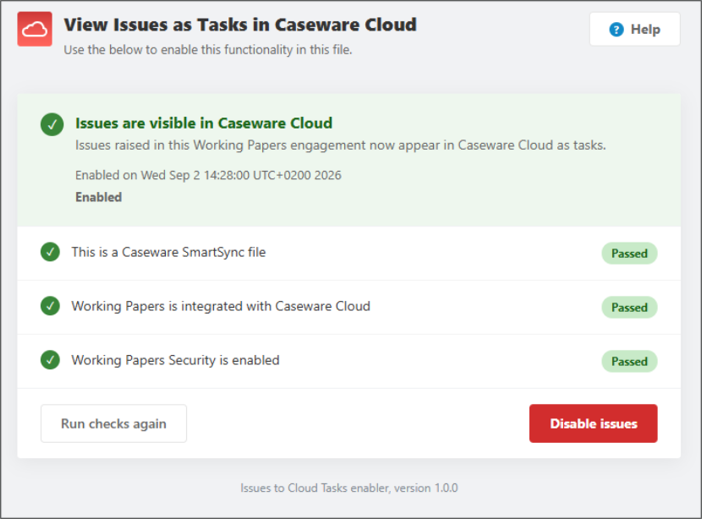
It has to be a SmartSync file that is integrated with Caseware Cloud and you must be using Cloud security on that file.
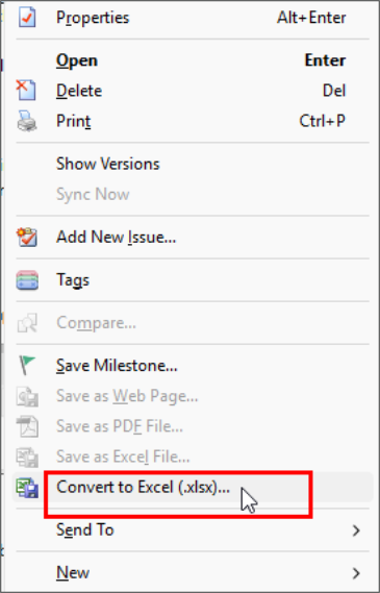
- A Convert to Excel File (.xlsx) option has been added to the right-click menu in the Document Manager, which converts a CSV file to .xlsx and replaces the original file.
- The Data Store Administration Tool is now compatible with Microsoft SQL Server 2025.
2.2 Fixes
This release includes fixes to the following issues:
- After lockdown, opening a document's properties and clicking OK trimmed a leading space from the document name, creating a modification event after lockdown.
- Excel imports truncated the extended map description in files that have multiple languages enabled.
- Deleting the first folder in the Document Manager deleted all Document Manager content when a workflow layout was applied.
- The History automatic document omitted some history events when filtering by a date range, due to a UTC timezone offset.
- Files closed unexpectedly when signed into Caseware Cloud with certain privileges.
- Child copies became stuck in a continuous syncing state.
- Dragging and dropping multiple files into the Document Manager changed the content of every file after the first, resulting in documents with content from another file.
- Working Papers defaulted to a fixed runtime instead of the evergreen WebView2 runtime.
- Attaching an .sfc file to an issue resulted in an error due to a file corruption check that did not apply to uncompressed attachments.
- External data cells in CaseView with an asterisk in the Form field caused data loss.
- CaseView pie charts using the old look rendered a default set of data instead of the values passed to them.
- CaseView crashed during HTML exports in documents with certain subdocument structures.
All 2026 Templates require Caseware Working Papers 2026 to be installed.
If you are a firm champion, you will have access to your unique download package by accessing the My Software page and clicking on the download packager icon top right. If you are responsible for managing updates and have not received login details for the Caseware Africa Success Community, click on Login (top right) and then choose the Register Now option.
If this is not successful contact our admin team at info@casewareafrica.com
Who is the firm champion?
The "Firm's Champion" is the staff member responsible for rolling out the template to the users at the firm.
I do have a Caseware Africa Success Community login
If you are a firm champion, you will have access to your firm's unique download package by accessing the My Software page and clicking on the download packager icon (top right).
I do have a Caseware Africa Success Community login, but cannot see the My Software option
You may request the file to be provided to you by your firm champion
Alternatively to obtain this access your firm champion will need to update your user permissions on the Content Management page once they have logged in. This page is available when selecting the My Team's Information option in the drop down menu. When clicking on the Manage button next the user's name, ensure that the Download Software checkbox is ticked. This will allow the user access to the My Software page.
I don't have a Caseware Africa Success Community login
If you are responsible for managing updates and don't have a login for the Caseware Africa Success Community, click on the Login button in the top right and then Register Now.
If this is not successful contact our admin team at info@casewareafrica.com
This release contains the latest technical enhancements, the update on the Body Corporate entity type based on the SAICA Illustratives, change to the tax and introduction to the Pillar Two Tax and 80% assessed loss rule and some improvements, fixes, and minor fixes.
To read more on our previous release notes, click on the links below to access:
Rate this article:
|vote=None|
Processing...
(Popularity = 39/100, Rating = 0.0/5)
Login to access this download.
Release Notes
For more detailed information on these and other enhancements to the software, please go through our Release Notes.
Download Release Notes
Related Articles
SME Financial Statements App | Latest release
IFRS for SME (Incl. XBRL) | Release Nov 2024 | Version 2024.01.02
IPSAS Latest Release
IFRS Financial Statements App | Latest release
view all...
Search Results
Guide ZA-Cash Management Form
Firm Template Guide Latest Version
Guide ZA-Liability Form
Guide ZA-Asset form
Probe | How do I fix the error “knowledge library not found” when inserting a step in the work program?
view all...