Erroneously sent requests can be recalled with an automatic refund issued back to the user. These are requests that are Pending and are not being actively processed by the Responder. If you are not able to select the confirmation, it is no longer eligible for recall and is being actively processed by the Responder. Successfully recalled confirmations will receive a full credit.
Instructions:
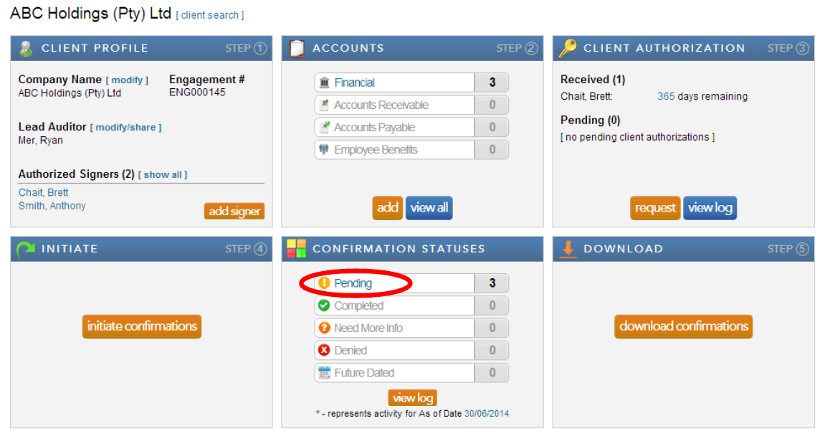
- Select “Pending” under the Confirmation Statuses block from the client profile.
- Select “Recall” from the drop down Action List.
- Tick the boxes next to the requests you want to recall.
- Click “submit” next to Action List and click “ok.”
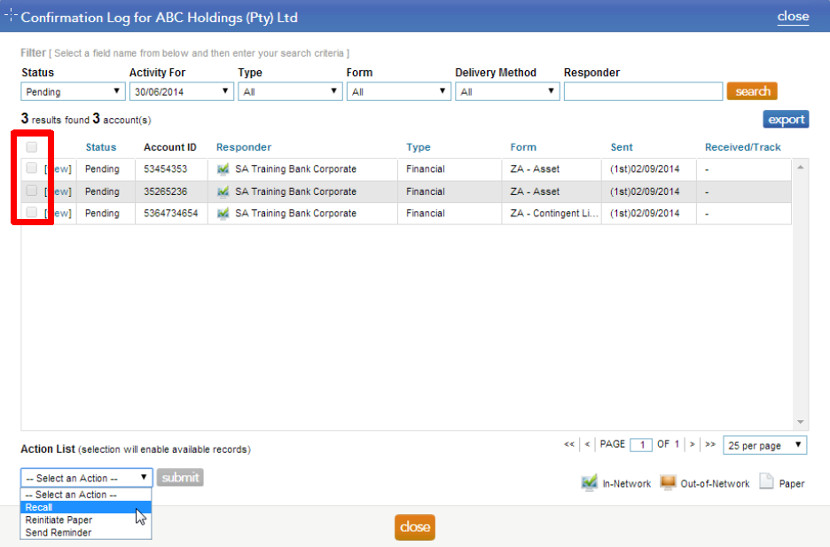
Note: If the box next to a pending request is greyed out, this indicates that the bank has either completed the request and it is currently being reviewed for quality or the request is a reconfirmed request and it is in the bank queue as a priority.
Rate this article:
|vote=None|
Processing...
(Popularity = 0/100, Rating = 0.0/5)
Related Articles
Adding Financial Forms to a Client Profile
Editing Financial Forms in a Client Profile
Roll Forward of a Client Profile
Why can’t I see a client’s profile on my list of clients?
view all...
Search Results
ABSA Corporate Bank South Africa Audit Confirmation Instructions
Can I request more information from the Responder (Bank)?
How do I update the Responder Instructions for my institution? (New Version of Confirmation)
Recalling a Confirmation
Form No Longer Accepted By Responder
view all...