You have not selected an engagement type in 10.20 Engagement evaluation.

Instructions:
To resolve this matter, ensure that you have selected an engagement type in 10.20 Engagement evaluation.
Options include:
- Audit – single legal entity
- Review
- Group audit – single legal entity with multiple business units
- Group audit – multiple entities
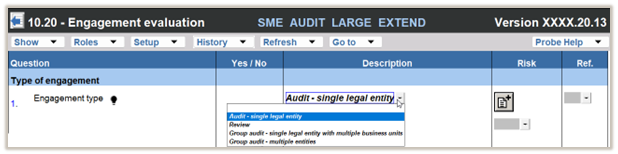
If you do not have any of the options indicated above, please follow the steps on this FAQ.
Rate this article:
|vote=None|
Processing...
(Popularity = 4/100, Rating = 0.0/5)
Related Articles
Why is there more than one form type available on Responder profiles?
Audit International | How to integrate your financials into your Audit International engagement file
Cloud App | How to manage the engagement documents
ISRS Agreed-Upon | How to create an engagement file
view all...
Search Results
How do I remove an inactive clerk or supervisor (New Version of Confirmation)
What's New | Responders: New version of Confirmation 2025/26
view all...