In 12.20, why is my inherent, fraud and control risk at financial statement level assessment showing "blank" or "Not yet assessed"?
Answer:
This is likely a result of a file that was rolled forward, which led to some cells being overridden in the background.
Solution:
- Open documents 11.20, 11.25 and 11.30, and confirm that the risk at financial statement level assessment has been performed:
- Open document 12.20 and confirm that the issue has been resolved, if not
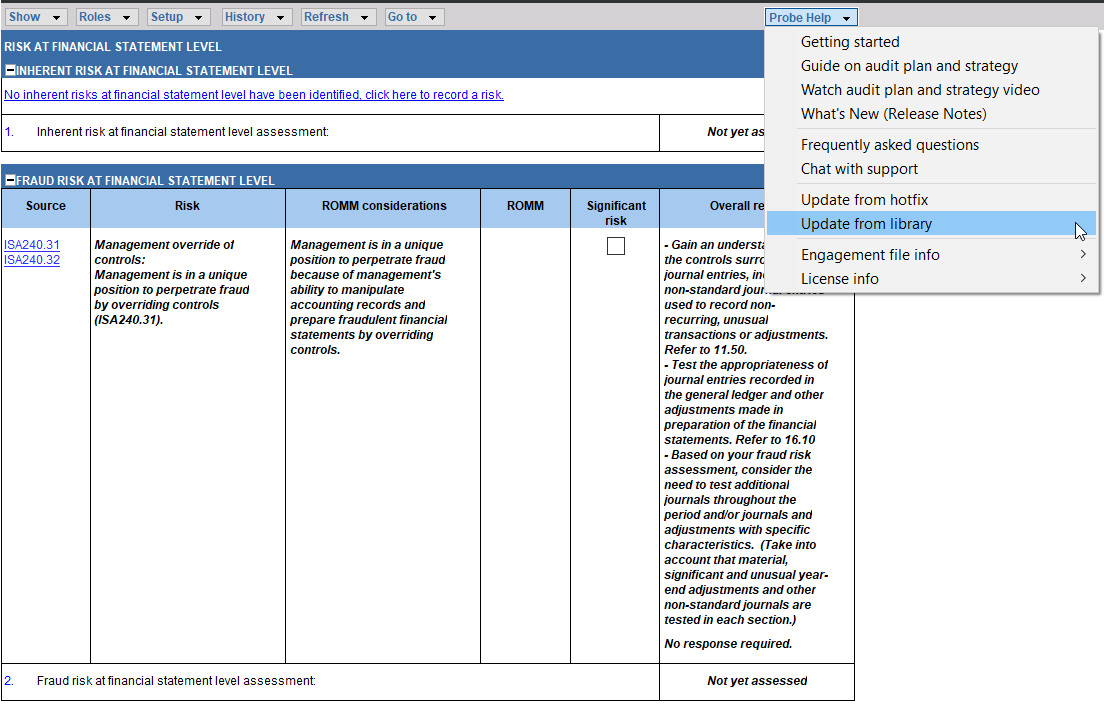
- What you need to do is update your document from the library:
- Click on the “Probe Help” dropdown;
- Select the “Update from Library” option.
- This effectively replaces your existing 12.20 with a new 12.20 copy from the template.
Note: By performing an "Update from Library", you will not lose any data.
Rate this article:
|vote=None|
Processing...
(Popularity = 12/100, Rating = 0.0/5)
Related Articles
Probe Methodology | Planning Risk Assessment - 11.40 Fraud Risk Assessment
Probe Methodology | Planning Risk Assessment - 11.20 Inherent Risk Assessment
Probe | Planning Risk Assessment | 11.40 Fraud Risk Assessment
Probe | Planning Risk Assessment | 11.20 Inherent Risk Assessment
view all...
Search Results
Sending a Future Dated Request
Can I request for a future "As of Date"?
What does the Future Dated Confirmation Report provide? (New Version of Confirmation)
Caseware Time | How can I find the client contacts that are missing after sending a client batch email?
What if the Account ID requested was closed for the As of Date (New Version of Confirmation)
view all...