In 12.20, why is my inherent, fraud and control risk at financial statement level assessment showing "blank" or "Not yet assessed"?
Answer:
This is likely a result of a file that was rolled forward, which led to some cells being overridden in the background.
Solution:
- Open documents 11.20, 11.25 and 11.30, and confirm that the risk at financial statement level assessment has been performed:
- Open document 12.20 and confirm that the issue has been resolved, if not
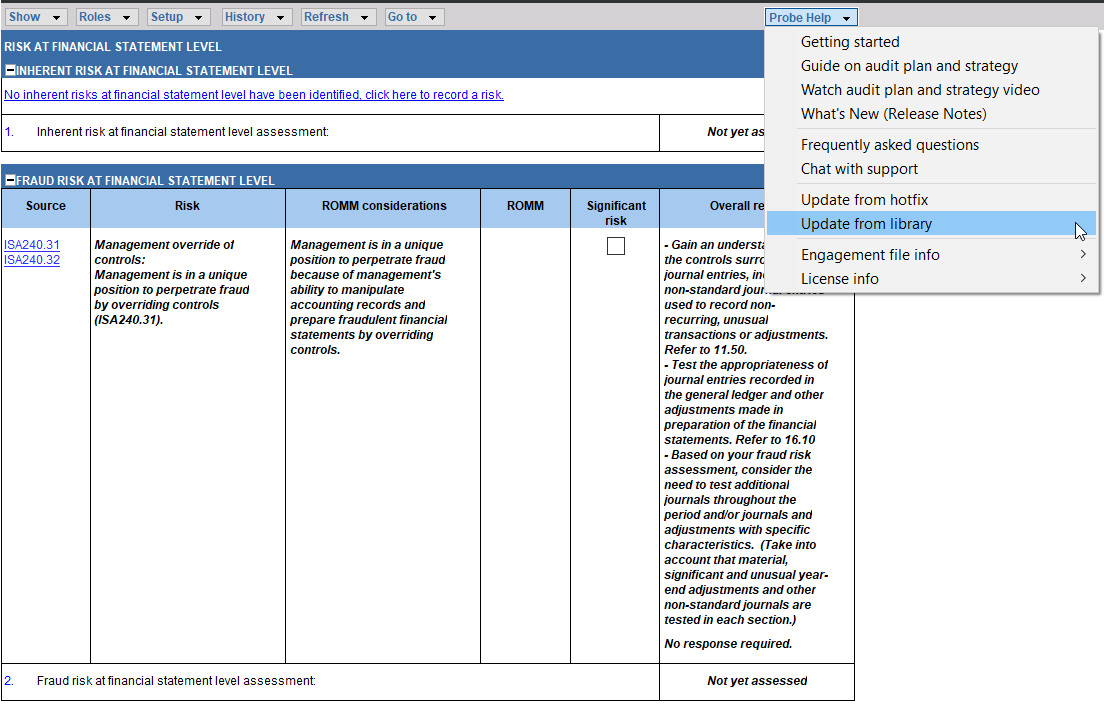
- What you need to do is update your document from the library:
- Click on the “Probe Help” dropdown;
- Select the “Update from Library” option.
- This effectively replaces your existing 12.20 with a new 12.20 copy from the template.
Note: By performing an "Update from Library", you will not lose any data.
Rate this article:
|vote=None|
Processing...
(Popularity = 0/100, Rating = 0.0/5)
Related Articles
Probe Methodology | Planning Risk Assessment - 11.40 Fraud Risk Assessment
Probe | Planning Risk Assessment | 11.20 Inherent Risk Assessment
Probe Methodology | Planning Risk Assessment - 11.20 Inherent Risk Assessment
IA Engagements Feature | Risks & Controls
view all...
Search Results
Why is the confirmation locked to another clerk (New Version of Confirmation)
Reassigning Client Profiles to Different Audit Users
ABSA Corporate Bank South Africa Audit Confirmation Instructions
Can I assign or reassign a confirmation to another department? (New Version of Confirmation)
Citibank South Africa Audit Confirmation Instructions
view all...