In 12.20, why is my inherent, fraud and control risk at financial statement level assessment showing "blank" or "Not yet assessed"?
Answer:
This is likely a result of a file that was rolled forward, which led to some cells being overridden in the background.
Solution:
- Open documents 11.20, 11.25 and 11.30, and confirm that the risk at financial statement level assessment has been performed:
- Open document 12.20 and confirm that the issue has been resolved, if not
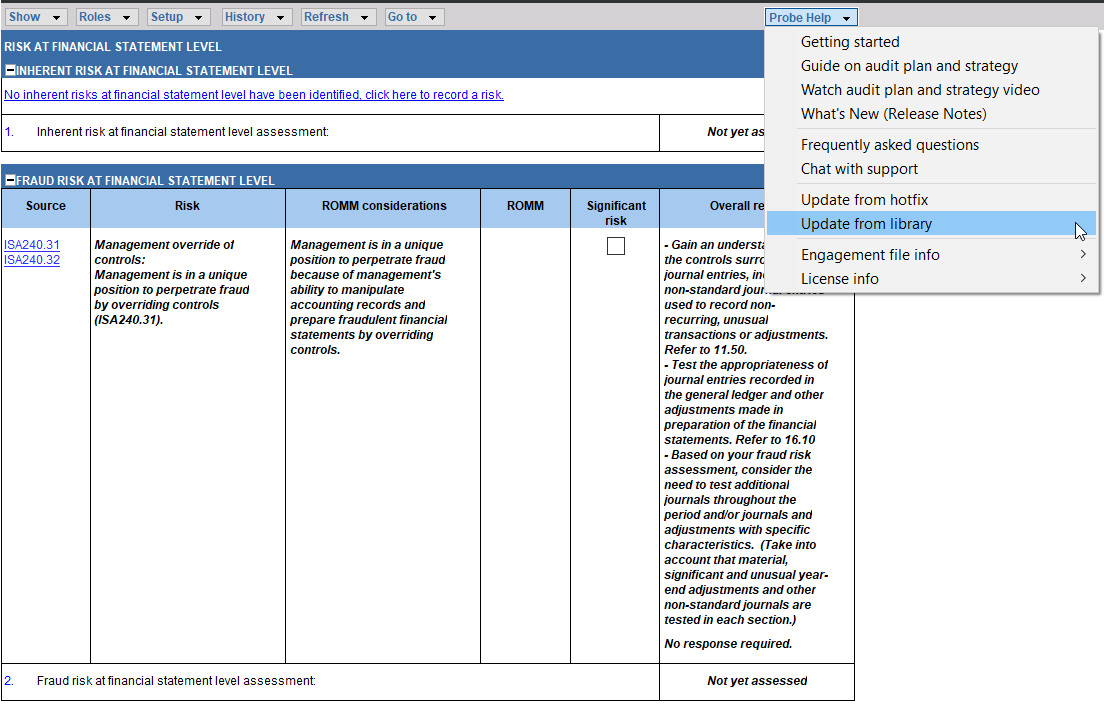
- What you need to do is update your document from the library:
- Click on the “Probe Help” dropdown;
- Select the “Update from Library” option.
- This effectively replaces your existing 12.20 with a new 12.20 copy from the template.
Note: By performing an "Update from Library", you will not lose any data.
Rate this article:
|vote=None|
Processing...
(Popularity = 9/100, Rating = 0.0/5)
Related Articles
Probe Audit | 11.25 - Fraud Risk Assessment
IA Engagement | PLANNING – 165 Risk And Control Matrix (RACM)
Probe Methodology | Planning Risk Assessment - 11.40 Fraud Risk Assessment
Probe Audit | 11.60 - Risk Assessment At Assertion Level
view all...
Search Results
Investec Private Bank South Africa Audit Confirmation Instructions
RMB Investment and Corporate Banking South Africa Audit Confirmation Instructions
Citibank South Africa Audit Confirmation Instructions
Standard Bank South Africa Audit Confirmation Instructions
Investec Corporate and Institutional Banking South Africa Audit Confirmation Instructions
view all...