The following describes the functionality and features included in Probe Audit Premium+
Instructions:
Objective
The objective of this document is to document the planned use of the internal audit function, determine the nature, timing and scope of the work to be performed by the internal auditors, and obtain declarations from the internal audit staff.
The following key concepts of the Probe Audit Premium+ Methodology are set in this document:
- Evaluation of the internal audit function’s objectivity, competence, and systematic approach (ISA 610)
- Determination of whether and how the work of internal audit can be used for the external audit
- Impact of internal audit reliance decisions on the overall audit strategy and resource allocation
Document placement
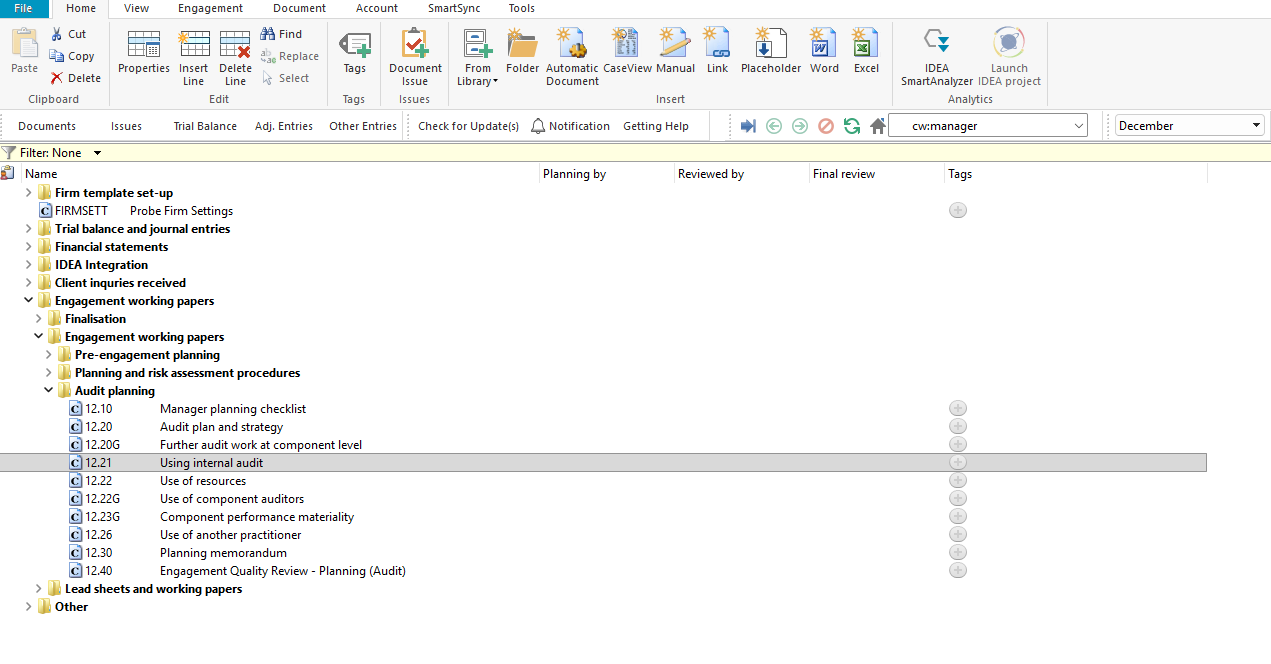
Document 12.21 – Using internal audit can be found in the Audit planning folder in the Caseware document manager.
Document content
This document is designed to be a questionnaire and checklist type document with space for a comment or further description.
The document addresses the requirements of ISA 610 (Revised 2013) – Using the Work of Internal Auditors. It covers the audit plan for internal audit involvement, the audit strategy for allocating work across relevant balances and transactions, the planning memorandum, and declarations from internal audit staff.
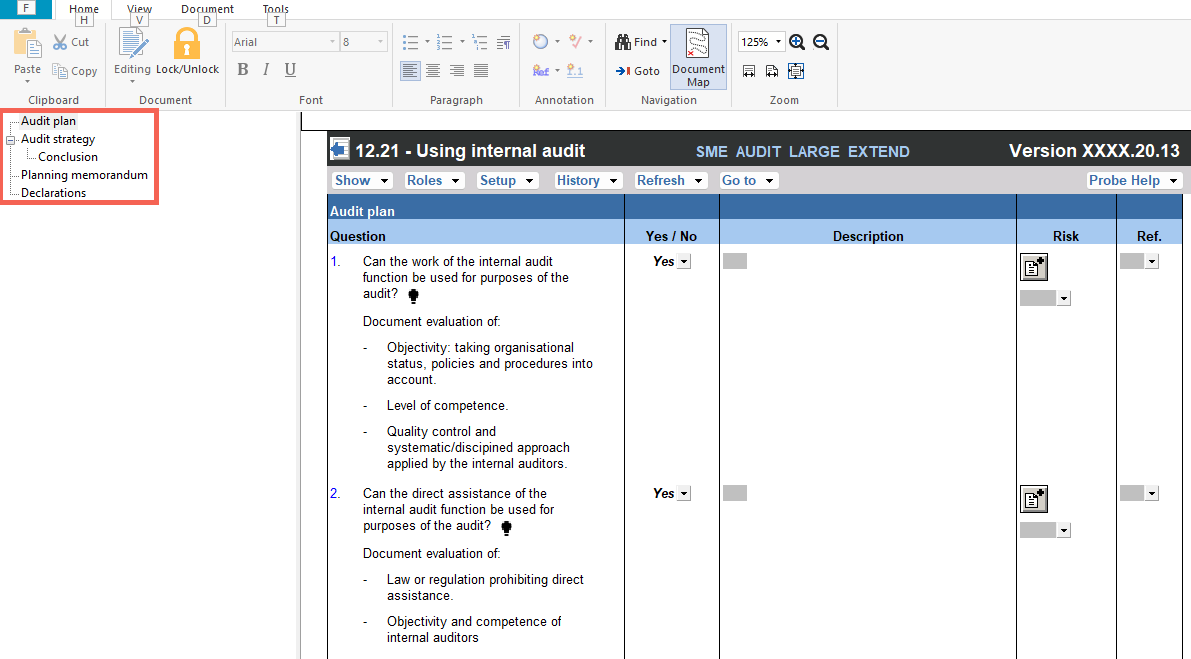
This document is divided into different bookmarks in the document map to assist you in documenting the planned use of internal audit:
- Audit plan
- Audit strategy
- Planning memorandum
- Declarations
Layout
|
Column
|
Input Required
|
Outcome
|
|
Audit plan
|
|
Question
|
No input is required in this column. Read the question and consider the matters listed.
|
No impact on the engagement file.
|
|
Yes / No
|
Select Yes or No to the question.
|
By answering the questions your engagement file will be tailored and further relevant questions will be shown in the engagement file (or hidden if not relevant).
|
|
Description
|
Provide a description or document the evaluation as required by the question.
|
No impact on the engagement file.
|
|
Risk
|
Record a risk or event by selecting the risk icon.
|
A risk or event will be recorded in the relevant risk table in the engagement file.
|
|
Ref.
|
Record a reference to supporting documentation.
|
No impact on the engagement file.
|
|
Audit strategy
|
|
Relevant balances and transactions
|
No input is required in this column. Read the balance or transaction listed.
|
No impact on the engagement file.
|
|
Use work of the internal auditor
|
Select the tick box if the work of the internal auditor will be used for the relevant balance or transaction.
|
No impact on the engagement file.
|
|
Reperform work done by internal auditor
|
Select the tick box if the work done by the internal auditor will be reperformed by the external auditor.
|
No impact on the engagement file.
|
|
Direct assistance
|
Select the tick box if the internal auditor will provide direct assistance for the relevant balance or transaction.
|
No impact on the engagement file.
|
|
Reason
|
Provide a reason for the selection made for each balance or transaction.
|
No impact on the engagement file.
|
|
Risk
|
Record a risk or event by selecting the risk icon.
|
A risk or event will be recorded in the relevant risk table in the engagement file.
|
|
Ref.
|
Record a reference to supporting documentation.
|
No impact on the engagement file.
|
|
Conclusion
|
Read and consider the conclusion questions listed under the Conclusion heading at the end of the Audit strategy table.
|
No impact on the engagement file.
|
|
Planning memorandum
|
|
Consideration
|
No input is required in this column. Read the consideration.
|
No impact on the engagement file.
|
|
Detail
|
Provide details of the planning discussions and agreements obtained.
|
No impact on the engagement file.
|
|
Risk
|
Record a risk or event by selecting the risk icon.
|
A risk or event will be recorded in the relevant risk table in the engagement file.
|
|
Ref.
|
Record a reference to supporting documentation.
|
No impact on the engagement file.
|
|
Declarations
|
|
Internal audit staff declarations
|
Read the declarations and confirm the internal audit staff members have acknowledged the requirements.
|
No impact on the engagement file.
|
|
Signature table
|
Complete the signature table with the name, role, qualification, industry experience, signature and date for each internal audit staff member.
|
No impact on the engagement file.
|
Document outcomes
You must complete the audit plan section to document whether the work and direct assistance of the internal audit function can be used for purposes of the audit.
The audit strategy section must be completed for each relevant balance and transaction to indicate whether the internal auditor’s work will be used, reperformed, or whether direct assistance will be provided.
The conclusion must be completed to confirm that the considerations in the Conclusion question at the end of the Audit strategy table have been addressed when determining the audit plan.
The planning memorandum must be completed to document discussions with the internal audit function and any written agreements obtained.
The internal audit staff declarations and signature table must be completed for all internal audit staff members involved in the engagement.
Group Audits
When the engagement type was selected as ‘Group Audit Single’ or ‘Group Audit Multiple’, questions are modified for the separate group audit engagement file.
The group audit engagement file differs from the single-entity file as follows:
- The planning memorandum question on the written agreement refers to an authorised representative of the group, and to the group not intervening in the internal auditor’s work, rather than the entity.
- The audit plan, audit strategy, conclusion and declaration questions are otherwise the same.
Features
The following features are available in the document:
- Insert or delete a comment, see page F3
- Insert or delete a row, see page F5
- Record a risk or event, see page F10
- Guidance, see page F16
- Freeze, see page F19
Rate this article:
|vote=None|
Processing...
(Popularity = 3/100, Rating = 0.0/5)
Related Articles
Caseware Internal Audit Latest Release
What is Caseware Internal Audit?
Probe Audit | 11.30 - Evaluation Of System Of Internal Control
Probe | Planning Risk Assessment | 12.21 Using internal audit
view all...
Search Results
Guide ZA-Signatories Form
Guide ZA-Liability Form
Easy Add-ons User Guide
Firm Template Guide Latest Version
Caseware Time | How to Add a VAT amount on an Invoice?
view all...