The following describes the functionality and features included in Probe Audit Premium+.
Instructions:
Objective
The objective of this document is to record and assess the inherent risk at the assertion level and determine whether sections are material, and if specific materiality is required.
The following key concepts of the Probe Audit Methodology are set in this document:
- Assessing the risks of material misstatements
- Significant risks
- Risks for which substantive procedures are insufficient
- Materiality assessment – Specific materiality
Document placement
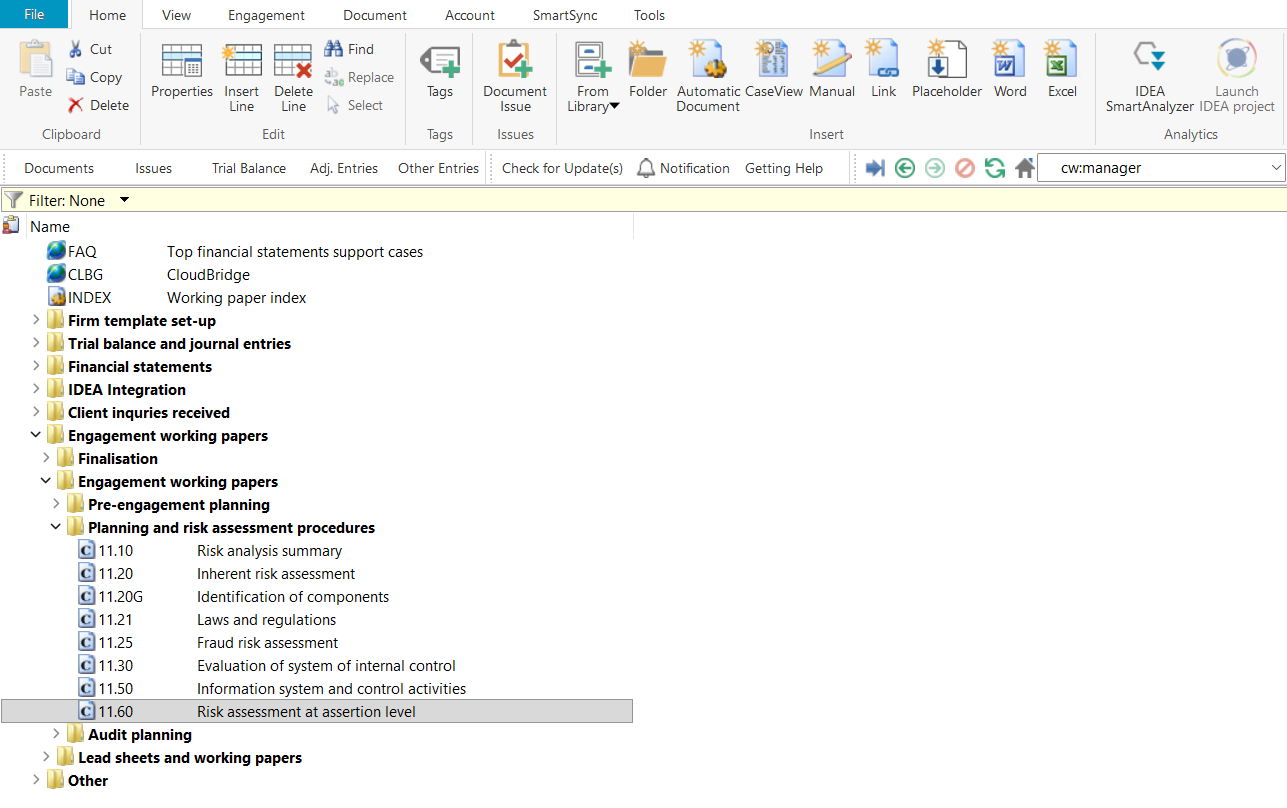
Document 11.60 – Risk assessment at assertion level can be found in the Planning and risk assessment procedures folder in the Caseware document manager.
Document content
This document is designed to be a worksheet.
This document is divided into different bookmarks in the document map to assist you in assessing the risk of material misstatement at the assertion level:
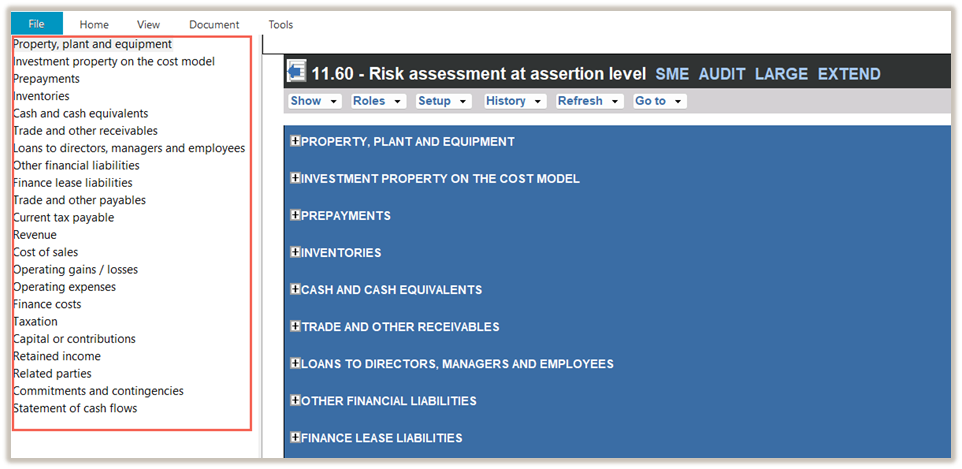
Sections will be included as follows:
|
COLUMN
|
Basis of inclusion
|
|
Sections (other than noted below)
|
Sections are enabled when at least one account with a current (CY) or prior year (PY) balance is mapped to that section in the engagement file or by manually enabling a section in 10.51-Types and volumes of transactions.
|
|
Related parties
Commitment and contingencies
|
These sections are always enabled.
|
|
Statement of cash flows
|
When “IFRS for SMEs Accounting Standard as issued by the International Accounting Standards Board” or “IFRS Accounting Standards as issued by the International Accounting Standards Board” are selected as the financial reporting framework in 10.20 – Engagement evaluation, the section will always be included.
When “Other” is selected as the financial reporting framework in 10.20, and the engagement team selected that a statement of cash flows will be presented in 10.50 – Gathering of information, the section will be included.
|
|
Other disclosures 1- 3
|
These sections are activated when the engagement team makes the following selections in 10.50 - Gathering of information:
- Answered “Yes” to the question “Are there any significant disclosure(s) in the financial statements not related to a specific financial statement item?”, and
- Selected the tick-box for “Other disclosure 1, 2 and 3”.
|
|
Other areas 1-3
|
These sections are activated when the engagement team makes the following selections in 10.50 - Gathering of information:
- Answered “Yes” to the question “Are there any significant other areas in the financial statements not related / dealt with within a specific financial statement item?”, and
- Selected the tick-box for “Other area 1, 2 and 3”.
|
Record risk at the assertion level
When recording a risk at the assertion level using the RECORD BUTTON, all the input fields in the risk dialogue must be completed before submitting the risk.
Upon submission, some of the information entered in the risk dialogue will populate:
- The risk tables in this document.
- The risk tables in the relevant section’s work program.
- The risk tables in 12.20 - Audit plan and strategy.
- 02.00 – Partner sign-off.
|
COLUMN
|
INPUT REQUIRED
|
OUTCOME
|
|
Source
|
Insert the reference of the document where the risk was identified.
You can double-click on the source input cell to insert the previous document you worked on or type in the source document.
|
The input will populate the risk tables in this document, as well as 12.20 - Audit plan and strategy.
|
|
Description of risk
|
Insert a brief description of the risk identified.
|
The input will populate the risk tables in this document, the relevant section’s work program, and 12.20 -Audit plan and strategy if the risk is significant.
It also pulls through to 02.00 – Partner sign-off.
|
|
Sections
|
When you use the Record a Risk or Event feature, the section you choose from the menu is filled automatically.
If the risk applies to more than one section, you can select additional sections.
|
The selected selections determine where the recorded risks will appear, and which sections’ inherent risk at the assertion level and risk of material misstatement (RoMM) will be updated.
|
|
Inherent risk factors
|
Select one or more of the inherent risk factors.
|
The input will populate the risk tables in this document.
|
|
Implication
|
Insert the implication of the risk identified.
|
The input will populate the risk tables in this document.
|
|
Assertions
|
Select one or more assertions applicable to the risk.
|
The input will populate the risk tables in this document, the relevant section’s work program, and 12.20 - Audit plan and strategy if the risk is significant.
In addition, audit procedures linked to the selected assertions will be included in the relevant work programs.
|
|
Likelihood to occur
|
Use the dropdown list to select the appropriate likelihood that the risk of misstatement may occur based on your consideration of the selected inherent risk factors.
The dropdown options are populated from FIRMSETT - Probe Firm Settings and are based on your firm’s audit methodology.
|
Your selection of likelihood, together with the monetary impact, is used to determine the inherent risk level of that risk.
|
|
Monetary impact
|
Use the dropdown list to select the appropriate monetary impact based on your assessment of the potential monetary impact of the risk.
The dropdown options are populated from FIRMSETT - Probe Firm Settings and are based on your firm’s audit methodology.
|
Your selection of monetary impact, together with the likelihood, is used to determine the inherent risk level of that risk.
|
|
Inherent risk
|
No input required,
The inherent risk assessment is calculated based on the likelihood to occur and the monetary impact you selected.
|
The calculated inherent risk assessment for each identified risk is used to determine the inherent risk of the applicable assertion.
If more than one risk is identified for the same assertion of the applicable section, the highest inherent risk assessment will determine the inherent risk level of that assertion.
The highest inherent risk assessment is displayed in the risk tables in this document, the relevant section’s work program, and 12.20 - Audit plan and strategy.
Furthermore, it is included as input in the determination of the risk of material misstatement (RoMM) of the applicable assertions in 11.10 - Risk analysis summary.
The risk assessment will populate the following in 12.20 – Audit plan and strategy.
- The “Inherent risk assessment at assertion level” of that section.
- The tick box of “Required procedures”.
|
|
Significant risk
|
Select whether the risk is assessed as a significant risk.
|
When a risk is assessed as significant, the “Control activities – Control to address risks“ will be activated in the applicable section of 11.50 - Information system and control activities, prompting the engagement team to identify and evaluate controls for the assertions to which the significant risk relates.
Furthermore, the following will be populated in the relevant section in 12.20 – Audit plan and strategy:
- Key details of the significant risk.
- The tick box of “Significant risk responses” under “Audit procedure”.
|
|
Non-substantive procedures required
|
Select the tickbox when you have determined that substantive procedures alone cannot provide sufficient appropriate audit evidence for the risk.
|
When selected, the “Control activities – Control to address risks“ will be activated in the applicable section of 11.50 Information system and control activities, prompting the engagement team to identify and evaluate controls for the assertions for which substantive procedures alone will not provide sufficient appropriate audit evidence.
|
|
Specific audit procedures.
|
This field is displayed when you select “Significant risk”.
Insert the audit procedures that the engagement team plans to perform in response to the significant risk recorded.
|
The description of the audit procedure will pull through to 12.20 – Audit plan and strategy, and the section’s work program.
|
Layout
|
COLUMN
|
INPUT REQUIRED
|
OUTCOME
|
|
Risks
|
When no risks have been recorded, you can use the “click here to record a risk” hyperlink or the Record button.
|
Key details of the risks will populate the relevant work program.
When a significant risk is recorded or when it is noted when recording a risk that substantive procedures alone are not sufficient, the section in 11.50 - Information system and control activities is activated, prompting the engagement team to obtain an understanding of the information system of the significant class of transactions, account balance or other disclosure (SCOTABD).
|
|
Lead schedules
|
|
Description, current and prior year figures, and % change
|
No input required in these columns.
Current and prior period balances are populated from the mapped trial balance.
The percentage change is automatically calculated.
You can use the hyperlink to obtain a list of the accounts mapped to that section.
When the amount of the section exceeds specific materiality for the section, a red asterisk will appear next to the current period balance.
|
No impact on the engagement file.
|
|
Risk assessment at assertion level
|
|
Inherent risk assessment at assertion level
|
No input required.
For those assertions for which no inherent risk was recorded, “No IR” will be displayed.
If the assertion does not apply to that section, “N/A” will be displayed.
For any assertion with recorded risks, the inherent risk assessment is based on the likelihood and magnitude selected in the risk dialogue. If multiple risks are identified for the same assertion, the highest inherent risk rating will determine the overall inherent risk level for that assertion.
|
Refer to the “Record risk at the assertion level” component of this document for details on how the assessment impacts the engagement file.
|
|
Is the section qualitatively material?
|
The question will be displayed for those sections:
- whose balances can be determined from the preliminary trial balance, and
- the section is not determined to be quantitatively material, based on the preliminary trial balance and specific materiality of the section.
Select the tick box if the section is determined to be qualitatively material.
|
If selected, the section will be treated as a material section in accordance with the Probe Audit Premium+ Methodology, which includes:
- The risk of material misstatement (ROMM) of the assertions will increase.
- If no inherent risk at assertion level was recorded for that section, the engagement team will be prompted in 12.20 – Audit plan and strategy to select at least one assertion to test the material section.
|
|
Reason for assessing the section as qualitatively material:
|
The procedure will appear when you select the tick box to the question “Is the section qualitatively material?.”
Document the judgements made in the determination of whether the section is qualitatively material.
|
No impact on the engagement file.
|
|
Do you conclude that the presumed fraud risk related to revenue or investment income recognition is not applicable in the circumstances of this engagement?
|
The question only appears for the revenue and investment income sections.
Answer the question by making a selection with the "Yes / No" drop-down box.
Refer Note 1 below
|
When “Yes” is selected, the pre-populated fraud risks will be removed.
|
|
Reason for rebuttal of presumed fraud risk related to revenue.
|
If you answer “Yes” to “Do you conclude that the presumed fraud risk related to revenue recognition is not applicable in the circumstances of this engagement?”, this follow-up question will appear.
Document your reasons and judgements for why you conclude the presumed fraud risk does not apply.
|
No impact on the engagement file.
|
|
Specific materiality for this section
|
The performance materiality set in 10.60 Overall materiality assessment. will be included as the default specific materiality.
If you determine that a lower materiality is required for that section, document the specific materiality.
When the documented specific materiality exceeds performance materiality, a pop-up message will appear prompting you to reconsider whether your determination of specific materiality is appropriate.
|
The specific materiality will populate the specific materiality for the applicable section in
- 12.20 – Audit plan and strategy.
- The relevant work program.
|
|
Reason
|
If you determine that a lower materiality is required for that section, document the judgements made in the determination of the specific materiality.
Other judgements made in the assessment of inherent risks can also be documented.
|
No impact on the engagement file.
|
|
Related parties, Commitments and contingencies, Statement of cash flows, Other disclosure 1-3, Other areas 1-3
|
|
Is the section material?
|
Select the tick box if the section is determined to be material.
|
If selected, the section will be treated as a material section in accordance with the Probe Audit Premium+ Methodology, which includes:
- The risk of material misstatement (ROMM) of the assertions will increase.
- If no inherent risk at assertion level was recorded for that section, you will be prompted in 12.20 – Audit plan and strategy to select at least one assertion to test the material section.
|
Note 1:
For the Revenue and Investment income sections, risks are pre-populated in the template to prompt the engagement team to assess the presumed fraud risk for each type or category of revenue. If the presumed fraud risk does not apply to a particular revenue stream, document the rationale for rebuttal in the “Implications” column. If the audit client has fewer than three revenue streams, note that the risk is not relevant to the engagement in the “Implications” column.
The following important questions/procedures are included in the document:
1. Item
|
2. Impact on the engagement file
|
|
Specific materiality
|
Specific materiality per COTABD is set within this document. This is then applied to the COTABD for the rest of the engagement, this will only change when updated in this document.
|
|
Qualitatively material
|
COTABDs that are not quantitatively material can be marked as qualitatively material in this document. It will then be treated as a material FSA for the rest of the engagement.
|
Document outcomes
You must conclude the following for each section in this document:
- The inherent risk assessment for each identified risk at the assertion level.
- For sections not determined to be quantitatively material, whether the section is material.
- Specific materiality level for each section, if required.
Group audits
The following apply to ‘Group Audit Single’ or ‘Group Audit Multiple’.
Compared with the single-entity file, the Group Audit file differs as follows:
- The risk table of each section in which a risk has been recorded includes an additional column, “Entity or business units to which risk relates”, which displays the entities or business units selected in the risk dialogue when the risk was recorded.
All other components of each section (lead schedules, inherent risk assessment at assertion level, the materiality questions, the presumed fraud risk question for revenue, specific materiality and reason) are the same as in the single-entity file.
The following important questions/procedures are included in the document:
|
Risk dialogue
|
Impact on the engagement file
|
|
Inherent risk factors
|
When “Consolidation process” is selected as an inherent risk factor in the RISK RECORD button, the tick box for “Consolidation Process” of that section in 12.20 – Audit plan and strategy will automatically be selected.
|
|
Entity or business units to which risk relates
|
Select from the list of entities or business units that populate from 11.20 – Identification of components.
|
Features
The following features are available in the document:
- Record a risk or event, see page F10
- Edit or delete a risk, see page F11
- Insert or remove a page break, see page F14
- Risk of material misstatement content, see page F18
Rate this article:
|vote=None|
Processing...
(Popularity = 6/100, Rating = 0.0/5)
Related Articles
Probe | F18 - Risk of Material Misstatement Content
Probe Methodology | Planning Risk Assessment - 11.60 Risk assessment at assertion level and 11.61 Controls over significant risk
Probe | How is Risk of Material Misstatement calculated?
Probe Audit | 11.60 Risk assessment at assertion level
view all...
Search Results
Investec Private Bank South Africa Audit Confirmation Instructions
RMB Investment and Corporate Banking South Africa Audit Confirmation Instructions
Citibank South Africa Audit Confirmation Instructions
Standard Bank South Africa Audit Confirmation Instructions
Investec Corporate and Institutional Banking South Africa Audit Confirmation Instructions
view all...