The following describes the functionality and features included in Probe Audit Premium+.
Instructions:
11.50 - INFORMATION SYSTEM AND CONTROL ACTIVITIES
The following describes the functionality and features included in Probe Audit Premium+.
Objective
The objective of this document is to obtain an understanding of the entity’s information system and communication relevant to the preparation of the financial statements, and where relevant, to record controls to obtain an understanding of control activities.
The following key concepts of the Probe Audit Methodology are set in this document:
- Control environment, risk assessment procedures, information system and communication, and monitoring
- Understanding control activities
Document placement
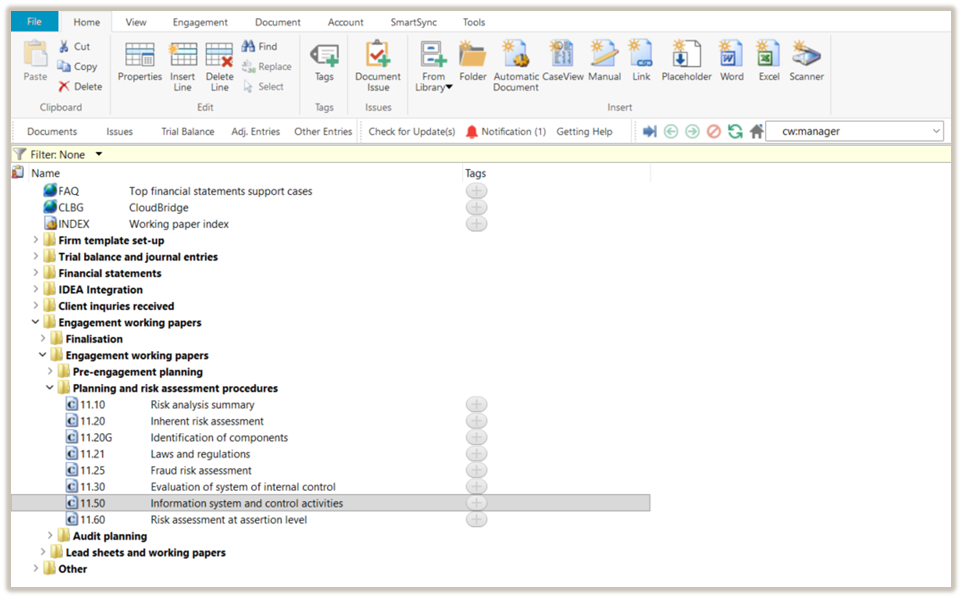
Document 11.50 Information system and control activities can be found in the Planning and risk assessment procedures folder in the Caseware document manager.
Document content
This document is designed to be a worksheet type document with space for a comment or further description.
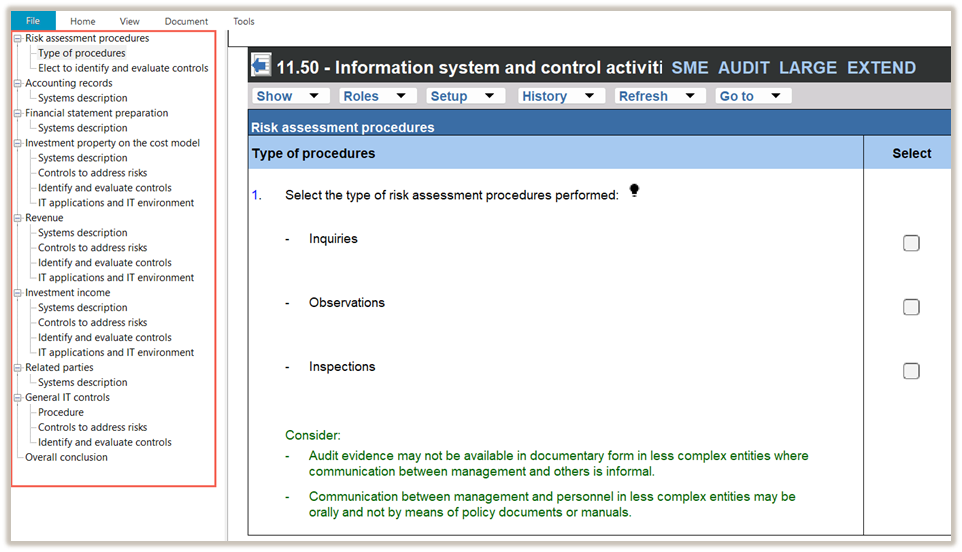
This document is divided into different bookmarks in the document map to assist you in evaluating the engagement:
- Risk assessment procedures
- Centralised activities and common controls (Only applicable to group audit engagements)
- Accounting records
- Financial statement preparation
- Sections
- General IT controls
- Overall conclusion
Record control
When recording a control using the RECORD CONTROL BUTTON, all the input fields in the control dialogue must be completed before submitting the control.
|
COLUMN
|
INPUT REQUIRED
|
OUTCOME
|
|
Description of control
|
Input a short description of the relevant control.
|
The input will populate the “Control activities – Identify and evaluate controls” table in the section.
|
|
Sections
|
When the engagement team use the Record Control button feature, the section from which they selected the control button will be auto-selected.
If the risk applies to more than one section, the engagement team can select an additional section.
|
The input will populate the “Control activities – Identify and evaluate controls” table in the section.
|
|
Is the control designed effectively to address the ROMM of assertions?
|
In the control dialog, select an answer from the “Yes / No” dropdown menu.
|
The input will populate the “Control activities – Identify and evaluate controls” table in the section.
|
|
Explain how you determined that the control was implemented
|
Insert a short description of how the engagement team determined that the control was implemented.
|
The input will populate the “Control activities – Identify and evaluate controls” table in the section.
|
|
Is the control implemented?
|
Select an answer from the “Yes / No” dropdown menu.
|
The input will populate the “Control activities – Identify and evaluate controls” table in the section.
|
|
Assertions
|
Select the tickbox of the appropriate assertion(s) addressed by the control.
|
The input will populate the “Control activities – Identify and evaluate controls” table in the section.
|
|
Reliance intended?
|
Select an answer from the “Yes / No” dropdown menu.
|
When the engagement team selects that reliance is intended, they will be prompted to record a test of control in the control dialogue.
The tick box for “Test of control” under the sub-heading “Audit procedures” in 12.20 – Audit plan and strategy will be auto-selected.
When auto-selected, the “Test of control” section in the work program will be activated. The description of the control will pull through to the section’s work program.
|
|
Description of test of control
|
The field appears when the engagement team selects that reliance is intended.
Record the test of controls that the engagement team plans to perform to test the control.
|
The description of the test of control will pull through to the section’s work program.
|
Layout
- Risk assessment procedures
- Sections (other than General IT controls
The sections will be included as follows:
|
COLUMN
|
Basis of inclusion
|
- Accounting records
- Financial statement preparations
- Related parties
|
These sections are always enabled.
Users cannot disable it manually.
|
|
Sections
|
A section is automatically enabled when a risk at the assertion level is recorded for that section in 11.60 Risk assessment at assertion level.
You can also manually enable a section.
|
|
COLUMN
|
INPUT REQUIRED
|
OUTCOME
|
|
System description
|
|
Systems description
|
No input required.
Some questions and considerations will only reflect if
- “Extended procedures” were selected in 10.20 – Engagement evaluation, and
- Selections are made in 10.55 - Understanding the Information Technology environment in the “IT environment characteristics” and “Relevant balances and transactions” components.
|
No impact on the engagement file.
|
|
Systems description – walk-through procedures
Perform a walk-through to confirm your understanding of the process to initiate, record, process and correct transactions and transfer to the general ledger.
|
The firm can elect in FIRMSETT - Probe Firm Settings whether walk-through procedures should be performed for all sections enabled in this document. The election can be done for all audits or per audit engagement.
When the election is made per audit engagement, the engagement team must answer a question in 10.50 Gathering of information.
When the firm or the engagement team elects to perform walk-through procedures, the walk-through procedure will appear in all sections within this document.
|
No impact on the engagement file.
|
|
Description
|
Document sufficient and appropriate details of the system description.
|
No impact on the engagement file.
|
|
Risk
|
Record a risk or event, if necessary, relating to the responses reflected.
|
A risk or event will be recorded in the relevant document. The engagement file will then prompt the engagement team for appropriate responses to the risk or event recorded.
|
|
Do you plan to test the operating effectiveness of the controls?
|
Answer the question by selecting from the "Yes / No" drop-down box.
|
When “Yes” is selected, the “Identify and evaluate controls” table is activated in the section.
|
|
Controls to address risks
The “Control activities – Controls to address risks” table is enabled when a risk at the assertion level is recorded using the RECORD BUTTON, and the engagement team selects “Significant risk” or “Non-substantive procedures required” in the risk dialogue.
|
- Description of risk
- Inherent risk
- Significant risk
Non-substantive
|
No input required.
These fields will be populated with information recorded or selections made in the risk dialogue using the RECORD BUTTON.
|
No impact on the engagement file.
|
|
Record control
|
Use the RECORD CONTROL BUTTON to record the details of the control that the audit client designed and implemented to address the risk.
|
The information recorded in the RECORD CONTROL BUTTON populates the “Control activities – Identify and evaluate controls” table.
|
|
Select
|
Select from the list of recorded controls the control that is designed to address the risk described in the “Description of risk” column.
|
When a control has been selected, the following columns will be populated with the information recorded in the control dialogue:
- Description of control
- Reliance intended.
|
- Description of control
- Reliance intended
|
When a control is selected in the “Select” column, the information in these columns is populated with the details entered in the control dialogue.
To edit this information, go to the “Description of control” column in the “Control activities – Identify and evaluate controls” table, right-click, and select “Edit control”.
|
No impact on the engagement file
|
|
IDENTIFY AND EVALUATE CONTROLS
The “Control activities – Identify and evaluate controls” table is enabled when the engagement team:
- Selects “Yes” to “Do you plan to test the operating effectiveness of the controls?”, or
- Recorded a control using the “Record control” button in the “Control activities – Controls to address risks” table.
|
- Description of control
- Designed effectively?
- Explain how you determined that the control was implemented
- Is the control implemented?
- Assertions
- Reliance intended?
|
When no controls have been recorded, you can use the “click here to record a control” hyperlink or use the control button.
Once controls have been recorded, the columns will be populated with information recorded in the control dialogue.
|
Refer to the “Record control” component of this document for details on how the selection impacts the engagement file.
|
|
IT APPLICATIONS AND IT ENVIRONMENT
|
|
Are any of the controls addressing significant risks or controls you intend to place reliance on, dependent on IT applications or other aspects of the IT environment (i.e. IT-dependent or automated)?
|
The question is included when the engagement team
- Recorded a control related to a significant risk or a control that relates to , or
- Selected that reliance is intended in the control dialogue.
Select an answer from the “Yes / No” dropdown menu.
|
When “Yes” is selected, the “General IT controls” component in this document is activated.
|
The section is automatically enabled when the engagement team answers yes to the following question in any of the sections included in this document:
“Are any of the controls addressing significant risks or controls you intend to place reliance on, dependent on IT applications or other aspects of the IT environment (i.e. IT-dependent or automated)?”
|
COLUMN
|
INPUT REQUIRED
|
OUTCOME
|
|
Procedure
|
No input required.
|
No impact on the engagement file.
|
|
Yes / No
|
Select and answer from the “Yes / No” dropdown menu.
|
Additional questions will be included if “Extended procedures” were selected in 10.20 – Engagement evaluation.
|
|
Identify IT risks
The table is enabled when the engagement team answered “Yes” to the question “Are any of the controls addressing significant risks or controls you intend to place reliance on, dependent on IT applications or other aspects of the IT environment (i.e. IT-dependent or automated?” in any of the sections in this document.
|
|
Description of risk
|
Document the description of the IT risk.
|
No impact on the engagement file
|
|
Record
|
Use the RECORD CONTROL BUTTON to record the details of the control that the audit client designed and implemented to address the risk.
|
The information recorded in the RECORD CONTROL BUTTON populates the “Control activities – Identify and evaluate controls” table.
|
|
Select
|
Select from the list of recorded controls the control that is designed to address the risk described in the “Description of risk” column.
|
When a control has been selected, the following columns will be populated with the information recorded in the control dialogue:
- Description of control
- Reliance intended.
|
|
Description of control
|
When a control is selected in the “Select” column, the information in this column is populated using the details entered in the control dialogue.
|
No impact on the engagement file.
|
|
Reliance intended
|
Same as “Description of control” in the line above.
|
If the engagement team selects that reliance on the General IT controls is intended, 19.10 – General IT control work program is enabled. The details of the controls and test of controls will pull through to 19.10.
Furthermore, a question is added to the “Conclusion” component in 12.20 - Audit plan and strategy to prompt the engagement team to consider the results of testing the IT general controls on the audit plan.
|
|
IDENTIFY AND EVALUATE CONTROLS
The table will be activated when you answer “Yes” to the question “Have you identified the IT-related risks arising from the accounting software, databases, operating systems, or networks that could affect the effectiveness of the identified IT-dependent or automated controls (i.e. application controls)?”.
|
- Description of control
- Designed effectively?
- Explain how you determined that the control was implemented
- Is the control implemented?
- Assertions
- Reliance intended?
|
When no controls have been recorded, you can use the “click here to record a control” hyperlink or use the control button.
Once controls have been recorded, the field will automatically be populated with information recorded in the control dialogue.
|
|
|
COLUMN
|
INPUT REQUIRED
|
OUTCOME
|
|
Evaluate whether intended reliance on IT-dependent or automated controls (i.e. application controls) is appropriate, considering intended reliance on general IT controls (ITGC's).
|
Answer the question by selecting from the "Appropriate / Inappropriate" drop-down box.
|
No impact on the engagement file.
|
|
Evaluate whether the information system and communication appropriately support the preparation of the entity's financial statements in accordance with Insert here.
|
Answer the question by selecting from the "Appropriate / Inappropriate" drop-down box.
|
No impact on the engagement file.
|
Document outcomes
You must reach a conclusion on the following items in this document:
- Whether the engagement team plans to test the operating effectiveness of controls in sections.
- For risks marked as “Significant Risk” or “Non-substantive Procedures Required” in the risk dialogue, whether controls exist to address those risks.
- Whether reliance is intended for all identified controls.
- For controls dependent on IT applications or other aspects of the IT environment, identify the related IT risks and assess whether controls address those risks.
- Evaluate whether the information system and communication appropriately support the preparation of the entity's financial statements in accordance with the applicable framework.
Group audits
The following apply to ‘Group Audit Single’ or ‘Group Audit Multiple’.
|
COLUMN
|
INPUT REQUIRED
|
OUTCOME
|
|
CENTRALISED ACTIVITIES AND COMMON CONTROLS
|
|
Centralised activities and common controls
|
The component is enabled when the engagement team selects “Yes” to either of the following questions in the ”Plan extent of risk assessment procedures” component of 10.50 Gathering of information:
- Does the group centralise activities or processes related to financial reporting that are applicable to more than one entity or business unit within the group?
- Did the group design controls that are intended to operate in a common manner across multiple entities or business units, i.e. common controls?
The component cannot be disabled if either of these questions is answered “Yes”.
|
No impact on the engagement file
|
|
Sections
|
The procedures prompting you the group auditor to obtain an understanding of the information system are included when the engagement team selects “Yes” to any of the following questions in 10.50G-Plan extended of risk assessment procedures, for the section:
- “Consolidation balance only?”, or
- ”Group centralised activities?”, or
- “Common controls?
For sections identified in 10.50G that involve centralised activities or common controls, additional procedures are included in the relevant section to obtain an understanding of those centralised activities and/or common controls.
For the other sections, the included procedures relate to communication with component auditors regarding their responsibility to obtain an understanding of the section’s information system.
|
No impact on the engagement file
|
Features
The following features are available in the document:
- Insert or delete a comment, see page F3
- Insert or delete a row at end, see page F5
- Record a risk or event, see page F10
- Edit or delete a risk, see page F11
- Enable or disable a section, see page F13
- Insert or remove a page break, see page F14
- Core vs Extended, see page F15
- Guidance, see page F16
- Record a control, see page XXX
- Edit or delete a control, see page XXX
Rate this article:
|vote=None|
Processing...
(Popularity = 10/100, Rating = 0.0/5)
Related Articles
IA Engagements Feature | Risks & Controls
Probe | Controls and control activities
Probe | Planning Risk Assessment | 11.50 Information system and control activities
Probe Audit | 11.50 Control activities design and implementation
view all...
Search Results
Caseware Working Papers | Getting Started | Download install and register Caseware Working Papers
How to download install and register Caseware Working Papers software
Caseware Working Papers | Performing a multiple Year-End-Close
Caseware Working Papers | What to do when opening a CaseWare Working Papers file and you get an Error 2 – File not found error?
Caseware Working Papers | Getting Started | Download install and register Caseware Working Papers New
view all...