The following describes the functionality and features included in Probe Audit Premium+
Instructions:
Objective
The objective of this document is to identify and assess the risks of material misstatement in the financial statements due to fraud, by evaluating whether fraud risk factors relating to incentives, opportunities and rationalisations are present, and to determine overall responses to the assessed risks of fraud.
The following key concepts of the Probe Audit Premium+ Methodology are set in this document:
- Assessment of fraud risk factors through the incentive, opportunity, and rationalisation framework (ISA 240)
- Presumed significant risk of management override of controls
- Identification of fraud risks that flow to the overall risk assessment and drive specific audit responses
Document placement
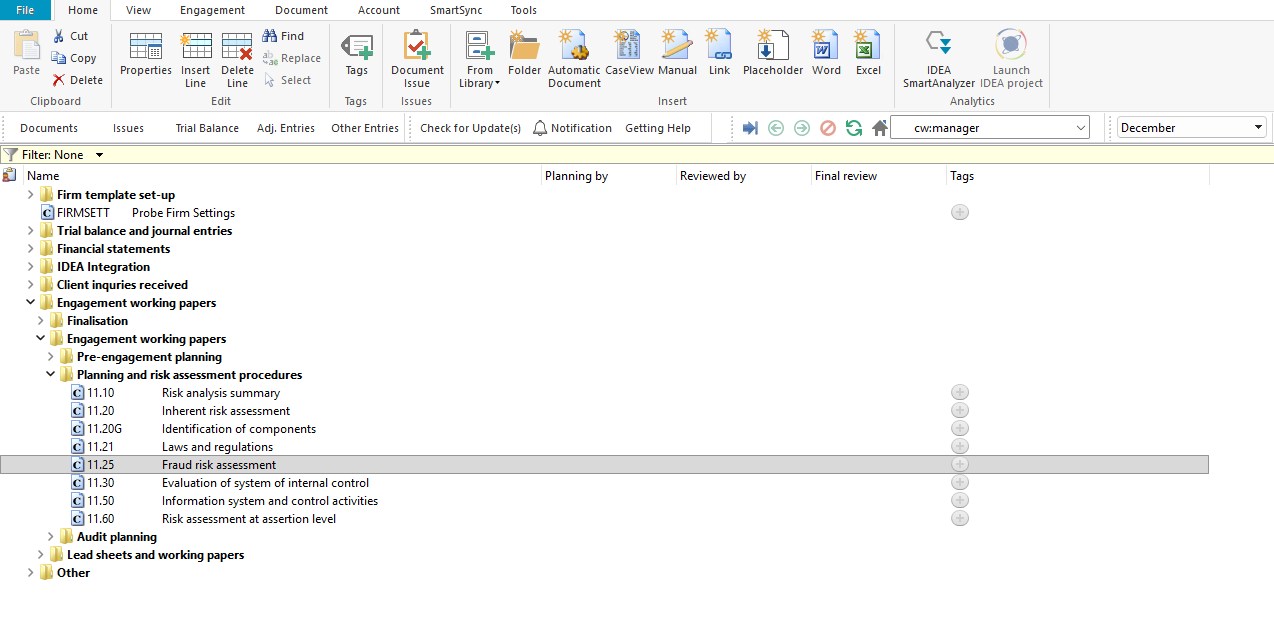
Document 11.25 – Fraud risk assessment can be found in the Planning and risk assessment procedures folder in the Caseware document manager.
Document content
This document is designed to be a questionnaire type document with space for a comment or further description.
The fraud risk factors in this document are structured around the three conditions generally present when fraud occurs, as described in ISA 240:
- Incentive – pressure or motive to commit fraud
- Opportunity – circumstances that allow fraud to be perpetrated
- Rationalisation – attitude or ethical values that allow individuals to justify a fraudulent act
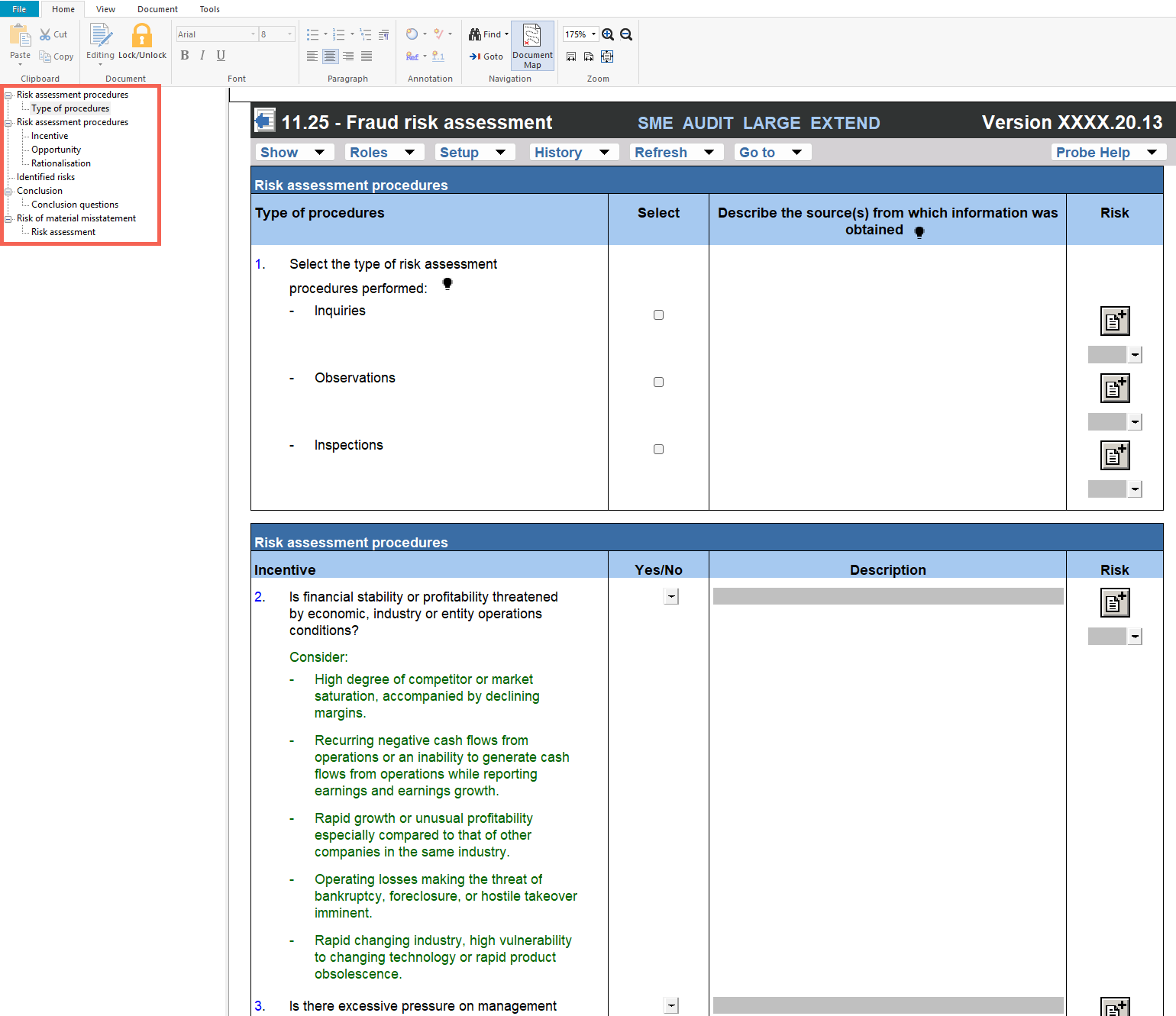
This document is divided into different bookmarks in the document map to assist you with the fraud risk assessment process:
- Risk assessment procedures
- Identified risks
- Conclusion
- Risk of material misstatement
Record control
When recording a control using the RECORD CONTROL BUTTON, all the input fields in the control dialog must be completed before submitting the control.
To edit or delete a recorded control, go to the “Description of control” column in the “Control activities – Identify and evaluate controls” table, right-click the control and select “Edit control” or “Delete control”.
|
COLUMN
|
INPUT REQUIRED
|
OUTCOME
|
|
Description of control
|
Input a short description of the relevant control.
|
The input will populate the “Control activities – Identify and evaluate controls” table in the section.
|
|
Sections
|
When the engagement team use the Record Control button feature, the section from which they selected the control button will be auto-selected.
If the risk applies to more than one section, the engagement team can select an additional section.
|
The input will populate the “Control activities – Identify and evaluate controls” table in the section.
|
|
Is the control designed effectively to address the ROMM of assertions?
|
In the control dialog, select an answer from the “Yes / No” dropdown menu.
|
The input will populate the “Control activities – Identify and evaluate controls” table in the section.
|
|
Explain how you determined that the control was implemented
|
Insert a short description of how the engagement team determined that the control was implemented.
|
The input will populate the “Control activities – Identify and evaluate controls” table in the section.
|
|
Is the control implemented?
|
Select an answer from the “Yes / No” dropdown menu.
|
The input will populate the “Control activities – Identify and evaluate controls” table in the section.
|
|
Assertions
|
Select the tickbox of the appropriate assertion(s) addressed by the control.
|
The input will populate the “Control activities – Identify and evaluate controls” table in the section.
|
|
Reliance intended?
|
Select an answer from the “Yes / No” dropdown menu.
|
When the engagement team selects that reliance is intended, they will be prompted to record a test of control in the control dialog.
The tick box for “Test of control” under the sub-heading “Audit procedures” in 12.20 – Audit plan and strategy will be auto-selected.
When auto-selected, the “Test of control” section in the work program will be activated. The description of the control will pull through to the section’s work program.
|
|
Description of test of control
|
The field appears when the engagement team selects that reliance is intended.
Record the test of controls that the engagement team plans to perform to test the control.
|
The description of the test of control will pull through to the section’s work program.
|
Layout
Column
|
Input required
|
Outcome
|
|
Risk assessment procedures
|
|
Type of procedures
|
No input is required in this column.
|
No impact on the engagement file.
|
|
Select
|
Select the risk assessment procedures performed by clicking on the relevant tick box (i.e. inquiries, observations and/or inspections).
|
No impact on the engagement file.
|
|
Describe the source(s) from which information was obtained
|
Insert a short description of the sources of information from which the understanding was obtained or the procedures performed. When inquiries are selected, record the name and designation of the interviewee and the date of the inquiry.
|
No impact on the engagement file.
|
|
Incentive / Opportunity / Rationalisation
|
|
Question
|
No input is required in this column.
|
No impact on the engagement file.
|
|
Yes/No
|
Answer the question by selecting from the “Yes / No” drop-down box.
|
By answering the questions, the engagement team documents their consideration of whether fraud risk factors are present. Responses may indicate the need to raise a fraud risk.
|
|
Description
|
Include a short description, if necessary, to substantiate or expand on the “Yes / No” answer selected.
|
No impact on the engagement file.
|
|
Risk
|
Raise a risk or event, if necessary, relating to the question or the responses reflected.
|
A risk or event will be recorded in the relevant document. The engagement file will then prompt the engagement team for appropriate responses to the risk or event recorded. If the risk raised is a fraud risk at financial statement level, the Identified risks table in this document will be activated.
|
|
Conclusion
|
|
Conclusion questions
|
Answer the conclusion questions to confirm whether the results of the fraud risk assessment procedures indicate risks that management would have been expected to identify but failed to do so, and/or whether any risks affect the assessment of risks at assertion level.
|
When risks affect the assessment of risks at assertion level, the engagement team should consider the impact on 11.60 – Risk assessment at assertion level.
|
|
Risk of material misstatement
|
Conclude on the fraud risk at financial statement level assessment.
|
The fraud risk at financial statement level assessment is documented for the engagement.
|
Record inherent risk at financial statement level
The Identified risks table is pre-populated with the presumed risk of management override of controls in terms of ISA 240.31 and ISA 240.32. Management is in a unique position to perpetrate fraud because of management’s ability to manipulate accounting records and prepare fraudulent financial statements by overriding controls. This presumed significant risk cannot be removed.
When recording a fraud risk using the ‘Add New Risk’ button, all the input fields in the risk dialog must be completed before submitting the risk. Upon submission, the information entered in the risk dialog will populate the Identified risks table in this document and 12.20 – Audit plan and strategy.
Column
|
Input required
|
Outcome
|
|
Source
|
Insert the reference of the document where the risk was identified.
You can double-click on the source input cell to insert the previous document you worked on or type in the source document.
|
The input will populate the risk tables in this document and 12.20 – Audit plan and strategy.
|
|
Risk
|
Insert a brief description of the risk identified.
|
The input will populate the risk tables in this document and 12.20 – Audit plan and strategy. It also pulls through to 02.00 – Partner sign-off.
|
|
ROMM considerations
|
Document further evidence used to assess the identified risk of material misstatement (ROMM) at financial statement level.
|
The input will populate the risk tables in this document and 12.20 – Audit plan and strategy.
|
|
ROMM
|
Select low, or high based on your assessment of ROMM.
|
The input will populate the risk tables in this document and 12.20 – Audit plan and strategy.
|
|
Significant risk
|
This selection will appear when the ROMM is assessed as “High”. Select whether the risk is assessed as a significant risk.
|
When a risk is assessed as significant, the risk tables in this document and 12.20 – Audit plan and strategy are updated. This will also result in an extended risk table being shown in 02.00 – Partner sign-off.
|
|
Overall response
|
When ROMM is assessed as high, select overall response(s) to the identified risk.
|
The input will populate the risk tables in this document and 12.20 – Audit plan and strategy. When the risk is significant, this will also update the risk table in 02.00 – Partner sign-off.
|
The following important questions/procedures are included in the document:
Item
|
Example
|
|
Overall response – Substantive
|
When the fraud risk at financial statement level is assessed as high, you can increase the extent of work on all relevant and selected assertions as part of your overall responses to address the assessed ROMM at financial statement level. To do so, answer Yes to the respective question.
|
Document outcomes
You must conclude on the fraud risk at financial statement level. The presumed risk of management override of controls (ISA 240.31 and ISA 240.32) is pre-populated as a significant risk and cannot be removed. Additional fraud risks should be raised where appropriate based on your evaluation of fraud risk factors. Where fraud risks are raised, overall responses must be documented.
Group Audits
When the engagement type was selected as ‘Group Audit Single’ or ‘Group Audit Multiple’, questions are modified for the separate group audit engagement file.
The fraud risk factors are assessed at group level, and the questions refer to the group and group management rather than the entity and management. Compared to the single-entity file, the group audit file differs as follows:
- Incentive – an additional question asks whether any component is more susceptible to risks of material misstatement due to fraud. The single-entity questions on personal financial obligations that may create pressure on management or employees with access to cash or other assets, and on adverse relationships between the entity and employees, are not included.
- Opportunity – an additional question asks whether the nature of related party relationships and transactions gives rise to a higher risk of material misstatement than transactions with unrelated parties, with considerations relating to a complex group structure, group information systems that are not integrated, and numerous or frequent related party transactions between entities and business units.
- Rationalisation – the single-entity question on behaviour indicating displeasure or dissatisfaction with the entity or its treatment of the employee is not included.
- Questions refer to group operations, group management and the group (for example, claims against the group and the relationship between the auditors and group management), and the conclusion question asks whether risks were identified that group management would have been expected to identify.
Features
The following features are available in the document:
- Insert or delete a comment, see page F3
- Insert or delete a row at the end, see page F5
- Record a risk or event, see page F10
- Core vs Extended, see page F15
- Guidance, see page F16
- Freeze, see page F19
Rate this article:
|vote=None|
Processing...
(Popularity = 1/100, Rating = 0.0/5)
Related Articles
view all...
Search Results
Guide ZA-Signatories Form
Guide ZA-Liability Form
Easy Add-ons User Guide
Firm Template Guide Latest Version
Form No Longer Accepted By Responder
view all...