The following describes the functionality and features included in Probe Audit Premium+.
Instructions:
10.53 - UNDERSTANDING ACCOUNTING ESTIMATES
Watch the video for detailed guidance on the feature above, then read the summary below for a concise overview.
Document placement
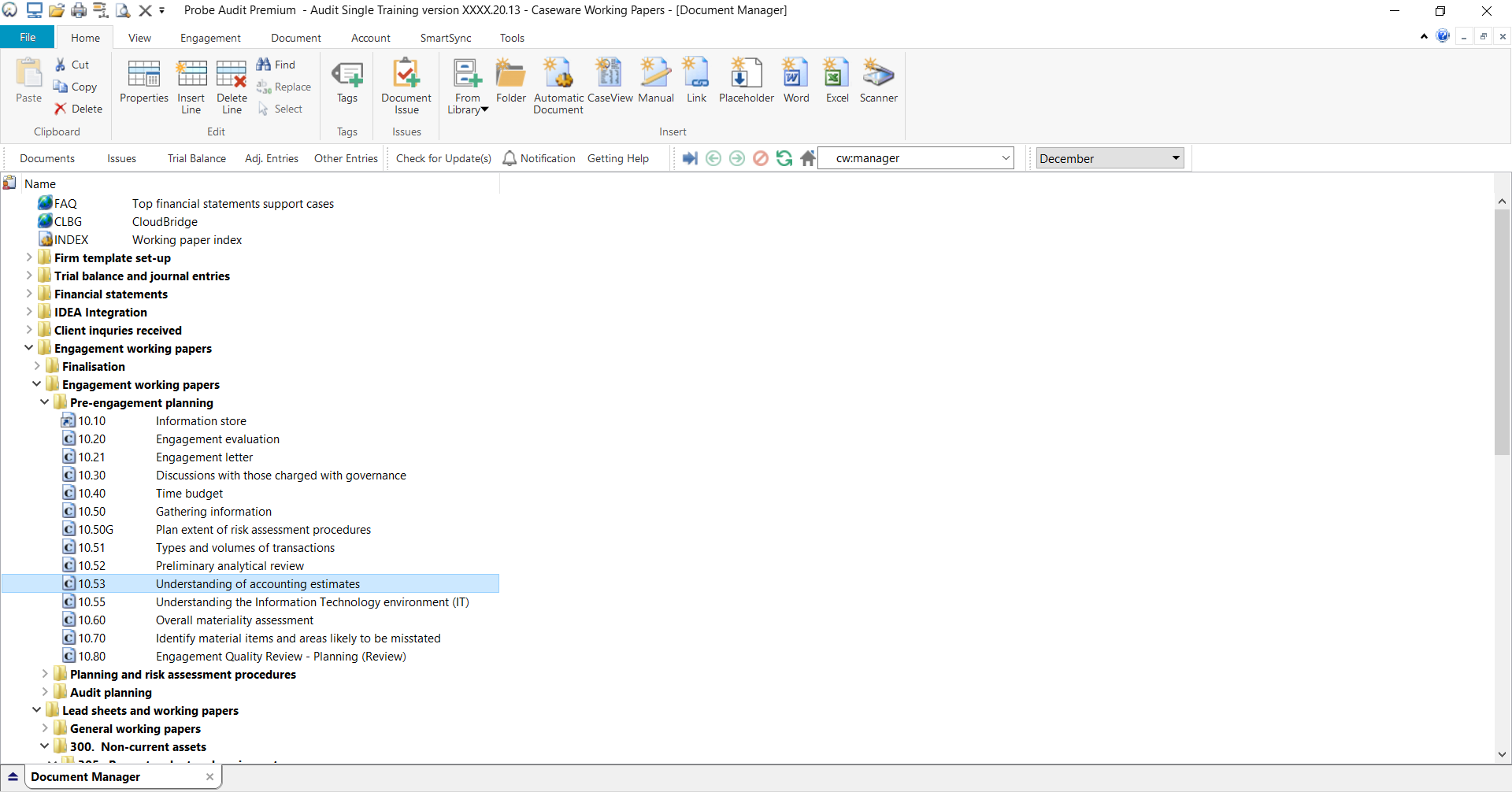
Document 10.53 – Understanding of accounting estimates can be found in the Pre-engagement planning folder in the Caseware document manager.
Document content
This document is designed to be a questionnaire type document with space for a comment or further description.
The document needs to be activated by:
- Indicating in 10.50 – Gathering information that there are amounts in the financial statements based on accounting estimates or fair value measurements; and
- Selecting the tick box for accounting estimates in the relevant COTABD in 10.51 – Types and volumes of transactions.
This document is divided into different bookmarks in the document map to assist you in evaluating the engagement:
- Risk assessment procedures
- COTABDS as activated in 10.51
Layout
|
COLUMN
|
INPUT REQUIRED
|
OUTCOME
|
|
Risk assessment procedures
|
|
Type of procedures
|
No input required.
|
No impact on the engagement file.
|
|
Select
|
Select the risk assessment procedures performed by clicking on the tick box (i.e. inquiries, observations and/or inspections)
|
No impact on the engagement file.
|
|
Describe the source(s) from which information was obtained
|
Insert a short description of the sources of information from which the understanding was obtained or the procedures performed.
When inquiries is selected, record the name and detail of the respondent and the date of the inquiry.
|
No impact on the engagement file.
|
|
Risk
|
Raise a risk or event, if necessary, relating to the responses reflected.
|
A risk or event will be recorded in the relevant document. The engagement file will then prompt the engagement team for appropriate responses to the risk or event recorded.
|
|
COTABDS
|
|
Consideration
|
No input required.
|
No impact on the engagement file.
|
|
Description
|
Document a response to the consideration.
|
No impact on the engagement file.
|
|
Risk
|
Raise a risk or event, if necessary, relating to the consideration or the responses reflected.
|
A risk or event will be recorded in the relevant document. The engagement file will then prompt the engagement team for appropriate responses to the risk or event recorded.
|
Document outcomes
You conclude on this document by recording your considerations of estimates and raise risks and then signing off the document.
Group audits
The content of this document is activated by:
- Indicating that there are amounts in the financial statements based on accounting estimates or fair value measurements in 10.50 Gathering information; and
- Selecting the COTABDs that are based on accounting estimates in 10.50G which will automatically make the selection in 10.51.
There are no other modifications to this document when the engagement type was selected as ‘Group Audit Single’ or ‘Group Audit Multiple’.
Features
The following features are available in the document:
- Insert or delete a comment, see page F3
- Insert or delete a row at the end, see page F5
- Record a risk or event, see page F10
- Expand or collapse all, see page F12
- Insert or remove a page break, see page F14
- Core vs Extended, see page F15
- Guidance, see page F16
- Freeze, see page F17
Rate this article:
|vote=None|
Processing...
(Popularity = 0/100, Rating = 0.0/5)
Related Articles
Probe Audit | What is Probe Audit Premium+ ?
Probe Audit | Important information on Probe MMX licensing (Probe Audit Premium+)
Probe Audit | 10.50G - Plan extent of risk assessment procedures
Probe Audit | 10.55 - Understanding the information technology environment (IT)
view all...
Search Results
Guide ZA-Letter of Credit Form
Confirmation Billing Guide (Effective 1 Nov 2025)
Guide ZA-Bills Form
Guide ZA-Asset form
Guide ZA-Signatories Form
view all...