The following describes the functionality and features included in Probe Audit Premium+
Instructions:
10.50 - GATHERING INFORMATION
Objective
The objective of this document is to obtain a high-level understanding of the entity (or group), and to identify key factors and circumstances for the engagement team to consider when planning the audit (i.e. audit considerations).
The following key concept of the Probe Audit Methodology is set in this document:
- Performing risk assessment procedures and documenting the results thereof.
Document placement
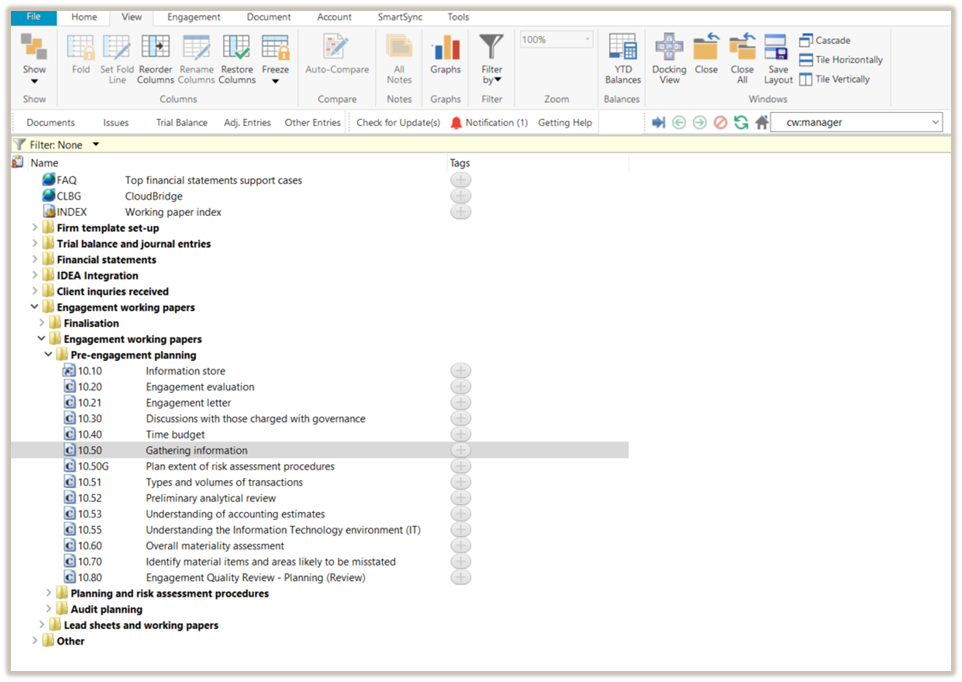
Document 10.50 – Gathering information can be found in the Pre-engagement planning folder in the Caseware document manager.
Document content
This document is designed to be a questionnaire type document with space for a comment or further description.
The document content is determined by:
- FIRMSETT - Probe firm settings
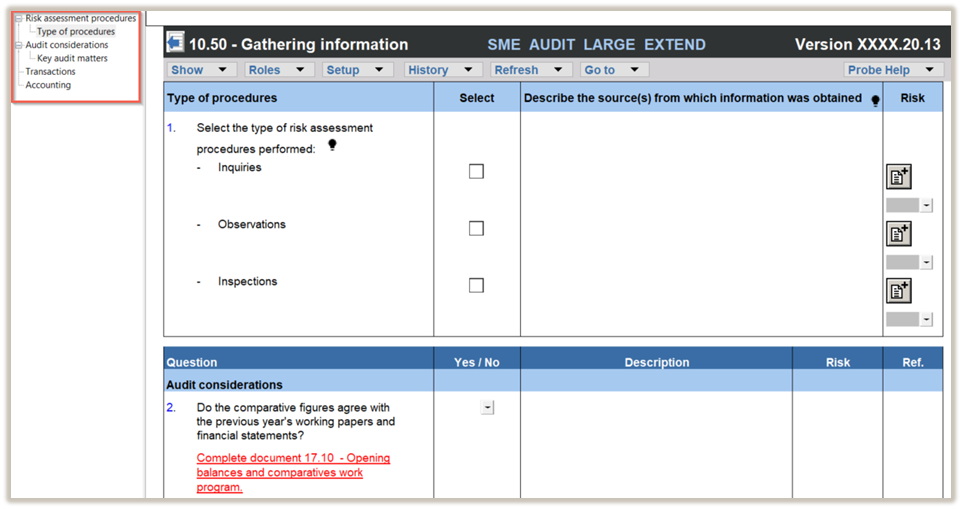
This document is divided into different bookmarks in the document map to assist you in evaluating the engagement:
- Risk assessment procedures
- Audit considerations
- Transactions
- Accounting
Layout
|
COLUMN
|
INPUT REQUIRED
|
OUTCOME
|
|
Risk assessment procedures
|
|
Type of procedures
|
No input required in this column.
|
No impact on the engagement file.
|
|
Select
|
Select the risk assessment procedures performed by clicking on the relevant tick box (i.e. inquiries, observations, and/or inspections).
|
No impact on the engagement file.
|
|
Describe the source(s) from which information was obtained
|
Insert a short description of the sources of information from which the understanding was obtained or the procedures performed.
When inquiries is selected, record the name and designation of the interviewee and the date of the inquiry.
|
No impact on the engagement file.
|
|
COLUMN
|
INPUT REQUIRED
|
OUTCOME
|
|
Audit considerations/Transactions/Accounting
|
|
Question
|
No input required in this column.
Some questions may only be shown based on the answers to earlier questions.
|
No impact on the engagement file.
|
|
Yes/No
|
Answer the question by selecting from the "Yes / No" drop-down box.
|
By answering the questions, your engagement will be tailored and further relevant questions will be shown in the engagement file (or hidden if not relevant).
The responses will in particular impact document 10.51 – Types and volumes of transactions. The selections made in 10.51 will tailor the work program for that section if a risk is raised for the relevant assertion in 11.60 - Risk assessment at assertion level or the assertion is selected in 12.20 - Audit plan and strategy for the material COTABD.
|
|
Description
|
Include a short description, if necessary, to substantiate or expand on the “Yes / No” answer selected.
|
No impact on the engagement file.
|
|
Risk
|
Raise a risk or event, if necessary, relating to the question or the responses reflected.
|
A risk or event will be recorded in the relevant document. The engagement file will then prompt the engagement team for appropriate responses to the risk or event recorded.
|
|
Ref.
|
If necessary, insert a reference to other documents in your engagement file.
|
No impact on the engagement file.
|
The following important questions/procedures are included in the document:
|
Question
|
Impact on the engagement file
|
|
Do we plan to record the type of risk assessment procedures performed for each class of transaction, account balance or other disclosure separately?
|
The firm can elect in FIRMSETT - Probe Firm Settings
whether the type of risk assessment procedures (“RAP”) is recorded per class of transactions, account balance and disclosure item (“COTABD”) or once on 10.51 - Types and volumes of transactions. The election can be done for all audits or per audit engagement.
When the election should be done per audit engagement, this question will be included in 10.50.
|
|
Do we plan to use 10.52 to perform analytical procedures to identify and assess risk of material misstatement instead of performing simple comparisons of information on 10.51?
|
The firm can elect in FIRMSETT - Probe Firm Settings that expectations for analytical procedures are developed on 10.52 – Preliminary analytical review or that simple comparisons of information are performed on 10.51 – Types and volumes of transactions. The election can be done for all audits or per audit engagement.
When the election should be done per audit engagement, this question will be included in 10.50.
When you select to develop expectations in 10.52 for your engagement, 10.52 will show content in the audit file, and the analytical procedures will be excluded from 10.51.
When you elect to perform simple comparisons of information on 10.51, 10.52 will be excluded, and the analytical procedures will be included on 10.51.
|
|
Are we planning to perform walk-through procedures to confirm our understanding of the process to initiate, record, process and correct transactions for significant classes of transactions, account balances and other disclosures (SCOTABDs)?
|
The firm can elect in FIRMSETT - Probe Firm Settings whether walk-through procedures are performed for all SCOTABDs. The election can be done for all audits or per audit engagement.
When the election should be done per audit engagement, this question will be included in 10.50.
When you select to perform walk-through procedures for all SCOTABDs for your engagement, a walk-through procedure will be included for each SCOTABD on 11.50 – Information system and control activities.
|
|
Question
|
Impact on the engagement file
|
|
Are there any significant disclosure(s) in the financial statements not related to a specific financial statement item?
|
You can add disclosure sections for financial statement areas where the trial balance does not populate the disclosure amounts.
Three “Other disclosure” sections are available. To add a disclosure section to your engagement file, select the tick box in the “Yes/No” column after answering “Yes” to this question.
To change the generic "Other disclosure" section name to a specific name, replace “Other disclosure 1, 2 or 3” in the description column with your chosen name, then click the "Rename section" button.
The engagement file will update automatically to include the section, including documents such as 11.10 – Risk analysis summary, 11.50 – Information system and control activities, 11.60 – Risk assessment at assertion level, and 12.20 – Audit plan and strategy. A work program for the section will also be added.
|
|
Are there any significant other areas in the financial statements not related / dealt with within a specific financial statement item?
|
You can add user-defined sections to your engagement file, by answering “Yes” to this question.
Three “Other areas” sections are available. To add an additional section, select the tick box in the “Yes/No” column after answering “Yes” to this question.
You can rename the section by replacing the default name in the description column with your chosen name, then click the "Rename section" button.
The engagement file will update automatically to include the section, including documents such as 11.10 – Risk analysis summary, 11.50 – Information system and control activities, 11.60 – Risk assessment at assertion level, and 12.20 – Audit plan and strategy. A work program for the section will also be added.
|
|
|
|
|
Does the entity / group have:
Internal auditors
|
When you select “Yes” to this question, additional questions are included to determine whether internal auditors will be used to obtain audit evidence.
If you select “Yes” to both of the following questions, you are required to complete 12.21 - Use of internal auditors.
- Are you planning to use the work of the internal audit function to obtain audit evidence?
- Are you planning to use the internal audit function to provide direct assistance to obtain audit evidence?
|
|
Question
|
Impact on the engagement file
|
|
Are any amounts in the financial statements based on accounting estimates or fair value measurements?
|
When you select “Yes” to this question, a question will be added to each section in 10.51 – Types and volumes of transactions to consider whether the measurement of the specific COTABD is based on accounting estimates or fair value measurements.
If you tick the box in 10.51 to indicate that the COTABD is measured using an accounting estimate or fair value, the related section in 10.53 - Understanding of accounting estimates will be activated.
|
Some questions contain red warnings or blue text either in the question or description column. Respond to the red warnings, as they indicate where key information must be recorded. Pay attention to blue text: in the description column, it shows where the understanding may be documented, and in the question column, it provides guidance for completing the question or action.
Document outcomes
You must answer all the questions to ensure that
- Relevant procedures are activated in 10.51 - Types and volumes of transactions.
- Relevant procedures in work programs are activated, for example, other information or supplementary information presented in the financial statements.
- Relevant documents are included in your engagement files, for example, 10.52 – Preliminary analytical review.
- Significant disclosure or other areas are included, where required.
Group Audits
All group scenarios
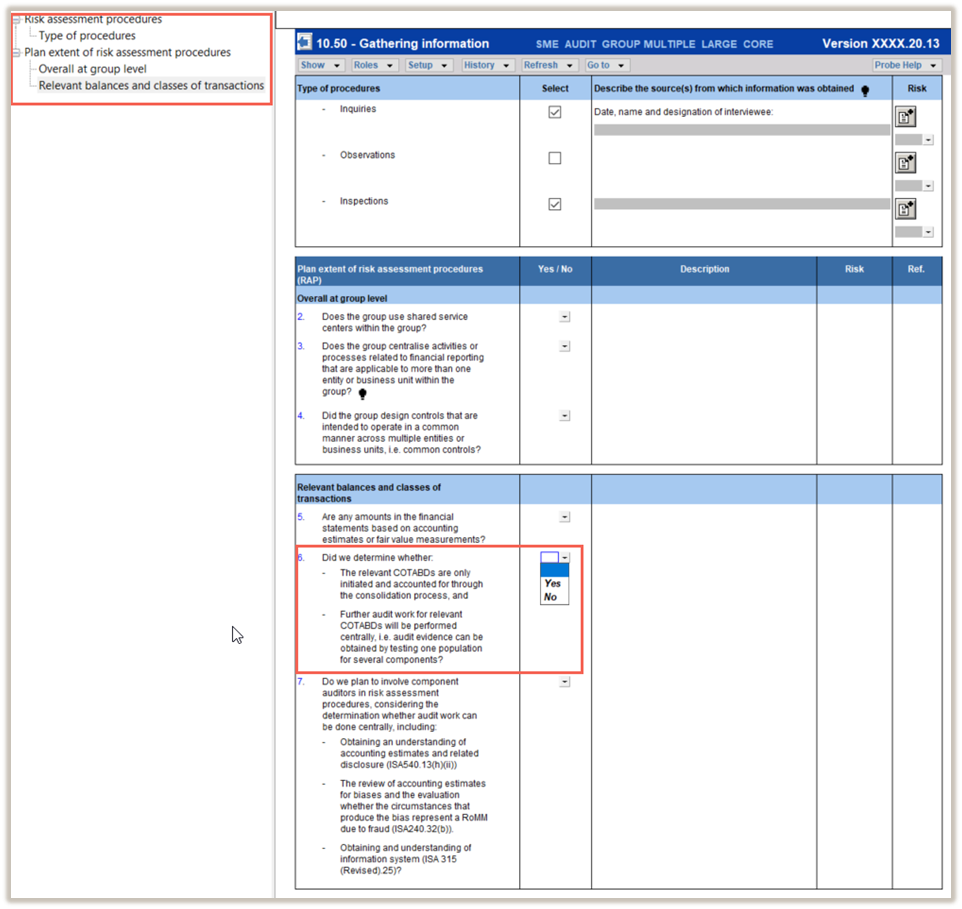
When the engagement type was selected as ‘Group Audit Single’ or ‘Group Audit Multiple’, only sub-sections “Risk assessment procedures” and “Plan extent of risk assessment procedures” will be included until you answered “Yes” to the question “Did we determine whether:
- The relevant COTABDs are only initiated and accounted for through the consolidation process, and
- Further audit work for relevant COTABDs will be performed centrally, i.e. audit evidence can be obtained by testing one population for several components?”
An additional bookmark will be included for group audits, namely ‘Plan extent of risk assessment procedures (RAP)’.
The following important questions/procedures are included in the document when the engagement type was selected as ‘Group Audit Single’ or ‘Group Audit Multiple’ :
|
Question
|
Impact on the engagement file
|
|
Overall at group level
|
|
Do the entities and business units within the group have similar activities and business lines?
|
This question will only reflect if “Extended procedures” were selected in 10.20 – Engagement evaluation.
When you select “Yes” to this question,
- An additional column titled “Similar activities and business lines across group?” is added in 10.50G Plan extent of risk assessment procedures to allow you to indicate, for each COTABD whether the group have similar activities and business lines across the group.
- Another column titled “Entities or business units similar activities and business lines relate to” is added to 10.50G. This allows you to link the entities or business units recorded on 11.20G - Identification of components, that share similar activities and business lines for the COTABD.
|
|
Question
|
Impact on the engagement file
|
|
Does the group centralise activities or processes related to financial reporting that are applicable to more than one entity or business unit within the group?
|
When you select “Yes” to this question:
- A column titled ”Group centralised activities?” is added in 10.50G - Plan extent of risk assessment procedures to allow you to indicate, for each COTABD, whether the group has centralised activities or processes for that COTABD.
- Another column titled “Entities or business units centralised activities relate to” is added in 10.50G -Plan extent of risk assessment procedures. This allows you to link the entities or business units recorded on 11.20G - Identification of components, to which the centralised activities apply.
- A section titled “Centralised activities and common controls” is added in 11.50 - Information system and control activities. It contains audit procedures that prompt you to obtain an understanding of the nature and extent of the group’s centralised activities.
|
|
Did the group design controls that are intended to operate in a common manner across multiple entities or business units, i.e. common controls?
|
When you select “Yes” to this question:
- A column titled ”Common controls?” is added in 10.50G - Plan extent of risk assessment procedures to allow you to indicate, for each COTABD, whether the group has common controls for that COTABD.
- Another column titled “Entities or business units common controls relate to” is added in 10.50G - Plan extent of risk assessment procedures. This allows you to link the entities or business units recorded on 11.20G - Identification of components, to which the common controls apply.
- A section titled “Centralised activities and common controls” is added in 11.50 - Information system and control activities. It contains audit procedures that prompt you to obtain an understanding of the nature and extent of common controls.
|
|
Relevant balances and classes of transactions
|
|
Are any amounts in the financial statements based on accounting estimates or fair value measurements?
|
A column titled “Based on accounting estimate?” is added in 10.50G - Plan extent of risk assessment procedures to allow you to indicate, for each COTABD, whether it is measured using accounting estimates or fair value measurements.
When you select in 10.50G that a COTABD is measured using accounting estimates or fair value measurements, the corresponding tick box in 10.51 - Types and volumes of transactions will be auto-ticked.
|
Once 10.50G – Plan extent of risk assessment procedures and “Did we determine whether” on 10.50 is addressed, the remaining questions will be added in 10.50G as follows:
- Questions relating to ISA requirements and those expected to be answered at the group level will be included.
- The inclusion of questions related to specific COTABDs will differ between Group Audit Single’ or ‘Group Audit Multiple’, as explained below.
Group Audit Multiple
When the engagement type was selected as ‘Group Audit Multiple’, the questions related to specific COTABDs will be included based on the firm’s election in FIRMSETT – Probe Firm Settings set out below:
|
Election in FIRMSETT – Probe Firm Settings
|
Impact on the remainder of 10.50
|
|
Required for all group audits - multiple entities
|
All the questions will be included.
|
|
Not required
|
The questions related to specific COTABDs will only be included when the engagement team selected “Yes” in the following columns on 10.50G – Plan extent of risk assessment procedures:
• Consolidation balance only, or
• Plan to perform centrally?
|
|
Elected per group audit - multiple entities
|
The following question will be included in 10.50:
Are we planning to complete the following from a group financial statement perspective:
• All the questions on 10.50 Gathering of information, and
• Sub-section transactions and balances for each COTABD with a CY or PY balance on 10.51?
When you select “Yes”, all the questions will be included (similar to the option in FIRMSETT – Required for all group audits).
When “No” is selected, the inclusion of the questions will be similar to when it was elected in FIRMSETT – Not required.
|
Group Audit Single
When Group Audit Single is selected as the engagement type, all the questions will be included.
Features
The following features are available in the document:
- Insert or delete a row at the end, see page F5
- Record a risk or event, see page F10
- Core vs Extended, see page F15
- Guidance, see page F16
- Freeze, see page F19
Rate this article:
|vote=None|
Processing...
(Popularity = 0/100, Rating = 0.0/5)
Related Articles
Probe Methodology | Pre-Engagement Planning - 10.50 Gathering information
Probe Audit | Important information on Probe MMX licensing (Probe Audit Premium+)
Probe Audit | 20.10 - 80.10 Work program
Probe Audit | 02.10 Subsequent events work program
view all...