The following describes the functionality and features included in Probe Audit Premium+
Instructions:
Objective
The objective of this document is to guide the engagement team through the audit procedures required to evaluate the validity, compliance, and adequacy of subordination agreements or letters of comfort / support obtained by the entity.
The following key concepts of the Probe Audit Premium+ Methodology are set in this document:
-
Validity and enforceability of subordination agreements supporting going concern (ISA 570)
-
Assessment of whether subordinated amounts are sufficient to restore commercial solvency
-
Direct linkage of subordination agreement findings to the going concern conclusion in document 02.20
Document placement
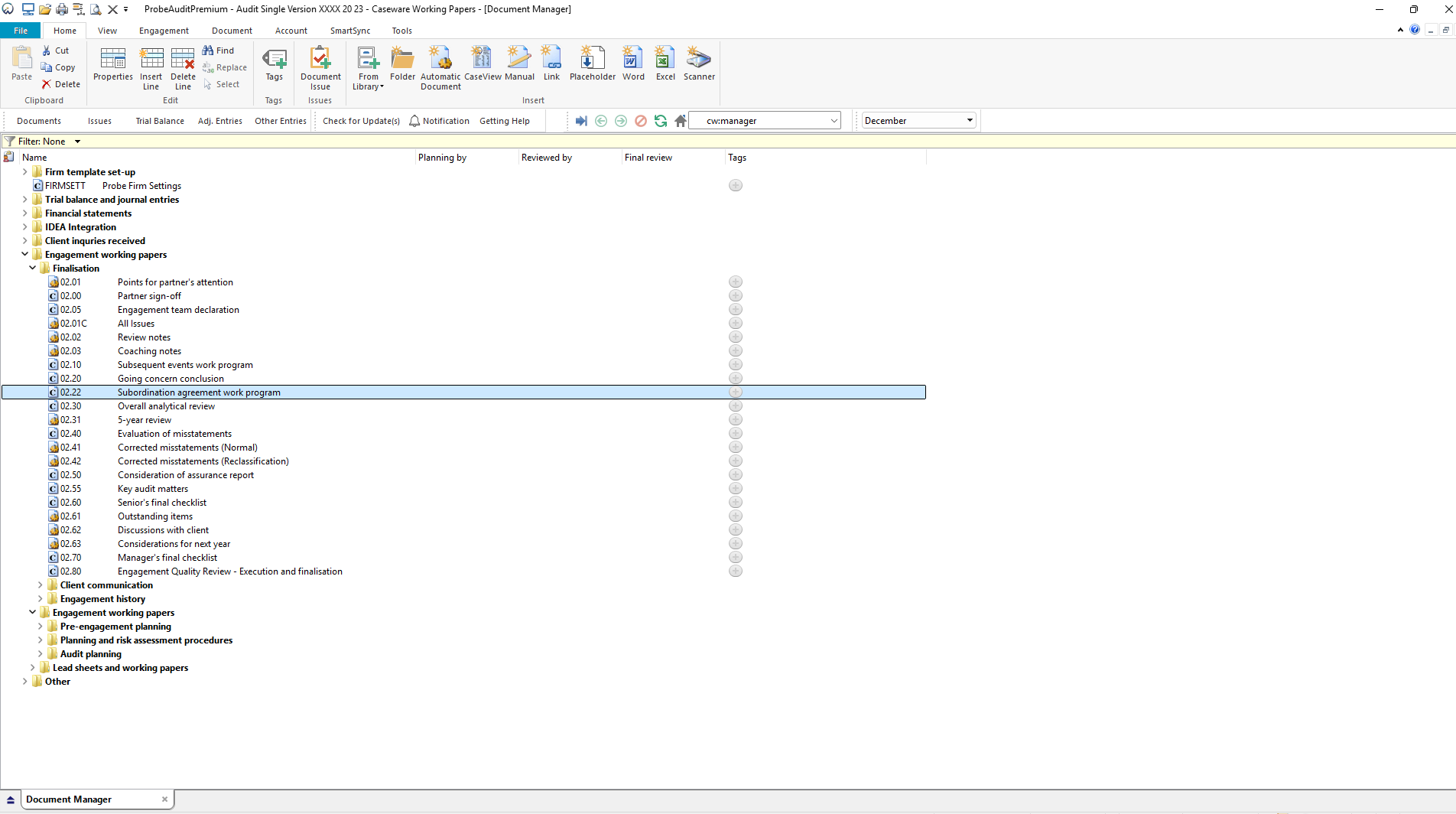
Document 02.22 – Subordination agreement work program can be found in the Finalisation folder in the Caseware document manager.
Document content
This document is designed to be a CaseView work program with pre-populated audit procedures for evaluating subordination agreements or letters of comfort / support. The work program includes space for documenting exceptions, the person who performed the procedure, and cross-references.
This document addresses ISA 570 (Going Concern) and ISA 250 (Consideration of Laws and Regulations in an Audit of Financial Statements) by providing a structured set of procedures for evaluating the validity, enforceability, and compliance of subordination agreements, and assessing the impact on the entity's going concern assessment and financial statement disclosures.
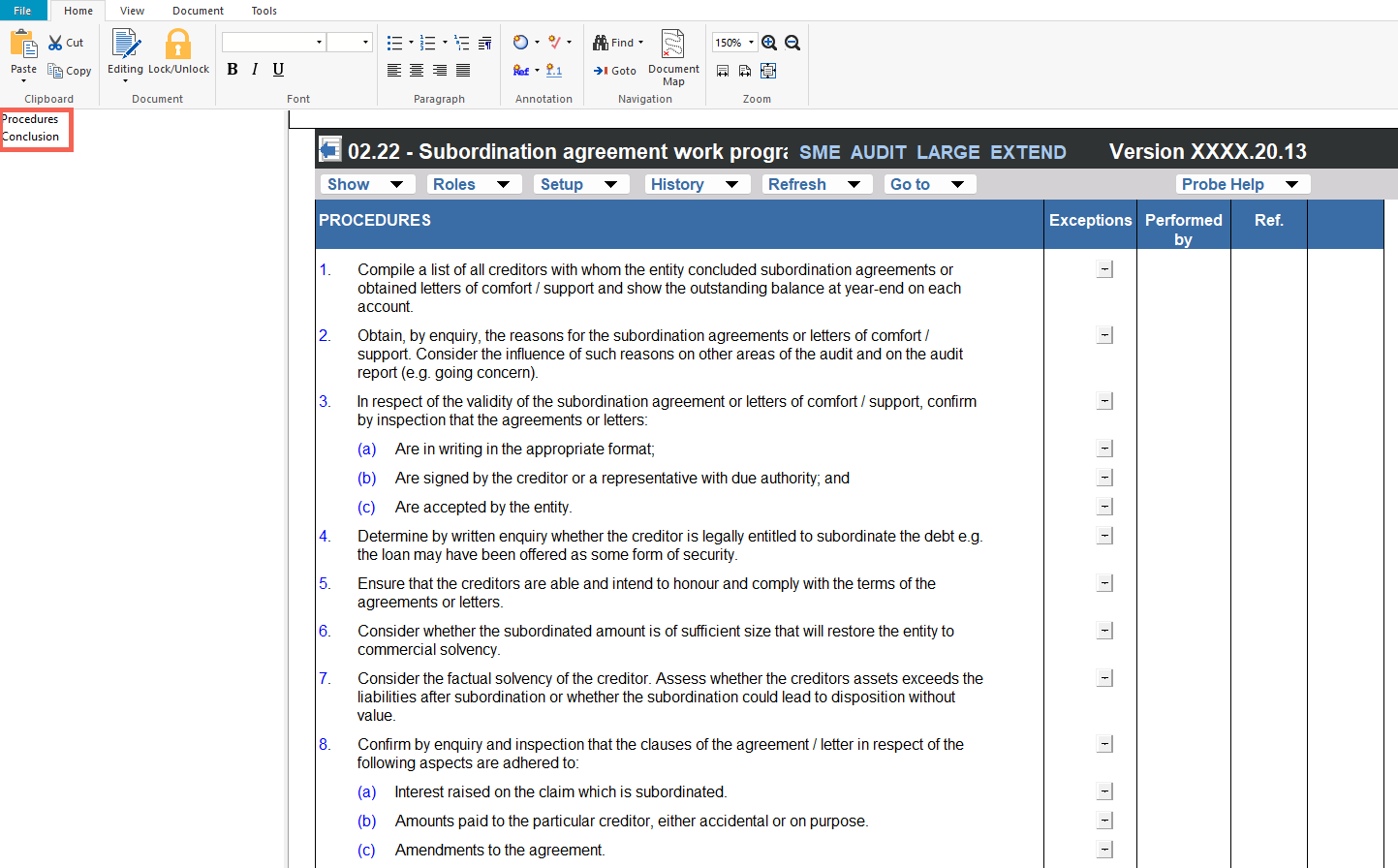
This document is divided into different bookmarks in the document map to assist you with navigation:
● Procedures
● Conclusion
Layout
|
Column
|
Input Required
|
Outcome
|
|
Procedures
|
|
Procedures
|
No input is required in this column. Displays 13 numbered audit procedures for evaluating subordination agreements or letters of comfort / support. The procedures address compiling a list of all creditors, obtaining reasons for subordination, validating the agreements, determining legal entitlement, assessing creditor solvency, confirming compliance with agreement clauses, evaluating non-resident creditor requirements, and confirming adequate financial statement disclosure.
|
No impact on the engagement file. Provides the structured work program for the engagement team to evaluate subordination agreements.
|
|
Exceptions
|
Select Yes or No from the drop-down to indicate whether any exceptions were identified during the performance of each audit procedure. Only when Yes is selected does a comment field become available to document the details of the exceptions noted.
|
No impact on the engagement file. Documents the exceptions identified for the engagement file.
|
|
Performed by
|
Populates automatically with the date and the initials of the engagement team member when No exceptions are indicated for the procedure. When Yes is selected, click the cell to populate the date and your initials.
|
No impact on the engagement file. Records the person who performed each procedure for the engagement file.
|
|
Ref.
|
Enter a cross-reference to the relevant working paper or supporting documentation for each procedure.
|
No impact on the engagement file. Documents the cross-reference for the engagement file.
|
|
Conclusion
|
|
Conclusion questions
|
No input is required in this column. Displays three pre-populated conclusion questions addressing: (1) whether the results indicate non-compliance with a subordination agreement, (2) whether the company is continuing to trade without reasonable expectation of meeting its liabilities and whether this is likely to cause financial loss, and (3) whether the existence of the agreement did not justify the adoption of a going concern basis of accounting.
|
Provides the conclusion framework for the engagement team's evaluation of the subordination agreement procedures. A Yes response to any of the three conclusion questions results in a possible reportable irregularity and displays three additional items in the Conclusion section: a statement that, based on your conclusion, the subordination agreement(s) could constitute irregularities to be reported in terms of Section 45 of the Auditing Profession Act, 2005; (a) an input field to provide details of additional discussions with the engagement partner about justifications for using the going concern basis and considerations on modifying the audit report; and (b) an input field to provide details of additional discussions with the client regarding the conclusions above. Items (a) and (b) must be completed.
|
|
Exceptions
|
Select Yes or No from the drop-down to answer each conclusion question. Only when Yes is selected does a comment field become available to document the details relating to the conclusion question, and the additional items described in the Outcome column are displayed.
|
No impact on the engagement file. Documents the engagement team's exceptions for each conclusion question.
|
|
Performed by
|
Populates automatically with the date and the initials of the engagement team member when No is selected for the conclusion question. When Yes is selected, click the cell to populate the date and your initials.
|
No impact on the engagement file. Records the person who evaluated each conclusion question for the engagement file.
|
|
Ref.
|
Enter a cross-reference to the relevant working paper or supporting documentation for each conclusion question.
|
No impact on the engagement file. Documents the cross-reference for the engagement file.
|
Document outcomes
The engagement team must perform the 13 audit procedures and document their exceptions, the person who performed each procedure, and cross-references. The procedures cover compiling creditor lists, obtaining reasons for subordination, validating the agreements, determining legal entitlement, assessing creditor ability to honour terms, evaluating the adequacy of the subordinated amount, assessing creditor solvency, confirming compliance with agreement clauses, evaluating non-resident creditor requirements, ensuring the agreement is on file, and confirming adequate financial statement disclosure.
The engagement team must evaluate the three conclusion questions to determine whether the results of the procedures indicate non-compliance with a subordination agreement, whether the company is continuing to trade without reasonable expectation of meeting its liabilities, and whether the existence of the agreement justifies the adoption of a going concern basis of accounting. Where any conclusion question is answered Yes, the subordination agreement(s) could constitute irregularities to be reported in terms of Section 45 of the Auditing Profession Act, 2005, the engagement team must document the additional discussions held with the engagement partner (justifications for using the going concern basis and considerations on modifying the audit report) and with the client regarding the conclusions.
Group Audits
When the engagement type was selected as 'Group Audit Single' or 'Group Audit Multiple', the group version of the subordination agreement work program is used. The audit procedures and conclusion questions are the same as in the single-entity version, with the following differences:
- Procedures 1, 3(c), 6 and 10 refer to the group rather than the entity (creditors with whom the group concluded agreements, agreements accepted by the group, restoring the group to commercial solvency, and the group's assets and liabilities position).
Features
The following features are available in the document:
● Insert or delete a comment, see page F3
- Insert or delete a row at the end, see page F5
- Edit paragraph or enable editing, see page F6
- Hide a paragraph or ignore a procedure, see page F8
- Guidance, see page F16
- Freeze, see page F19
Rate this article:
|vote=None|
Processing...
(Popularity = 1/100, Rating = 0.0/5)
Related Articles
Probe Audit | 02.22 Subordination agreement checklist
Probe Audit | 02.10 - Subsequent Events Work Program
Probe Audit | 20.10 - 80.10 Work program
Probe Audit | 02.20 - Going Concern Conclusion
view all...
Search Results
Guide ZA-Signatories Form
Guide ZA-Liability Form
Easy Add-ons User Guide
Firm Template Guide Latest Version
Caseware Time | How to Add a VAT amount on an Invoice?
view all...