The following describes the functionality and features included in Probe Audit Premium+
Instructions:
Objective
The objective of this document is to document the engagement partner's conclusion on the appropriateness of management's use of the going concern basis of accounting, and to record the audit opinion in relation to going concern.
The following key concepts of the Probe Audit Premium+ Methodology are set in this document:
- Evaluation of management’s going concern assessment (ISA 570)
- Determination of whether material uncertainty exists regarding the entity’s ability to continue as a going concern
- Impact of going concern conclusions on the form of the audit opinion
Document placement
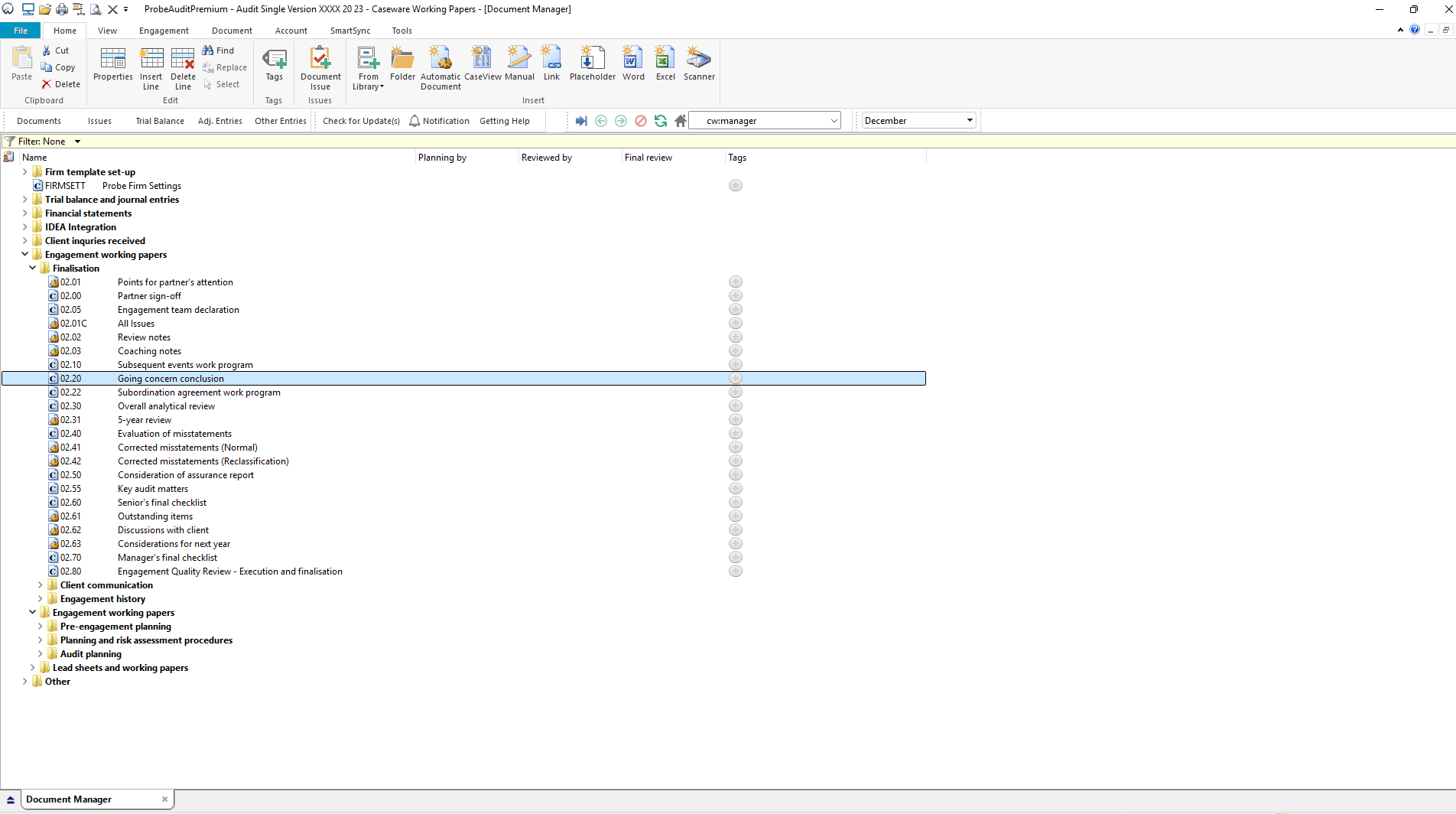
Document 02.20 – Going concern conclusion can be found in the Finalisation folder in the Caseware document manager.
Document content
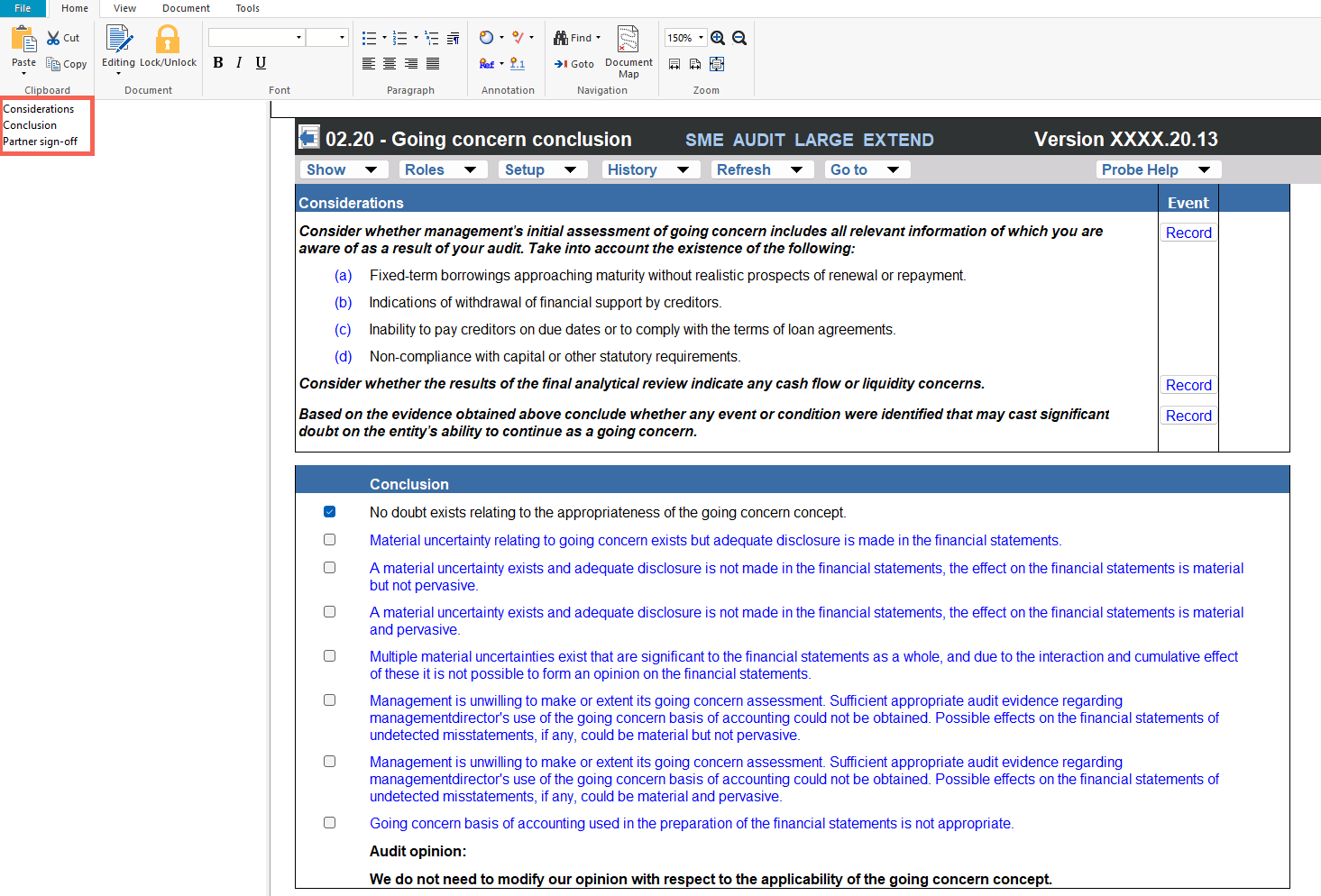
This document is designed to be a CaseView conclusion document. It presents pre-populated considerations for evaluating management's going concern assessment, a going concern conclusion selection with the resulting audit opinion, and a partner's sign-off declaration.
This document addresses ISA 570 (Going Concern) by documenting the engagement team's evaluation of whether events or conditions exist that may cast significant doubt on the entity's ability to continue as a going concern and recording the resulting conclusion and audit opinion.
This document is divided into different bookmarks in the document map to assist you with navigation:
● Considerations
● Conclusion
● Partner sign-off
Layout
|
Column
|
Input Required
|
Outcome
|
|
Considerations
|
|
Considerations
|
No input is required in this column. Displays pre-populated considerations for evaluating management's going concern assessment. The considerations include: (a) fixed-term borrowings approaching maturity without realistic prospects of renewal or repayment, (b) indications of withdrawal of financial support by creditors, (c) inability to pay creditors on due dates or to comply with loan agreement terms, and (d) non-compliance with capital or other statutory requirements. Additional prompts address cash flow or liquidity concerns from the final analytical review and whether any event or condition may cast significant doubt on the entity's ability to continue as a going concern.
|
No impact on the engagement file. Provides the consideration framework for the engagement team's evaluation of going concern.
|
|
Event
|
Record the description of any event or condition identified that may cast significant doubt on the entity's ability to continue as a going concern.
|
No impact on the engagement file. Records the going concern event or condition identified for the engagement file.
|
|
Conclusion
|
|
Conclusion statement
|
The engagement partner must select the going concern conclusion that applies to the engagement by ticking one of the following options. The default selection is "No doubt exists relating to the appropriateness of the going concern concept." The alternative options are: (a) material uncertainty relating to going concern exists but adequate disclosure is made in the financial statements; (b) a material uncertainty exists and adequate disclosure is not made in the financial statements, and the effect on the financial statements is material but not pervasive; (c) a material uncertainty exists and adequate disclosure is not made in the financial statements, and the effect on the financial statements is material and pervasive; (d) multiple material uncertainties exist that are significant to the financial statements as a whole, and due to their interaction and cumulative effect it is not possible to form an opinion on the financial statements; (e) management is unwilling to make or extend its going concern assessment, sufficient appropriate audit evidence regarding management's use of the going concern basis of accounting could not be obtained, and the possible effects of undetected misstatements could be material but not pervasive; (f) as for (e), but the possible effects could be material and pervasive; and (g) the going concern basis of accounting used in the preparation of the financial statements is not appropriate.
|
No impact on the engagement file. The selected conclusion determines the audit opinion displayed in the Audit opinion row below.
|
|
Audit opinion
|
No input is required in this column. The audit opinion is populated automatically based on the conclusion selected in the Conclusion row above. The default audit opinion displayed is "We do not need to modify our opinion with respect to the applicability of the going concern concept."
|
No impact on the engagement file. Provides the audit opinion on going concern that corresponds to the selected conclusion, for the engagement partner's review.
|
|
Partner sign-off
|
|
Partner declaration
|
No input is required in this column. Displays the pre-populated partner declaration confirming that the going concern procedures and evidence documented in planning and finalisation have been reviewed, and that sufficient and appropriate audit evidence has been obtained to support the conclusion and the report of the independent auditor in relation to the going concern basis of accounting.
|
No impact on the engagement file. Provides the partner's declaration framework for the going concern conclusion.
|
Document outcomes
The engagement team must consider the pre-populated going concern indicators and record any events or conditions identified that may cast significant doubt on the entity's ability to continue as a going concern. The considerations address fixed-term borrowings, withdrawal of financial support, inability to pay creditors, non-compliance with statutory requirements, cash flow or liquidity concerns, and the results of the final analytical review.
The engagement partner must select the appropriate going concern conclusion. Where no doubt exists, the default conclusion and audit opinion are retained. Where events or conditions have been identified, the alternative conclusion is selected and the audit opinion changes accordingly.
The engagement partner must review the partner sign-off declaration confirming that the going concern procedures and evidence have been reviewed and that sufficient and appropriate audit evidence has been obtained to support the going concern conclusion and the report of the independent auditor.
Group Audits
When the engagement type was selected as 'Group Audit Single' or 'Group Audit Multiple', the going concern conclusion applies to the group financial statements. The document follows the same layout as the single-entity version, with the following differences:
- The Considerations refer to group management's initial assessment of going concern (rather than management's assessment) and to events or conditions that may cast significant doubt on the group's ability (rather than the entity's ability) to continue as a going concern.
- The Conclusion, Audit opinion, Partner sign-off declaration and Engagement partner block are unchanged from the single-entity version.
Features
The following features are available in the document:
- Insert or delete a comment, see page F3
- Insert or delete a row, see page F4
- Edit paragraph or enable editing, see page F6
- Recording a risk or event, see page F10
- Guidance, see page F16
- Freeze, see page F19
Rate this article:
|vote=None|
Processing...
(Popularity = 0/100, Rating = 0.0/5)
Related Articles
Probe Audit | 10.20 - Engagement Evaluation
Probe Audit | 02.10 - Subsequent Events Work Program
Probe Audit | What is Probe Audit Premium+ ?
Probe Audit | Important information on Probe MMX licensing (Probe Audit Premium+)
view all...
Search Results
Reassigning Client Profiles to Different Audit Users
Adding Financial Forms to a Client Profile
Roll Forward of a Client Profile
Can I add different authorised signers to different forms?
Editing Financial Forms in a Client Profile
view all...