Executive summary
This annual update of the MCS Financial Statements adds the latest effective MCS presentation and disclosure requirements from the 2026-2027 MCS Standards and the latest SCOA changes to your MCS Caseware file.
At the time of the release, National Treasury has not yet made the updated version of the Excel AFS available for 2026-2027. Caseware Africa is actively engaging with the relevant stakeholders. Once the version is available, we will release an updated version.
This update coincides with the full market release of Caseware Working Papers (Version 2026.00.058) and Connector (Version 2026.00.03).
Contents
1. MCS 2026.12.01
1.1. Update to align Caseview AFS to the prescribe format "2026-2027 Specimen issued June 2026"
For the Caseview AFS to align to this latest version of the MCS prescribe format the following sections are updated:
1.1.1. Statement of financial position
- Renamed "Voted funds receivable" to "Revenue Fund receivables" and added a new line item for Voted funds receivable.
- Renamed the related mapping number.
1.1.2. Statement of changes in net assets
- Added a new line item "Other (specify)" in the Recoverable revenue section.
1.1.3. Accounting policies
The following accounting policies were updated to align to the latest specimen:
- Basis of preparation
- Departmental revenue
- Other expenditure
- Finance leases
- Prepayments and advances
1.1.4. Notes to the financial statements
- Goods and services
- Updated the sort order of rows in the table.
- Loans
- Added a new line for Interest in the Analysis of balance table.
- Contingent liabilities and contingent assets
- "Intergovernmental contingent liabilities" are now shown separately from "Contingent liabilities".
- Lease commitments
- Updated references to the MCS Standard.
- Updated descriptions of totals.
- Updated guidance.
- Added a new section for Lease and sublease payments expensed.
- Updated the Finance lease section.
- Added a new table for Value of assets.
- Added a new table for Contingent rent expensed.
- Added a new table for Future sublease payments expected to be received under non-cancellable subleases.
- Added a new table for Contingent rent received.
- Public private partnerships
- Updated the whole note with the new format.
- Provisions
- Added a new table for Intergovernmental provisions.
- Movable tangible capital assets
- Updated the reference to the MCS Standard.
- Updated the table for movable tangible capital assets under construction.
- Immovable tangible capital assets
- Added a total to the table for Immovable tangible capital assets under investigation.
- Principal-agent arrangements
- Updated references to the MCS Standard.
- Added additional guidance.
- Changes in accounting estimates and Changes in accounting policies
- Updated references to the MCS Standard.
- Removed out-of-date content.
- Transfers of functions and mergers
- Updated references to the MCS Standard.
- Updated the row description for "Revenue Fund receivables".
- Statement of conditional grants and other transfers paid to the provinces
- Updated the name of the note.
- Updated the headings of the table.
- Departure from the MCS
- Added a new note for Departure from the MCS.
1.1.5. Annexures
The following annexures are updated:
- Annexure 5
- Added a new table for Contingent liabilities.
- Annexure 13
- Added a new annexure for Analysis of Public Private Partnerships.
1.2. Excel AFS for 2026-2027
At the time of the release, National Treasury has not yet made the updated version of the Excel AFS available for 2026-2027. Caseware Africa is actively engaging with the relevant stakeholders. Once the version is available, we will release an updated version.
1.3. Update to SCOA
Updated the automap of SCOA to version "Chart of Accounts - SCOA COR 6 03 25 26 31 December 2025".
2. Caseware Working Papers 2026.00.058
The following describes the features and fixes included in Working Papers 2026 and related products, as published in Caseware's official documentation.
2.1. Features
This release includes the following new features:
- You can now revoke Caseware Working Papers licences from the Success community.
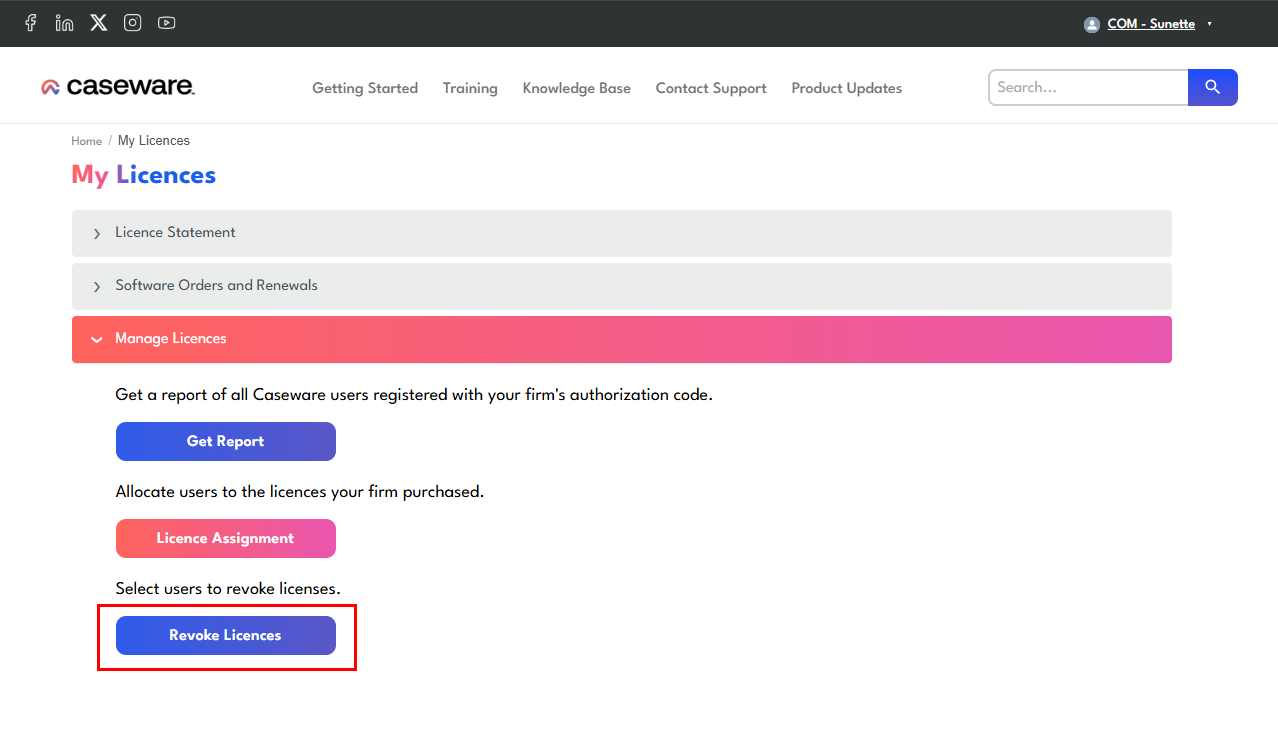
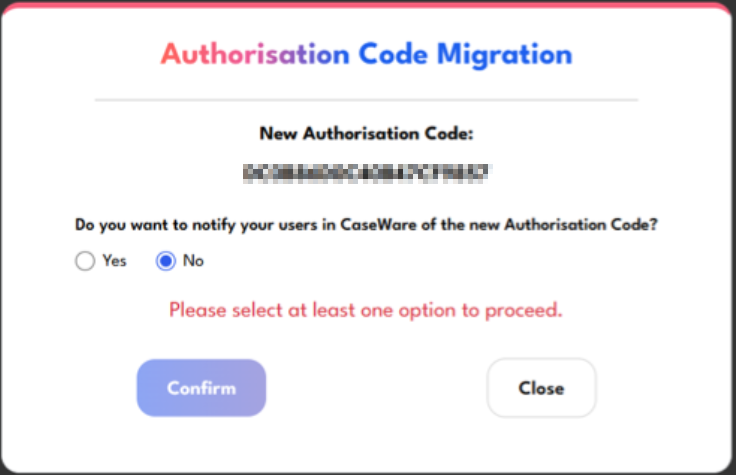
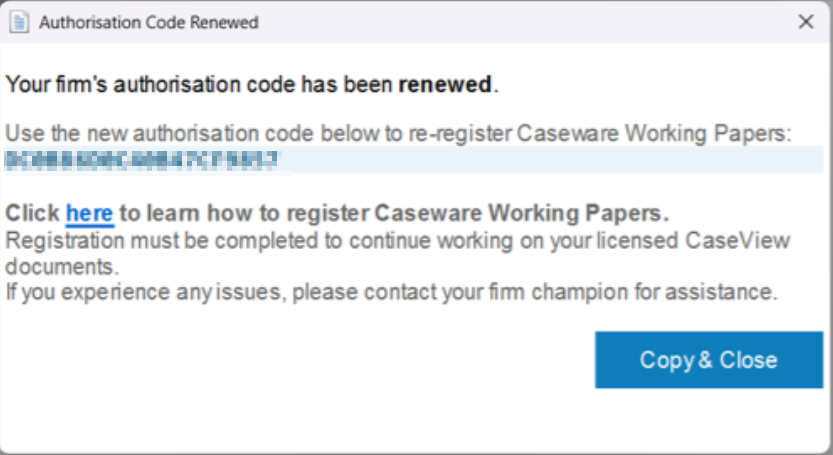
- You are able to send in-app notifications to all users in your firm to register Caseware Working Papers with the organisation's new authorisation code. This is helpful when you renew your Caseware licences and all users need to be moved to the new authorisation code.
- From the Success community licence management screen, you will be able to control when to send the notification out to users.
- Users will get this notification with steps to follow when they open Caseware Working Papers.
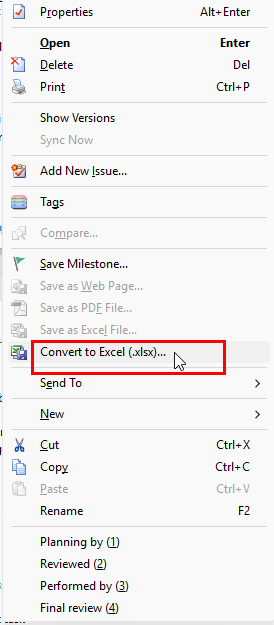
- A Convert to Excel File (.xlsx) option has been added to the right-click menu in the Document Manager, which converts a CSV file to .xlsx and replaces the original file.
- The Data Store Administration Tool is now compatible with Microsoft SQL Server 2025.
2.2. Fixes
This release includes fixes to the following issues:
- After lockdown, opening a document's properties and clicking OK trimmed a leading space from the document name, creating a modification event after lockdown.
- Excel imports truncated the extended map description in files that have multiple languages enabled.
- Deleting the first folder in the Document Manager deleted all Document Manager content when a workflow layout was applied.
- The History automatic document omitted some history events when filtering by a date range, due to a UTC timezone offset.
- Files closed unexpectedly when signed into Caseware Cloud with certain privileges.
- Child copies became stuck in a continuous syncing state.
- Dragging and dropping multiple files into the Document Manager changed the content of every file after the first, resulting in documents with content from another file.
- Working Papers defaulted to a fixed runtime instead of the evergreen WebView2 runtime.
- Attaching an .sfc file to an issue resulted in an error due to a file corruption check that did not apply to uncompressed attachments.
- External data cells in CaseView with an asterisk in the Form field caused data loss.
- CaseView pie charts using the old look rendered a default set of data instead of the values passed to them.
- CaseView crashed during HTML exports in documents with certain subdocument structures.
All 2026 Templates require Caseware Working Papers 2026 to be installed.
If you are a firm champion, you will have access to your unique download package by accessing the My Software page and clicking on the download packager icon top right. If you are responsible for managing updates and have not received login details for the Caseware Africa Success Community, click on Login (top right) and then choose the Register Now option.
If this is not successful contact our admin team at info@casewareafrica.com
Find below our previous release information for the Modified Cash Template:
Rate this article:
|vote=None|
Processing...
(Popularity = 5/100, Rating = 0.0/5)
Login to access this download.
Release Notes
For more detailed information on these and other enhancements to the software, please go through our Release Notes.
Download Release Notes
Related Articles
Modified cash | Release | Nov 2025 | 2025.12.01
mSCOA | Release | March 2026 | Version 2025.13.01 Incl. Sec 71 2026_1
Support and Company Closures for 2026
mSCOA Latest Release (Version 2025_13_02 Incl Sec 71 2026_2)
view all...
Search Results
Changing Client Signers on Forms
How do I know the client signer has authorized the auditor to send requests? (New Version of Confirmation)
Adding Financial Forms to a Client Profile
I can’t request authorisation from a client signer as the name is greyed out (cannot be selected)?
Can I add different authorised signers to different forms?
view all...