Executive summary
This annual update of the MCS Financial Statements adds the latest effective MCS presentation and disclosure requirements from the 2024-2025 MCS Standards to your MCS Caseware file. Notably the implementation of new National Treasury Excel AFS for 2024-25 is included in this release as well.
This update coincides with the full market release of Caseware Working Papers (Version 2024.00.164) and Connector (Version 2024.00.003).
Contents
1. MCS 2024.12.01
1.1. Update to align Caseview AFS to the prescribe format "Departmental Specimen AFS 2024-25_Final June 2024_Updated December 2024 Clean":
1.1.1. Accounting policies
1.1.2. Notes
1.2. Update version of Excel AFS for 2024-2025
1.3. Update to SCOA
2. Caseware Working Papers 2024.00.164
2.1. Features
2.2. Improvement
2.3. Fixes
3. Previous release: MCS 2023.12.02
3.1. Update to align Caseview AFS to the prescribe format "Departmental Specimen AFS 2023-24_Dec 2023_clean":
3.2. Update version of Excel AFS for 2023-2024
3.3. Update to SCOA
4. Previous release: MCS 2023.12.01
4.1. Update to align Caseview AFS to the prescribe format "Departmental Specimen AFS 2023-24_30 June 2023_clean":
4.2. New version of Excel AFS for 2023-2024
4.3. Update to SCOA
4.4. User requests improvements
4.5. Technical improvements
4.6. Update to SCOA
MCS 2024.12.01
1.1. Update to align Caseview AFS to the prescribe format "Departmental Specimen AFS 2024-25_Final June 2024_Updated December 2024 Clean":
For the Caseview AFS to align to this latest version of the MCS prescribe format the following sections are updated:
1.1.1. Accounting policies
- Finance leases
- Prepayments and advances
1.1.2. Notes
The following notes are updated:
- Departmental revenue.
- Aid assistance.
- Expenditure for capital assets.
- Prepayment and advances.
- Voted funds to be surrendered.
- Movable tangible assets.
- Intangible capital assets.
- Immovable tangible capital assets.
1.2. Update version of Excel AFS for 2024-2025
National Treasury issued a new version of the Excel AFS named "Dept_Financial Statement Template_2024-25_Final". This Excel AFS version has been updated with Patch 1 of 2024-25 which was released in December 2024.
The update will add this new Excel version to the document manager named "Dept Financial Statement Template_2024-2025 Final".
1.3. Update to SCOA
The automap logic for mapping accounts in BAS/Vulindlela for new accounts added in the latest Standard Chart of Accounts lists that was published on 1 April 2024.
Caseware Working Papers 2024.00.164
The following describes the features and fixes included in Working Papers 2024 and related products.
2.1. Features
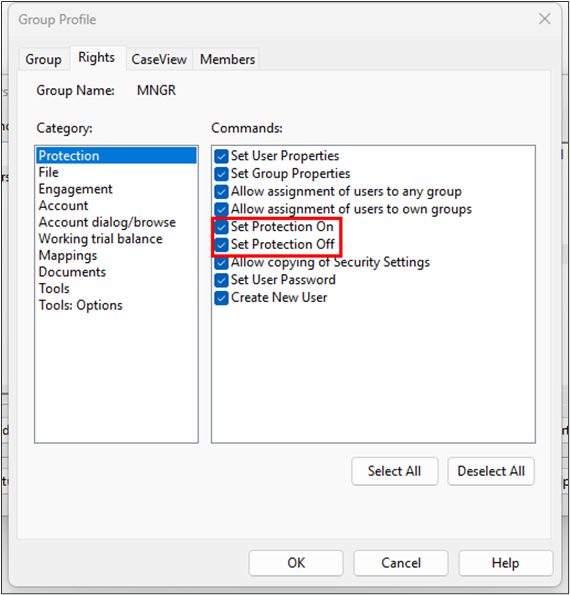
2.1.1. Protection setup
Split the existing Set Protection On/Off group right into Set Protection On and Set Protection Off. This can be used to expand the number of users that can enable file protection without giving them the ability to disable it.
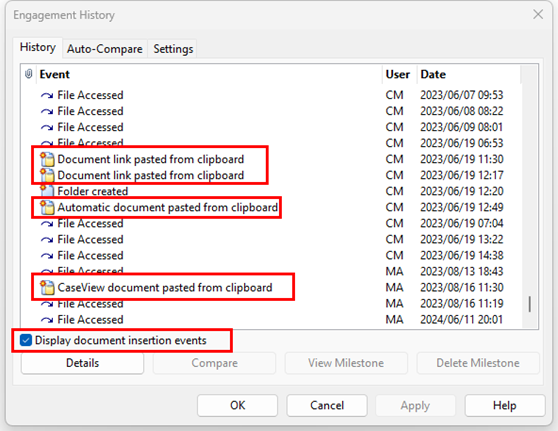
2.1.2. History and milestones
Added an option to display document insertion events in the file history log.
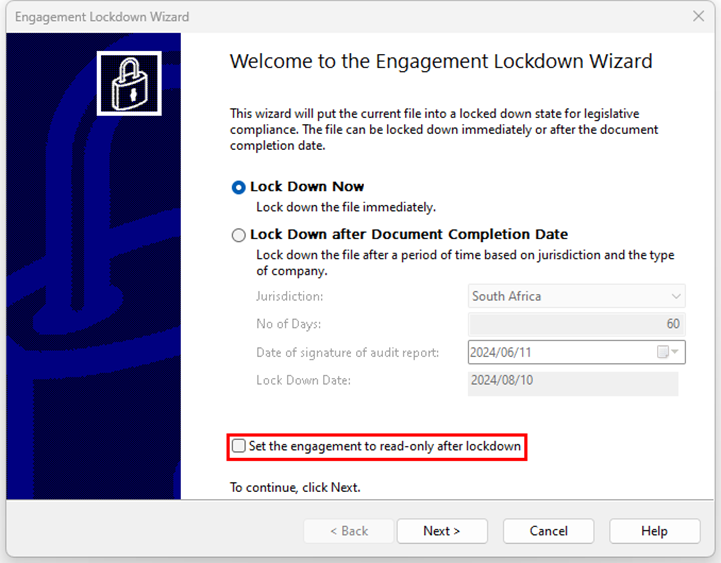
2.1.3. Lockdowns
Added an option to the Engagement Lockdown Wizard to set all content in a file’s directory to read-only after lockdown. This read-only mode also applies to any sync copies of the file.
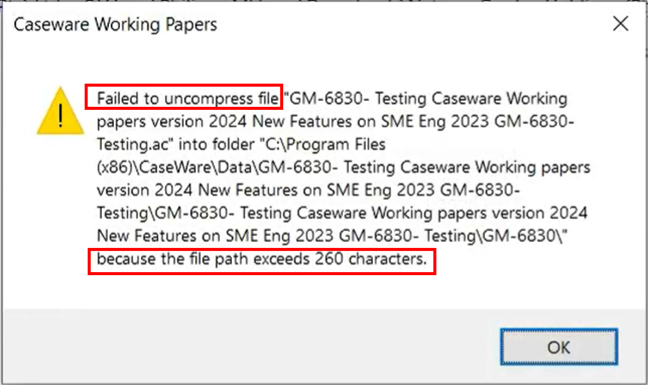
2.1.4. More information Erro Messaging
Added a more informative error dialog when attempting to open a compressed file that contains documents with file paths exceeding 260 characters.
2.1.5. Annotations
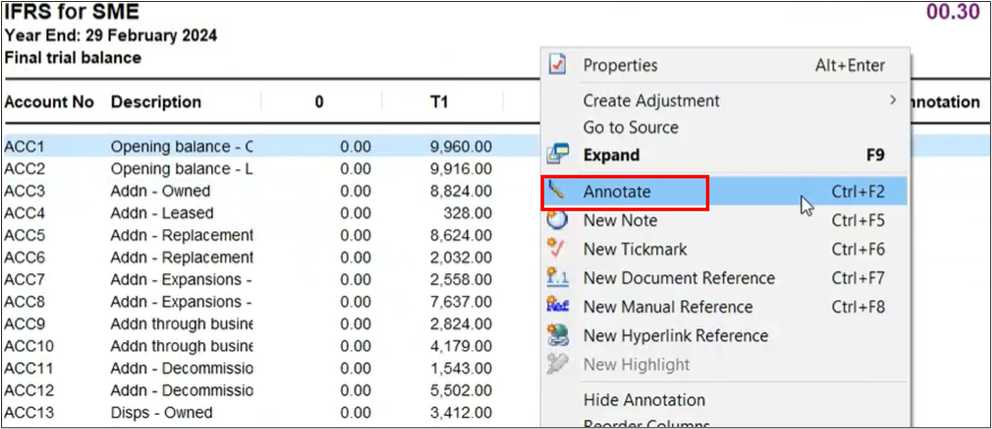
The Annotation column is now visible in trial balance automatic documents using the Consolidated view.
2.1.6. Caseview Scripting
Increased the character limit for CaseView script names to 31 characters. This increased character limit aligns with the existing CaseView UI limit and prevents some potential scripting errors.
2.1.7. Data Store Administration Tool
The Data Store Administration Tool (DSAT) can now be used with Microsoft SQL Server 2022.
2.1.8. Imports and exports
Added support for imports from the following software packages:
QuickBooks 2024 (Australia, Canada, UK)
Sage 50 Accounting 2024 (Canada)
Added support for exports to the following software packages:
ProFile 2023 (Canada)
The import process for QuickBooks US files now matches the process to import QuickBooks Canada, UK and Australia files. This process requires the QuickBooks Export Utility.
2.1.9. Xero online (Direct) import
Working Papers now fully supports imports from Xero Online. You can import your Xero trial balance and general ledger details from the Import - Accounting Software dialog without having any licencing errors using the “Xero Online(Direct)” option.
2.1.10. Protection setup
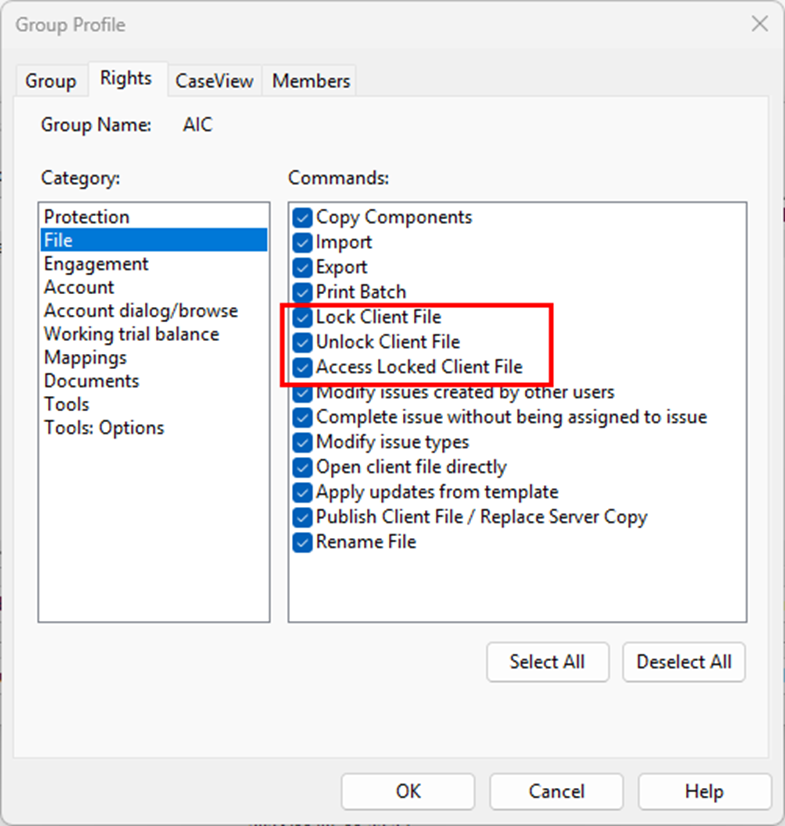
Split the Lock Client File/Unlock Client File group right into separate Lock Client File and Unlock Client File rights to provide more control over these operations.
2.1.11. Licencing
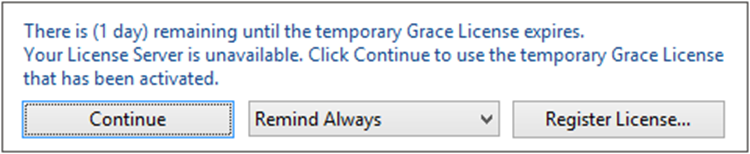
Added a warning dialog that displays when a Working Papers license is nearing its expiration date.
2.1.12. Hybrid cloud
Increased the duration that Working Papers will attempt to communicate with Cloud to prevent the process from timing out before completion.
2.1.13. XBRL
CaseView now supports multiple XBRL entry points. In the new Select Entry Points dialog, you can add taxonomies and select the applicable entry points to use from the list.
2.2 Improvement
- Attempting to access a computer’s system drive through CaseView causes CaseView to close unexpectedly.
- After performing a silent installation to a newer version of Working Papers, the older version is uninstalled, but the shortcut folder remains in the Windows 10 Start menu.
2.3 Fixes
2.3.1. Imports
Importing data from AccountView into an engagement that was rolled forward does not clear the previous year-to-date (YTD) value.
2.3.2. SmartSync
Documents locked for exclusive use may not indicate that they are ‘Locked’ when opened by the exclusive user, or ‘Read-only’ when opened by other users. The locked/read-only status was still applied, however.
2.3.3. Licencing
Working Papers reports a time tampering issue and locks the application when the system time has not been modified.
2.3.4. XBRL
Inline XBRL and non-XBRL-tagged HTML files do not preserve optional hyphens (also known as soft hyphens, which are used to break words across lines) in the export file.
2.3.5. User interface
Some Working Papers fonts and CaseView icons do not properly scale to monitor resolution.
Previous release: MCS 2023.12.02
3.1. Update to align Caseview AFS to the prescribe format "Departmental Specimen AFS 2023-24_Dec 2023_clean":
For the Caseview AFS to align to this latest version of the MCS prescribe format the following sections are updated:
3.1.1. Accounting policies
Updated the "Leases" accounting policies with an option to select between "Finance lease assets acquired at the end of the lease term" or "Finance lease assets acquired at the commencement of the lease term".
3.1.2. Notes
The following notes are updated:
- Update the sub-note named "Gifts, donations and sponsorships received in-kind" in the "Departmental revenue" note.
- Update the sub-notes named "Aid assistance prepayments (expensed)" and "Aid assistance received in-kind (not included)" in the "Aid assistance" note.
- Update the sub-note named "Gifts, donations and sponsorships made in kind (not included in the main note)" in the " Transfers and subsidies " note.
- Update the sub-note named "Advances paid (Expensed)" in the " Prepayments " note.
- Update the note "Voted funds to be surrendered to be Revenue Fund" as well as the sub-note "Reconciliation on unspent conditional grants".
- Update "Employee benefits" note by adding a new subnote named "Included in the above totals are the following"
- Update "Changes in accounting estimates and Changes in accounting policies" note.
- Update Annexure 1I with wording changes.
- Update Annexure 12 with wording changes.
3.2. Update version of Excel AFS for 2023-2024
National Treasury issued a new version of the Excel AFS named "Dept_Financial Statement Template_2023-24_Final for publishing - Updated Dec 2023" as well as a "Patch 1 of 2023-24" and "Macro to Allow Filter of Current Yr TB Sheet".
The update will add this new Excel version to the document manager named "Dept FS Template_2023-2024 Final v2 with patch 1", which is based on the Dec 2023 version and already includes Patch 1 and the Macro filter correction.
Users should use this version only for the final submission at the end of May and no other previous versions.
3.3. Update to SCOA
The automap logic for mapping accounts in BAS/Vulindlela for new accounts added in the latest Standard Chart of Accounts lists that was published on 24 January 2024.
Previous release: MCS 2023.12.01
4.1. Update to align Caseview AFS to the prescribe format "Departmental Specimen AFS 2023-24_30 June 2023_clean":
For the Caseview AFS to align to this latest version of the MCS prescribe format the following sections are updated
4.1.1. Statement of Financial Position
Added a new line item for "Statutory Appropriation to be surrendered to the Revenue Fund" under the Current Liabilities section.
4.1.2. Notes
The following notes are updated:
- Added a new note for "Statutory Appropriation to be surrendered to the Revenue Fund".
- Update "Statutory Appropriation note" with new line for "Statutory Appropriation not requested / not received".
- Update the "Net cash flow available from operating activities" note with a new line for "Statutory Appropriation not requested / not received".
- Update the " Transfer of functions and mergers" note with a new line for "Statutory Appropriation to be surrendered to the Revenue Fund".
- Update the "Annual Appropriation" note reference to MCS standard paragraph.
- Update the "Aid Assistance" note, to remove column for "prepayments expensed" as not permitted from 1 April 2023.
- Update "Goods and services" note, the "Other supplies" subnote by removing the line for "Human settlement property".
- Update "Advances paid" note by updating lines item descriptions from "Public departments" to "Public entities" and "Other institutions" to " Other entities".
- Update "Receivables" note, update heading of subnote "Recoverable expenditure", remove line for "Statutory appropriation receivables" from the "Other receivables" subnote.
- Update the "Contingent liabilities and contingent assets" note by updating the description for "Intergovernmental payables".
- Update the "Employee benefits" note by updating the line description for "Capped leave".
- Update the Immoveable tangible capital assets note by renaming the line for "Machinery and equipment" to " Land and subsiol assets".
- Update the "Changes in accounting estimates and Changes in accounting policies" note by adding new sections for "Changes in accounting estimates" and "Changes in accounting policies".
- Update the "Inventories" note by updating the reference to the paragraph in the Modified Cash Standard.
4.1.3. Update to Annexures
The following Annexure are updated:
- Update to Annexure - "Statement of gifts, donations and sponsorships received" by having separate tables for Gifts, sponsorships and donations.
- Update to Annexure - "Statement of gifts, donations and sponsorships made" by having separate tables for Gifts, sponsorships and donations.
- Update to Annexure - "Natural disaster or relief expenditure", which was previously named "Covid 19 response expenditure".
- Add a new Annexure - "Analysis of prepayments and advances".
4.2. New version of Excel AFS for 2023-2024
The latest version of the Excel AFS version and related documents are added to the document manager:
- Dept_Financial Statement Template_2023-24_Final for publishing v2
- Improved calculations for rounding which will align the Excel AFS better to the Caseview AFS.
- Add new linkages to the new sections added between the Excel AFS and Caseview AFS.
- Import Prior Year TB Numbers - 2023-24.
4.3. Update to SCOA
The automap logic for mapping accounts in BAS/Vulindlela for new accounts added in the latest Standard Chart of Accounts lists that was published on 1 July 2023.
4.4. User requests improvements
The following improvements requested by users are added in this update:
- Option to show Annexures being "Audited or Unaudited".
4.5. Technical improvements
The following technical improvements to ensure better user experience are added in this update:
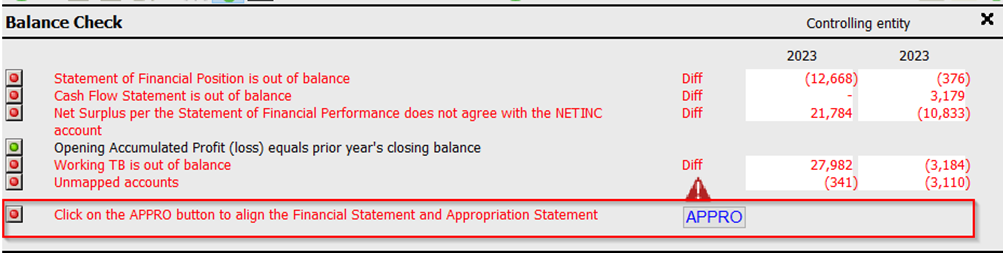
- New control feature to check that the Appropriation Statement and Financial Statements is aligned.
- Part of the balance check a new check now will notify the user if the Appropriation Statement and the Financial Statements is not aligned, if so, call to action will be to launch the Appropriation Statement while the Financial Statements are opened. That will ensure these to interconnected reports are aligned.
- New Data retention view
- This view works together with the document map feature. With this feature the document map can be filtered to present sections that are added, changed or removed during the update.
- Optimizer improvements
- The Optimizer feature has been improved to removed sections in the Caseview AFS which is switched off, and have no values. This removal will improved the speed of the Caseview AFS.
- Notification manager:
- The Notification manager has been improved to better notify users if the file currently working on has a content update available.
- New icons:
- The look of the menu in the Caseview AFS have been updated with new icons.
4.6. Importing from Vulindlela
The import from Vulindlela have been improved with the following features:
- Added a section to that deals with the Budget import. This section gives users the following 3 options:
- Option 1 – Default option
- Option 2 – Importing Original Budget with Virements and Shifts separately.
- Option 3 – Import Adjusted Budget with Post-Adj Virements and Shifts separately.
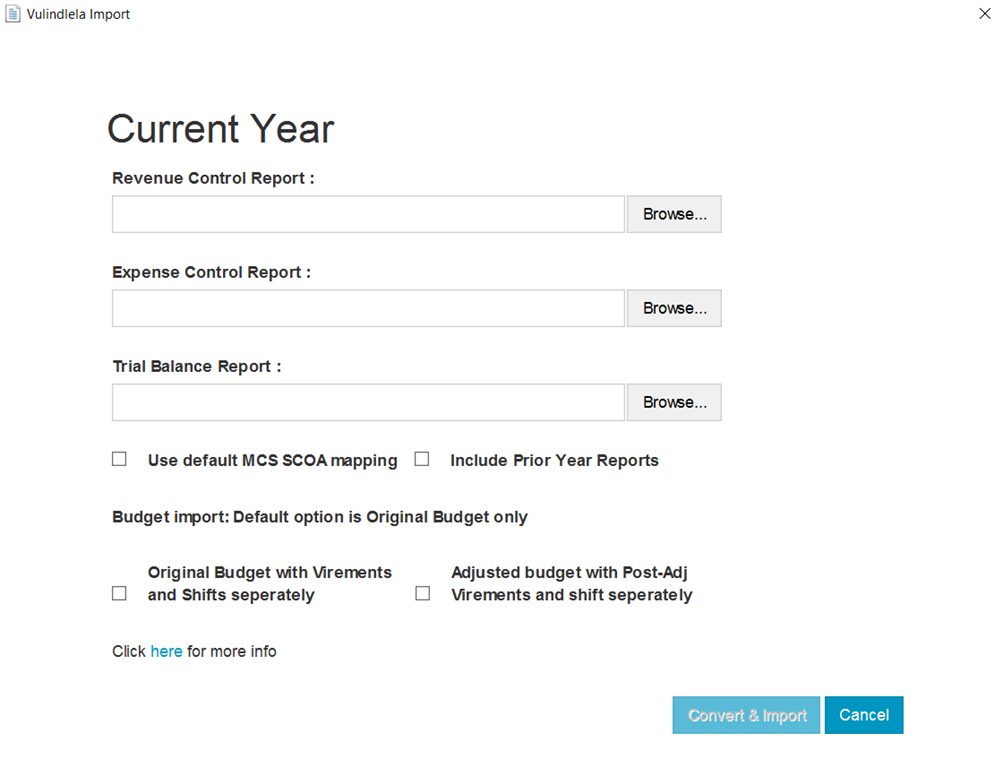
- Added a notification when the import has been "Completed".
- Correcting and issue when importing both current and prior year.
All Caseware Working Papers 2024 Templates require Caseware 2024 to be installed.
If you are a firm champion, you will have access to your unique download package by accessing the My Software page and clicking on the download packager icon top right. If you are responsible for managing updates and have not received login details for the Caseware Africa Success Community, click on Login (top right) and then choose the Register Now option.
If this is not successful contact our admin team at info@casewareafrica.com
Find below our previous release information for the Modified Cash Template:
Rate this article: