How to track the engagement file status?
Answer:
Each engagement file has a built-in workflow. You can use the workflow to track the status of the overall engagement work. The workflow is one of the properties that you can set in the pop-up that is accessible from the top menu.
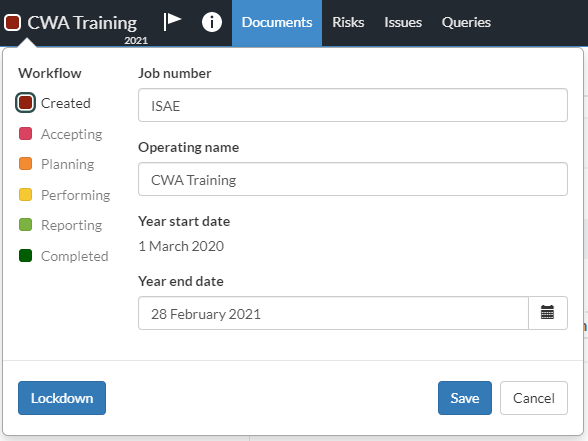
Select a workflow stage from this menu to apply it to the engagement.
|
Note: The workflow status automatically changes when you complete certain parts of the engagement. For example, when you upload the trial balance into your engagement file, the workflow stage is automatically changed to In Progress.
|
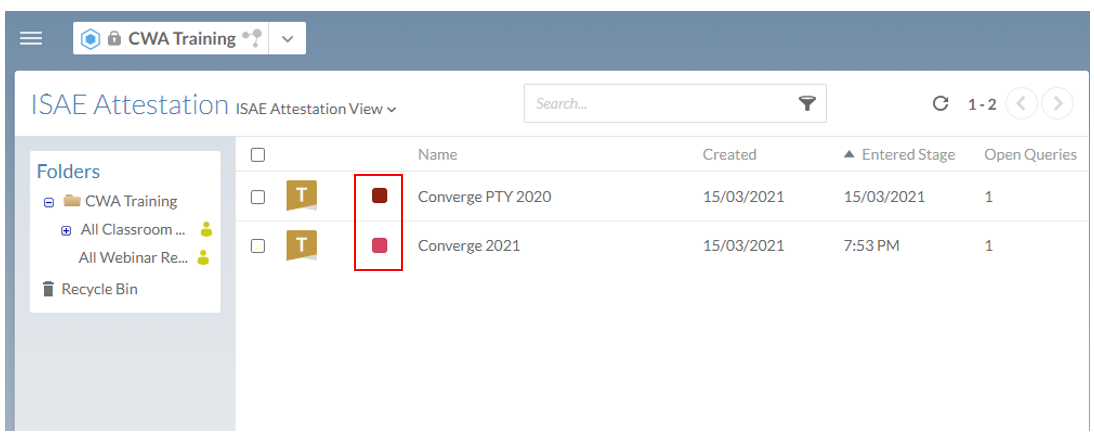
The engagement file status is also displayed in Cloud.
Rate this article:
|vote=None|
Processing...
(Popularity = 0/100, Rating = 0.0/5)
Related Articles
Cloud App | Report the engagement status to others
Cloud App | How to manage the engagement documents
Cloud App | How to attach documents to an engagement file
Cloud App | How to create an engagement team
view all...
Search Results
Sending a Future Dated Request
Can I request for a future "As of Date"?
What does the Future Dated Confirmation Report provide? (New Version of Confirmation)
Caseware Time | How can I find the client contacts that are missing after sending a client batch email?
What if the Account ID requested was closed for the As of Date (New Version of Confirmation)
view all...