Executive summary
This release contains the latest technical enhancements, the 2023 and 2024 taxonomy and mandatory page changes for iXBRL and other improvements.

Contents
1. iXBRL changes
1.1 Taxonomy
The taxonomy was updated to align with the latest CIPC XBRL Taxonomy 2024 IFRS Data Model, including all changes from the 2023 Data Model.
1.2 Mandatory page
The taxonomy and validation changes implemented resulted in the following changes on the Mandatory page:
|
Area
|
Details is from
|
Guidance on completion
|
|
Name of auditor
|
Automated from Information Store
|
|
|
Practice number of auditor
|
Input field
|
|
|
Name of audit firm
|
Automated from Information Store
|
|
|
Type of auditor's opinion
|
Automated from the audit report
|
If not completed in the Information Store this can also be captured on the Mandatory page
|
|
Holding company
|
Automated from Information Store
|
Complete null if NA
If not completed in the Information Store this can also be captured on the Mandatory page
|
|
Ultimate holding company
|
Automated from Information Store
|
Complete null if NA
If not completed in the Information Store this can also be captured on the Mandatory page
|
|
Name of director authorised to approve annual financial statements
|
Dropdown Automated from Information Store
|
Signatories of Directors Report
|
|
Were there any directors' emoluments paid?
|
True/False
|
|
|
Directors emoluments
|
Automated from the total of directors' emoluments note
|
If the note is not switched on this can also be captured in the Mandatory page
|
The following financial information was added to the Mandatory page. If not applicable for the current period, a footnote will be required to indicate a nil value:
|
Financial information
|
Guidance on completion
|
|
Retained income (equity)
|
|
|
Equity and liabilities
|
|
|
Administrative expenses
|
Input field
|
|
Profit (loss), attributable to owners of parent
|
Consolidation only
|
|
Profit (loss), attributable to non-controlling interest
|
Consolidation only
|
|
Non-controlling interest
|
Consolidation only
|
1.3 Other
1.3.1 Period Settings
Ensure that the period settings are set to yearly before validation.

2. SME template
2.1 CTM Changes
CTM forms are updated per SARS 2024 tax year requirements.
2.2 Improvements
- Statement of profit and loss – Correct the header to show correctly on the Statement of profit and loss as well as the index
- Nigeria Companies Act - Update the Companies Act for Nigeria to be Companies and Allied Matters Act of Nigeria, 2020
- Event after reporting period and going concern - The buttons are updated so that the two notes work independently when a selection is made
3. PI Score
The PI Score calculation in document 01.25 PI Score Calculation - Engagement Type and Basis of Preparation and the Mandatory page relevant to iXBRL, were previously based on post-adjustment figures.
In this release, document 01.25 has been updated to use pre-adjustment figures, as the engagement type and basis of preparation are determined at the beginning of the engagement. Please note that to automate the figures in 01.25, you must open document 10.20 Engagement Evaluation and document 10.60 Overall Materiality Assessment.
As a result, the PI Score calculation on the Mandatory page will differ from 01.25, as the Mandatory page will continue to use post-adjustment figures consistent with the final Financial Statement values.
4. Caseware Working Papers 2024.00.164.06
The following describes the features and fixes included in Working Papers 2024 V1 and related products.
4.1 Features
4.1.1. Xero online (Direct) import
Working Papers now fully supports imports from Xero Online. You can import your Xero trial balance and general ledger details from the Import - Accounting Software dialog without having any licencing errors using the “Xero Online(Direct)” option.
4.1.2. Protection setup
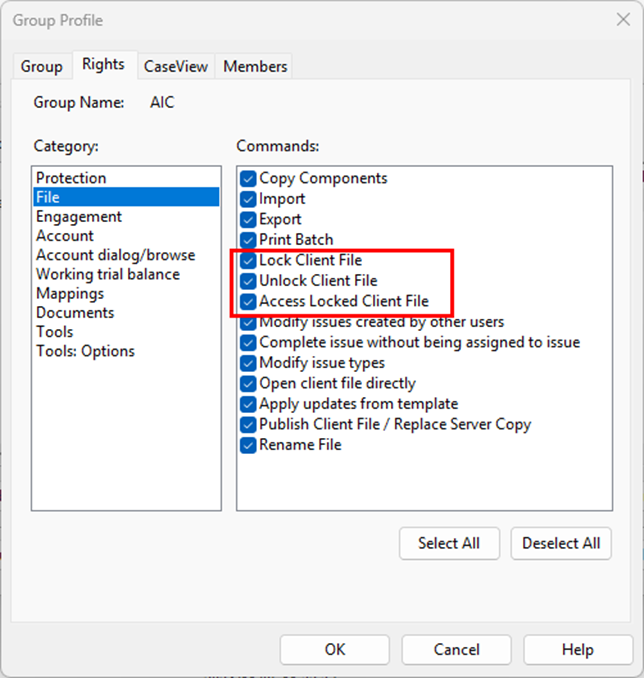
Split the Lock Client File/Unlock Client File group right into separate Lock Client File and Unlock Client File rights to provide more control over these operations.
4.1.3. Licencing
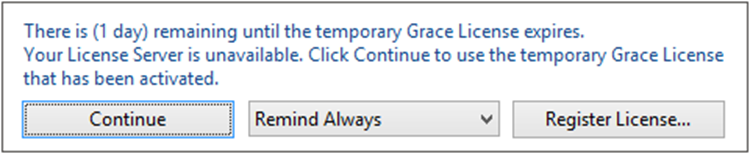
Added a warning dialog that displays when a Working Papers license is nearing its expiration date.
4.1.4. Hybrid cloud
Increased the duration that Working Papers will attempt to communicate with Cloud to prevent the process from timing out before completion.
4.1.5. XBRL
CaseView now supports multiple XBRL entry points. In the new Select Entry Points dialog, you can add taxonomies and select the applicable entry points to use from the list.
4.2 Fixes
4.2.1. Imports
Importing data from AccountView into an engagement that was rolled forward does not clear the previous year-to-date (YTD) value.
4.2.2. SmartSync
Documents locked for exclusive use may not indicate that they are ‘Locked’ when opened by the exclusive user, or ‘Read-only’ when opened by other users. The locked/read-only status was still applied, however.
4.2.3. Licencing
Working Papers reports a time tampering issue and locks the application when the system time has not been modified.
4.2.4. XBRL
Inline XBRL and non-XBRL-tagged HTML files do not preserve optional hyphens (also known as soft hyphens, which are used to break words across lines) in the export file.
4.2.5. User interface
Some Working Papers fonts and CaseView icons do not properly scale to monitor resolution.
4.3 Known issues
CaseView frequently displays script errors when opening documents on Windows 11
Solution: Windows H2V2 – Error Executing Scripts
All 2024 Templates require Caseware Working Papers 2024 to be installed.
If you are a firm champion, you will have access to your unique download package by accessing the My Software page and clicking on the download packager icon top right. If you are responsible for managing updates and have not received login details for the Caseware Africa Success Community, click on Login (top right) and then choose the Register Now option.
If this is not successful contact our admin team at info@casewareafrica.com
Who is the firm champion?
The "Firm's Champion" is the staff member responsible for rolling out the template to the users at the firm.
I do have a Caseware Africa Success Community login
If you are a firm champion, you will have access to your firm's unique download package by accessing the My Software page and clicking on the download packager icon (top right).
I do have a Caseware Africa Success Community login but cannot see the My Software option
You may request the file to be provided to you by your firm champion
Alternatively to obtain this access your firm champion will need to update your user permissions on the Content Management page once they have logged in. This page is available when selecting the My Team's Information option in the drop down menu. When clicking on the Manage button next the user's name, ensure that the Download Software checkbox is ticked. This will allow the user access to the My Software page.
I don't have a Caseware Africa Success Community login
If you are responsible for managing updates and don't have a login for the Caseware Africa Success Community, click on the Login button in the top right and then Register Now.
If this is not successful contact our admin team at info@casewareafrica.com
This release contains the latest technical enhancements, the update on the Body Corporate entity type based on the SAICA Illustratives, a change to the tax and introduction to the Pillar Two Tax and 80% assessed loss rule and some improvements, fixes and improvements and minor fixes.
To read more on our previous release notes, click on the links below to access:
Rate this article:
|vote=None|
Processing...
(Popularity = 24/100, Rating = 0.0/5)
Login to access this download.
Release Notes
For more detailed information on these and other enhancements to the software, please go through our Release Notes.
Download Release Notes
Related Articles
SME Latest Release Version 2026.01.01 Insl. IFRS vir KMO's 2026.01.01AFR
SME Financial Statements App | Latest release
XBRL Lite | Latest Release Version number (IFRS) 2026.05.01 & (SME) 2026.04.01
IPSAS Latest Release
view all...
Search Results
Retrieving Completed Confirmations
Financial Statements | iXBRL | How do I complete the submission to CIPC, after exporting to the document manager?
Probe | Completing a work program
Reconfirming/Querying a Completed Confirmation
Probe | How do I fix the error “knowledge library not found” when inserting a step in the work program?
view all...