Executive summary
This release contains the latest technical enhancements. It also includes updated functionality on the super insert, inclusion of the carry forward headers in the directors’ report (and equivalent to other entities) and various other improvements.

Contents
1. New features and improvements
1.1. Basis of preparation
1.2. Going concern (REPOWNER_052, NOTES_070) and Events after reporting period (REPOWNER_051, NOTES_062)
1.3. Directors Report (REPOWNER)
1.4. Tax
1.4.1. Taxation note (NOTES_126)
1.4.2. 01.50 – Corporate tax computation and ITR14 support
1.5. Super insert
1.5.1. Details of property
1.5.2. Input row/Link to map/Negative link to map with terms (Loans to/from shareholders)
1.5.3. Text table
1.5.4. Other
1.6. Document manager changes
1.6.1. Connector reports
1.6.2. IDEA
1.6.3. Client inquiries
1.7. Improvements
1.8. Firm Template Guide
1.9. Speed Guide
1.10. Assurance reports - Audit Report
1.10.1. Reporting on consolidated financial statements
1.10.2. IRBA Rule on Enhanced Auditor’s Reporting
1.10.3. Fixes
2. Caseware Working Papers 2024.00.092.07
1. New features and improvements
1.1. Basis of preparation
The IAASB have updated their trademark and therefore the Basis of preparation is updated to be IFRS for SMEs Accounting Standard as issued by the International Accounting Standards Board in the Information store as default.
There are various preferences on how this can be disclosed, some users might want to add the ® or only refer to SMEs Accounting Standards (without “… as issued by the International Accounting Standards Board”). We had included the default as above, for consistency throughout the financial statements and consistent with SAAPS 3.
Also consider that pages can be sorted, and therefore the reference to the first instance can vary between engagement files.
If you require to change the reference:
Consistently – amend any reference and this will update all the references
Inconsistently - amend any reference and this will update all the references, and delete the cell that you would want to be different from the rest and replace text
Remember that this change can be made on Firm template level, or specific files as required, and there is not an effective date for the change to be implemented.
1.2. Going concern (REPOWNER_052, NOTES_070) and Events after reporting period (REPOWNER_051, NOTES_062)
Delete the reference to the Covid disclosure in the going concern and events after reporting period in the Directors report and in the Notes.
1.3. Directors Report (REPOWNER)
We have received market feedback that the user wants the header in the Directors’ Report to carry forward to the next page if it does not fit on the previous page. We have made this improvement in the Directors’, Trustees’ and Members’ Report for the various entity types.
1.4. Tax
1.4.1 Taxation note (NOTES_126)
The estimated tax loss amounts were updated to reflect the figures after the 80% assessed loss rule. A refresh button with guidance is also included in this note to update the figures without opening document 01.50 – Corporate tax computation and ITR14 support.

1.4.2 01.50 – Corporate tax computation and ITR14 support
The assessed loss utilised was not calculated correctly if the Taxable income was between R 1000 001 and R 1250 000 and the company had an assessed loss.
1.5. Super insert
The super insert function was updated to include the following options:
1.5.1 Details of property
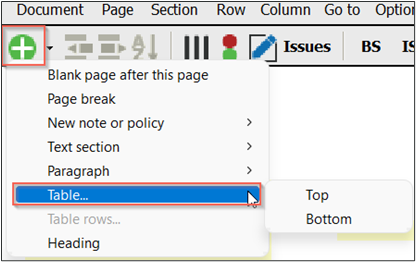
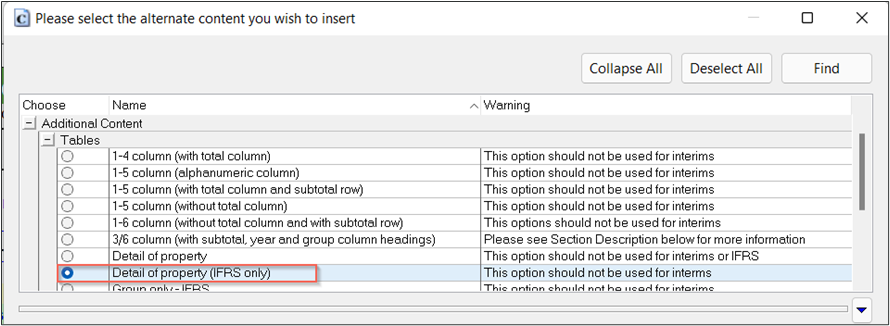
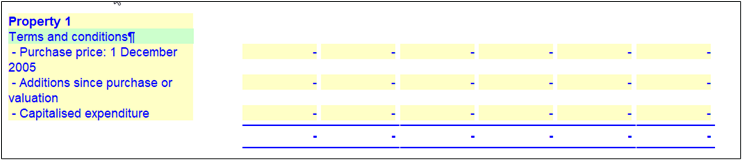
We have received market feedback that clients require to add more details of properties in the Property, plant and equipment note and Investment property. There is now an additional option available under the Super Insert | Table option. Remember, it is best practice to be on the subsection heading to insert a table, in this case, Details of properties.
1.5.2 Input row/Link to map/Negative link to map with terms (Loans to/from shareholders)
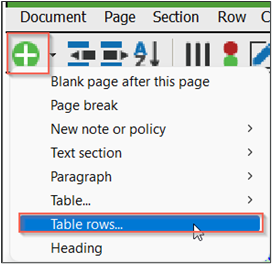
We have received market feedback that clients require to add more rows with terms in the loan to/from shareholder notes. There is now an additional option available under the Super Insert | Row option. Take note that Builder mode must be activated to see this option and is only available in the loan notes.
Refer to the link for further details on how to add a mapping number including a flip mapping number.
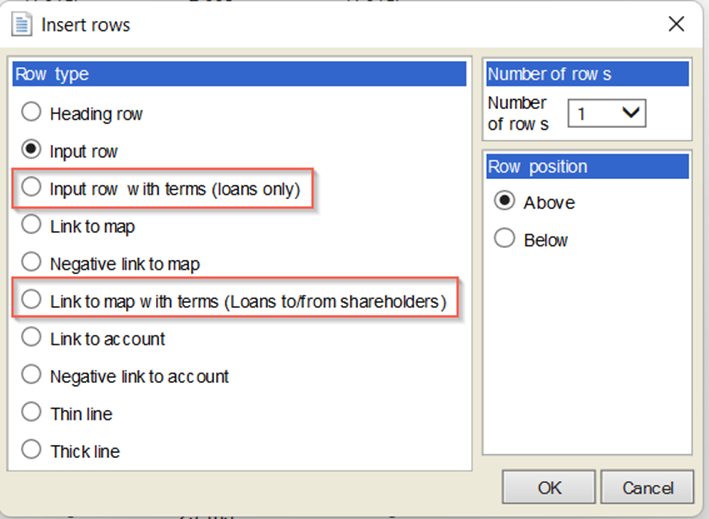
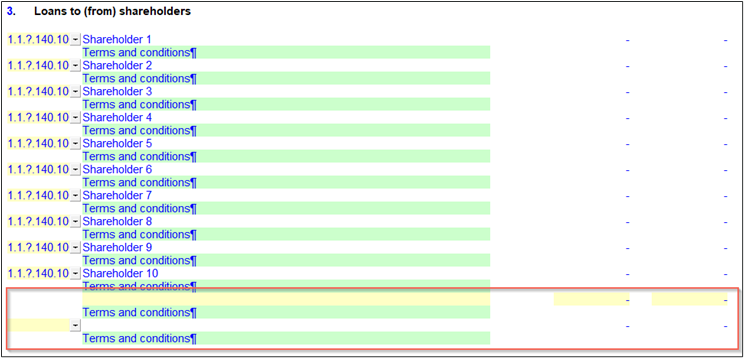
1.5.3 Text table
We have received market feedback that clients require to add a text table. There is now an additional option available under the Super Insert | Table.
1.5.4 Other
All the other menus are linked to the super insert eg Row | Insert row; Right click Row | Insert row; the shortcuts on the menu bar.
1.6. Document manager changes
1.6.1 Connector reports
A new connector document, 01.75 Sample Connector Monthly BS & IS – Company is made available. These connector accounts are example accounts for what is possible with Connector and can be used in any of your files. You can explore this further if you want to adjust this and can use this resource as a training video or can reach out to your Account Manager if you would like to engage with our consulting team to expand on this.
Refer to the link for training on the Connector functionality
1.6.2 IDEA
A new folder is added to the document manager, IDEA Integration, for the Easy Integration.
1.6.3 Client inquiries
A new folder is added to the document manager, Client inquiries received, for the new Client inquiries app.
1.7. Improvements
- Detailed income statement
- When the Income Statement was replaced with the full detailed income statement, the footer was still referring to the supplementary information while it is not part of the supplementary information anymore.
- We fixed an issue whereby when you replaced your income statement with the full detailed income statement, the income statement would not show anymore when doing a file new file from existing.
- Zimbabwe Currency - Updated the Zimbabwe Currency to be ZiG in the Information store.
- Naira symbol – The default currency symbol was corrected to be ₦, when Nigeria is selected
- Cash generated from operations note - Update the Investment income and Finance cost so that the Properties retain when amending the description.
- When importing a trial balance with map numbers, non-existent map numbers will not be created. This reduces the risk of assigning accounts to map numbers which are not catered for in the rest of the product.
1.8. Firm Template Guide
We have made multiple improvements to the guide by adding more automated tests and making it easier to navigate by moving from the guide to other specific areas of the Caseware file. Further to this and following the success of our feature to turn off all content, we have now given you the ability to turn on all content at once.
Refer to the link for further details on this guide
1.9. Speed Guide
We have created the first version of a guide to help make your file faster. This guide will continuously improve for a full release in October 2024. Currently, we give you the ability to purge probe documents if not required; which makes the Year end close process substantially faster. We also let you delete unused accounts, and it gives further details about sections which can be optimised out. Use it on your slow files or share your slow files with us to help improve the Speed Guide.
Refer to the link for further details on the Speed Guide
1.10. Assurance reports - Audit report
1.10.1 Reporting on consolidated financial statements
The Auditor’s report now includes content for reporting on consolidated financial statements.
| Matter identified | ISA reference | Comment |
|---|
| Guidance text | ISA700.24 | Guidance text has been added to prompt users to confirm that the:
- The name of the reporting entity includes “and its subsidiaries”, and
- Description of the financial statements and the individual statements include the word “consolidated”.
It also includes guidance text related to the inclusion of the term ‘group’ and the addressee discussed below. |
| Include the term ‘group’ | | To include the term 'group', go to 'Options', select 'Enable special features' insert the code and click OK. Then, go to 'Options' and select 'Group figures'. |
| Addressee of the report | | For the salutation, insert the entity name of the addressees, to whom the auditor’s report is addressed, excluding the group description, for example, ABC Limited, rather than ABC Limited and its subsidiaries. |
| Other information | | The content has been updated for the auditor’s report on the consolidated financial statements for both the following options:
- Enable when information or reports are obtained prior to the date of the auditor's report and other information is expected after the date of the auditor's report.
- Enable when information or reports are obtained prior to the date of the auditor's report.
Please take note that the description of the financial information differs from the description of the financial information used in the auditor’s report on the separate financial statements. |
| Auditor’s Responsibilities for the Audit of the Financial Statements | ISA700.38(c) | The paragraph related to the auditor’s responsibilities in a group audit engagement was updated in accordance with ISA 700.38(c) which was amended to conform with ISA 600 (Revised).
This paragraph will now only be included in the auditors’ report for reporting on consolidated financial statements. |
1.10.2 IRBA Rule on Enhanced Auditor’s Reporting
This paragraph only relates to South Africa. The IRBA Rule on Enhanced Auditor Reporting for the Audits of Financial Statements of Public Interest Entities (EAR Rule), published in Government Gazette No. 49309 dated 15 September 2023 (EAR Rule) is effective for audits of financial statements for periods ending on or after 15 December 2024, with early adoption permitted.
The EAR Rule prescribes additional disclosures in the independent auditor’s report on the audit of annual financial statements of Public Interest Entities (PIEs), as defined in the IRBA Code of Professional Conduct for Registered Auditors (Revised April 2023), as amended. The Revisions to the IRBA Code of Professional Conduct for Registered Auditors (Revised April 2023) issued in November 2023 were applied.
Therefore, the auditor’s report has been updated with the following to include additional content related to the EAR Rule related to public interest entities:
| Matter identified | ISA reference | Comment |
|---|
| 01.20 Information store |
| Public Interest Entity | | A new field has been added, namely “Public interest entity” in the Client Information / General section.
Content related to the EAR Rule will be included when the user selected “Public Interest Entity”. The relevant paragraphs will be switched on by default when “Public Interest Entity” is selected. |
| Auditor’s Report |
| Basis for Opinion | IRBA EAR Rule | Users are prompted to include disclosure related to final materiality and group audit scope in terms of the EAR Rule.
The group audit scope paragraph will only be included in the auditors’ report for reporting on consolidated financial statements. |
| Material Uncertainty Related to Going | IRBA EAR Rule | Users are prompted to include disclosure related to how they evaluated management’s assessment of the company/group’s ability to continue as a going concern, in terms of the EAR Rule. |
| Key audit matters | IRBA EAR Rule | Users are prompted to include disclosure related to key audit matters in terms of the EAR Rule.
Additional columns will be included in the tables when users select “Public Interest Entity” in 01.20 Information Store:
- Outcomes of audit procedures with respect to the key audit matter
- Key observations with respect to the key audit matter
For Probe Audit users, details will pull through from the Key Audit Matters table on 02.55 Key audit matters, when users conclude that the KAM will be reported on in the Auditor’s Report.
For Audit International users, details will pull through from the Key Audit Matters table on 325 Worksheet – Key audit matters. |
| Report on Other Legal and Regulatory Requirements | IRBA EAR Rule | Users are prompted to include disclosure related to fee-related matters in terms of the EAR Rule.
The existing audit tenure paragraph will now also be included based on the selection of public interest entity in 01.20 Information Store. |
1.10.3 Fixes
The Other information paragraph in the Audit report did not update when the detailed income statement was selected to be disclosed as part of the financial statements as the Income Statement, and not as Supplementary information.
2. Caseware Working Papers 2024.00.092.07
The following describes the features and fixes included in Working Papers 2024 and related products.
2.1. Features
2.1.1. Protection setup
Split the existing Set Protection On/Off group right into Set Protection On and Set Protection Off. This can be used to expand the number of users that can enable file protection without giving them the ability to disable it.
2.1.2. History and milestones
Added an option to display document insertion events in the file history log.
2.1.3. Lockdowns
Added an option to the Engagement Lockdown Wizard to set all content in a file’s directory to read-only after lockdown. This read-only mode also applies to any sync copies of the file.
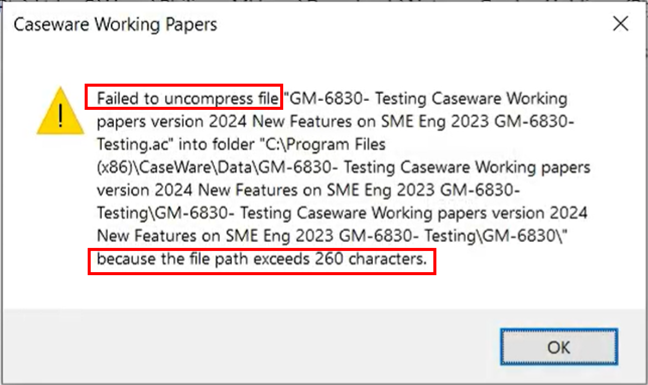
2.1.4. More informative Error Messaging
Added a more informative error dialog when attempting to open a compressed file that contains documents with file paths exceeding 260 characters.
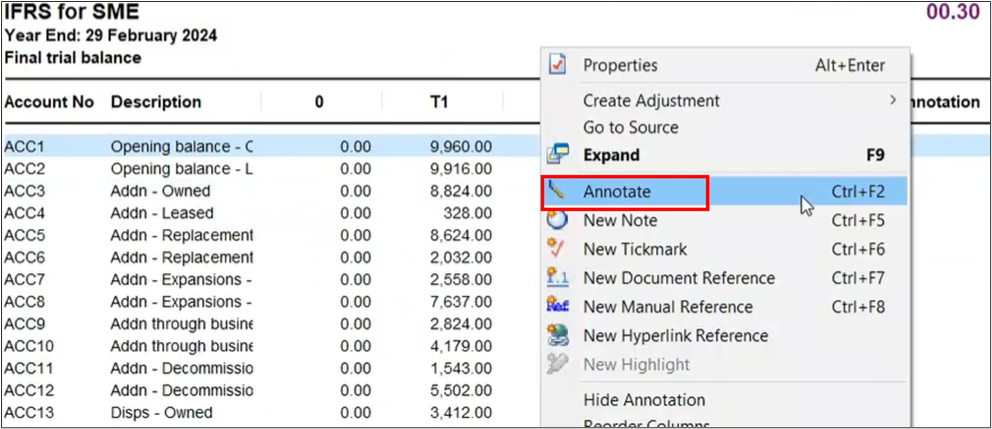
3.1.5. Annotations
The Annotation column is now visible in trial balance automatic documents using the Consolidated view.
2.1.6. Caseview scripting
Increased the character limit for CaseView script names to 31 characters. This increased character limit aligns with the existing CaseView UI limit and prevents some potential scripting errors.
2.1.7. Data Store Administration Tool
The Data Store Administration Tool (DSAT) can now be used with Microsoft SQL Server 2022.
2.1.8. Imports and exports
- Added support for imports from the following software packages:
- QuickBooks 2024 (Australia, Canada, UK)
- Sage 50 Accounting 2024 (Canada)
- Added support for exports to the following software packages:
- ProFile 2023 (Canada)
- The import process for QuickBooks US files now matches the process to import QuickBooks Canada, UK and Australia files. This process requires the QuickBooks Export Utility.
2.2. Improvement
- Attempting to access a computer’s system drive through CaseView causes CaseView to close unexpectedly.
- After performing a silent installation to a newer version of Working Papers, the older version is uninstalled, but the shortcut folder remains in the Windows 10 Start menu.
All 2024 Templates require Caseware Working Papers 2024 to be installed.
If you are a firm champion, you will have access to your unique download package by accessing the My Software page and clicking on the download packager icon top right. If you are responsible for managing updates and have not received login details for the Caseware Africa Success Community, click on Login (top right) and then choose the Register Now option.
If this is not successful contact our admin team at info@casewareafrica.com
Who is the firm champion?
The "Firm's Champion" is the staff member responsible for rolling out the template to the users at the firm.
I do have a Caseware Africa Success Community login
If you are a firm champion, you will have access to your firm's unique download package by accessing the My Software page and clicking on the download packager icon (top right).
I do have a Caseware Africa Success Community login but cannot see the My Software option
You may request the file to be provided to you by your firm champion
Alternatively to obtain this access your firm champion will need to update your user permissions on the Content Management page once they have logged in. This page is available when selecting the My Team's Information option in the drop down menu. When clicking on the Manage button next the user's name, ensure that the Download Software checkbox is ticked. This will allow the user access to the My Software page.
I don't have a Caseware Africa Success Community login
If you are responsible for managing updates and don't have a login for the Caseware Africa Success Community, click on the Login button in the top right and then Register Now.
If this is not successful contact our admin team at info@casewareafrica.com
This release contains the latest technical enhancements, the update on the Body Corporate entity type based on the SAICA Illustratives, change to the tax and introduction to the Pillar Two Tax and 80% assessed loss rule and some improvements, fixes and improvements and some minor fixes.
Our November 2022 release introduced the revamped Cashflow worksheet, Co-operatives as a new entity type (fully incorporated with iXBRL taxonomy), updated document manager due to ISA315(R) 2019, some minor fixes and the 2023 CIPC taxonomy.
To read more on our previous release notes, click on the links below to access:
Rate this article: