Executive summary
The IFRS Financial Statements App 2026.2 (2.152.0.0) release delivers major enhancements across compliance, entity support, and usability.
Key highlights include:
- IFRS 19 disclosure across the accounting policies and notes
- Page-level year headers, with CY/PY headers moved to the top of the page
- Cash flow statement & Cash flow worksheet combined removing the need to capture cash flow workings separately
- Updated Statement of equity to include share premium and treasury shares
- Visualisation
- Other enhancements
Contents
1. Update to latest template
A new engagement is created based on a template. Templates are created and managed by authors — staff members with the Settings Admin role or similar — who customise the default product content to meet specific firm needs. Following this release, firm authors are required to update the enterprise firm template to make the latest changes available to their users.
Further guidance: Detailed step-by-step instructions for each scenario are available at the following links:
2. IFRS 19 early adoption
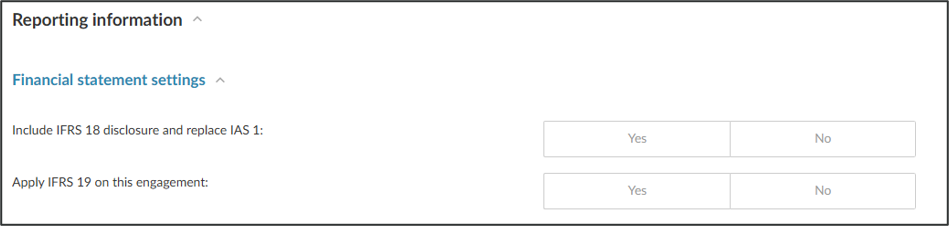
Eligible entities can now apply IFRS 19 reduced disclosure requirements, selected per engagement in 101 – Engagement Setup. A new “Apply IFRS 19” setting drives a new “IFRS 19 Disclosure” component throughout the file, which shows or hides IFRS 19-specific content across the accounting policies and notes. Full details: IFRS 19 adoption
| Area | What changes |
| Accounting policies | Basis of preparation and the Overall accounting policies section updated with new reduced-disclosure paragraphs. |
| Statement of financial position notes | Disclosure reduced across Property, plant and equipment, Investment property, Biological assets, Intangible assets, Investments in subsidiaries/associates/joint arrangements, Inventories, Loans receivable, Loans to group companies, Investments at fair value, Transferred financial assets, Cash and cash equivalents, Deferred tax, Retirement benefits, Leases (company as lessee) & Finance lease receivables, Non-current assets held for sale and assets of disposal groups, and Supplier finance arrangement. |
| Statement of comprehensive income notes | Disclosure reduced across Revenue, Operating expenses and Share-based payments. The Other comprehensive income note is retained in all cases, as it is used to build the primary statements. |
| Other notes | Financial instruments and risk management, Fair value information, Business combinations and Sale of subsidiary updated with a mix of reduced and newly-added disclosure. |
| Related parties | New disclosure identifying the immediate parent and ultimate controlling party is added when IFRS 19 is applied. |
3. Page-level headers for notes the financial statements
3.1 How it works
Print settings include page-level table header for current year and prior year headers. Page-level table header consolidates shared table header information into a page-level header so it appears once at the top of the page. Tables that use the page-level header appear without their own table headers. This creates a cleaner layout when users review printed or exported documents.
Depending on which Print Settings you are accessing, you can choose any of the dynamic tables that are part of that area by selecting it from the drop-down in the Print Settings.
A dynamic table can be configured to act as a page-level header.
- On any dynamic table, select More Actions (
 ) | Edit dynamic table.
 - Select the Settings icon (
 ).
). - Choose the Header behaviour from these options:
- Default: Uses the page-level header when it's enabled.
- Show: Always shows the table header.
- Hide: Always hides the table header.
Page-level table headers are available in documents that use the financial statements layout, including letters and memos.
Page-level table headers appear based on the content on each page:
- If the page includes at least one eligible dynamic table, the page-level table header appears and the table appears without its own header.
- If the page includes text only, only the text header appears.
- If the page includes only non-standard tables, only the text header appears because non-standard tables are not eligible.
3.2 How to change the page header for the notes
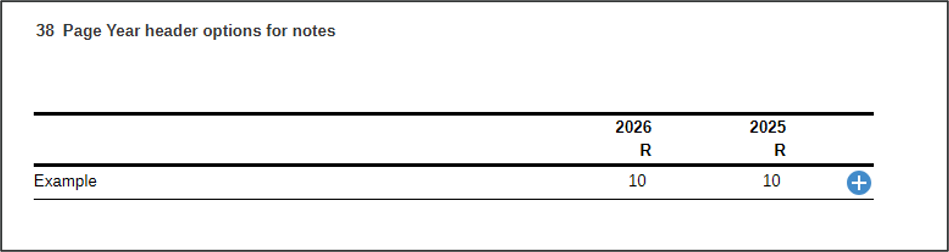
A dedicated note, “Page Year header options for notes”, is added at the end of the notes section to drive the header values.
- Add the note “Page Year header options for notes” from the library into the engagement
- Make the required adjustments to the header by going into Edit Dynamic table
- Once changes have been made, exclude the Note from the Engagement again
4. Cash flow statement & Cash flow worksheet combined
The Cash flow worksheet has been combined into the Cash flow statement, so users no longer need to capture cash flow workings in a separate area. Direct cell references have been removed so current year figures roll forward correctly to the prior year, and the workings columns are hidden automatically within the statement once the related checklist question has been completed, keeping the printed statement clean.
4.1 Cash flow worksheet workings:
- The cash flow worksheet columns consist of Opening balance, Closing balance, Movement, System adjustments, and Manual non-cash adjustments.
- Only capture values in the Manual non-cash adjustments column. All other columns and calculations are automatically populated by the system.
- The Opening balance and Closing balance columns are only populated where the balances are required to determine the cash flow for a specific line item. As a result, some rows will not contain opening or closing balances.
- The Cash flow worksheet columns are provided to support the preparation and review of the financial statements and will not be required in the final published financial statements.
To hide the Opening balance, Closing balance, Movement, System adjustments, and Manual non-cash adjustments columns for final printing, navigate to Document 101 – Financials Finalisation and set "Do you want to hide the Cash flow worksheet section in the financial statements for final printing?" to Yes.
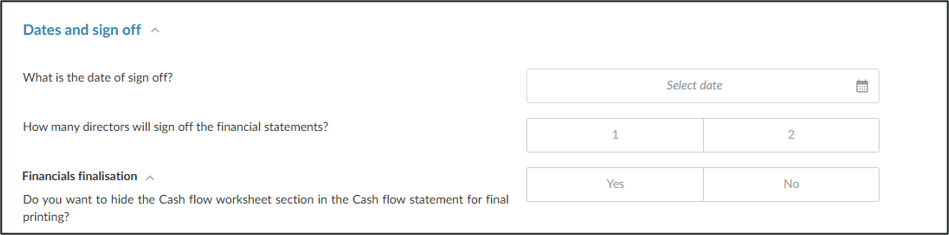
This will hide the Cash flow worksheet columns from the final printed output while retaining the underlying calculations and cash flow balances.
5. Financial insights and visualisation builder
The Financial insights and visualisation builder let users group trial balance accounts, analyze trends and variances across up to 5 periods, and build a dashboard of interactive charts – all inside a Caseware engagement. Charts can be exported to any document type within the engagement.
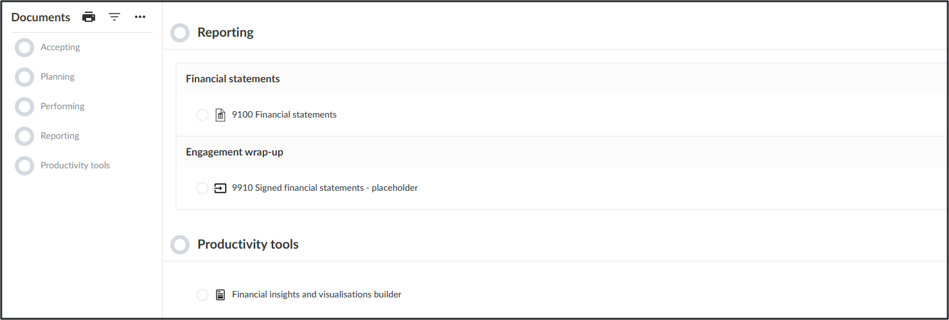
The Financial insights and visualisation builder can be accessed from the document manager under the Productivity tools section. Full details: Visualisations
To improve the user experience and streamline engagement setup, questions that activate procedures within the work programs have been moved from Document 131 Understanding the entity and its environment to Document 203 Financial statement optimiser. This change centralizes the selection of engagement-specific procedures within the relevant workflow area, making it easier to configure and manage work program requirements. Existing activation logic remains unchanged; only the location of the questions has been updated. As a result, users can expect a more intuitive setup process with reduced navigation between documents when tailoring procedures for an engagement.
The document numbers for the Reporting Phase were updated to the 9000 range to accommodate the new grouping number range for IFRS 18.
Additional headings are included to facilitate the ease of use.
The immaterial checklist was updated to reflect the final amounts, after journals are processed.
An additional disclosure paragraph has been added to the end of the Main business activities accounting policy, covering the category used to present interest income, finance costs, or dividends received in the statement of cash flows when these are presented across multiple categories in profit or loss.
The share capital and the share premium columns were split to be separate columns.
The share capital note was updated to include an authorised share capital table. Additional placeholders were included in the additional information section.
The retirement benefit note was updated to include Reimbursements rights as per the updated grouping.
Groupings were updated/amended to ensure consistency between apps and correctly reflecting the nature of the grouping:
| Grouping | Change | Detail |
| 3xx-xxx-112 | Description changed from ‘Fair value adjustments’ to ‘Revaluation’ | Description updated to closer align to the standard |
| 3xx-xxx-515 | Description changed from ‘Transfer - owner-occupied property’ to ‘Transfer – other’ | Description updated to closer align to the standard |
330-130
430-130 | Description changed from ‘Operating lease assets’ to ‘Operating lease receivables’ | Description updated from market feedback |
380-105
480-105 | Description changed from ‘Fair value of retirement benefit assets’ to ‘Fair value of plan assets’ | Description updated from market feedback |
380-110
480-110 | Add grouping for ‘Reimbursements rights’ | Additional grouping added for automation of disclosure |
430-175 & 630-175 amended to
430-125 & 630-125 | Amend grouping number for VAT | Grouping number changed to align with other financial apps |
| 430-194 | Description changed from ‘Operating lease assets’ to ‘Operating lease receivables’ | Description updated from market feedback |
| 805-305 | Description changed from ‘No par value’ to ‘No par value Type A’ | Description updated from market feedback |
| 805-310 | Description changed from ‘No par value Type A’ to ‘No par value Type B’ | Description updated from market feedback |
| 805-315 | Description changed from ‘No par value Type B’ to ‘No par value Type C’ | Description updated from market feedback |
Use the checklist below when preparing engagements under this release:
| Action | Detail |
| Update to latest template | Update the enterprise firm template in Manage Template. If using the default template, select “Update from [2.152.0.0]”, then Publish template. |
| IFRS 19 (if applicable) | Select “Apply IFRS 19” in Document 101 for eligible entities. Review the affected notes and accounting policies listed above. |
| Year headers | Enable “Enable page-level table header” in Settings → Financial Statement if the firm wants to adopt the new layout. Review the Notes - page header note. |
| Cash flow statement | Review the combined Cash flow statement layout, confirm the correct method (Direct/Indirect) is selected in Document 101, and complete the related checklist question to hide workings columns. |
To read more on our previous release notes, click on the link below to access:
Rate this article: