How do I fix GRAP XBRL rejection error?
Answer:
Issue: GRAP XBRL rejection error
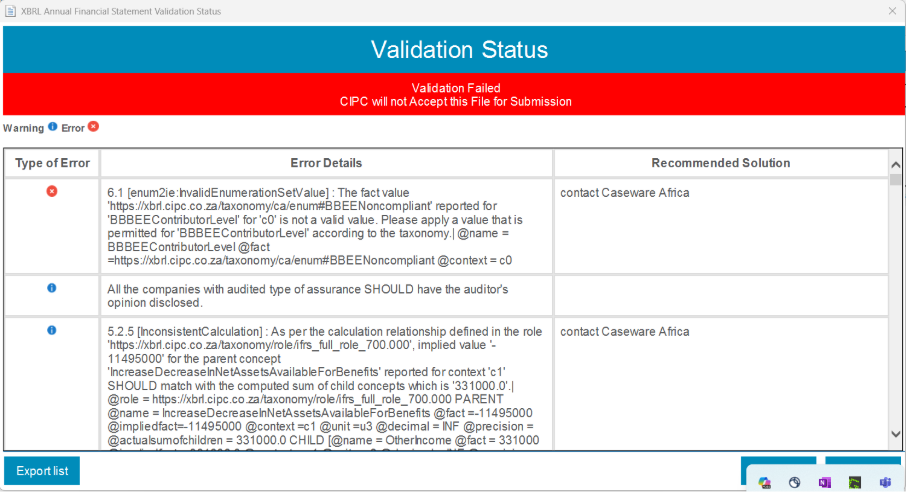
Reproduction steps:
- Checking if the XBRL hotfix was applied since the error starts with “6.1”.
- Checking the section of the error from the Mandatory Information and confirmed that the issue is with the wording of the field next to “Declaration of BBBEE contributor level”
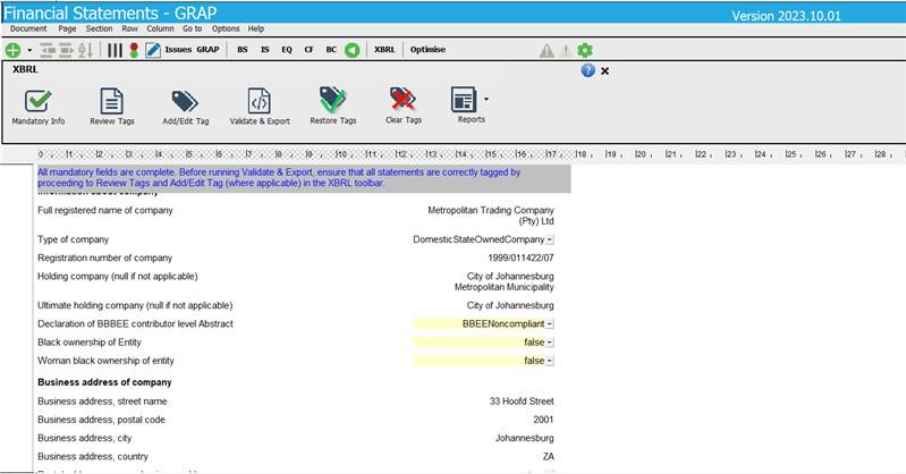
- Checking if the issue arises from both the GRAP 2024_2 and GRAP 2024_3, and it was infrastructure related
Solution:
- Manually correct the wording of the filed from “BBEENoncompliant” to “BBBEENcompliant”
- Checking and confirming if all tags are correct, then proceeded to validate and export
Rate this article:
|vote=None|
Processing...
(Popularity = 0/100, Rating = 0.0/5)
Related Articles
How to resolve special character XBRL submission error
Caseware Working Papers | GRAP XBRL, what is the deal?
Introduction to the online validation process for XBRL submissions to CIPC
XBRL | How to change security settings for Caseware and when iXBRL "hangs" on CIPC validation
view all...
Search Results
Investec Private Bank South Africa Audit Confirmation Instructions
RMB Investment and Corporate Banking South Africa Audit Confirmation Instructions
Citibank South Africa Audit Confirmation Instructions
Standard Bank South Africa Audit Confirmation Instructions
Investec Corporate and Institutional Banking South Africa Audit Confirmation Instructions
view all...