How do I fix GRAP XBRL rejection error?
Answer:
Issue: GRAP XBRL rejection error
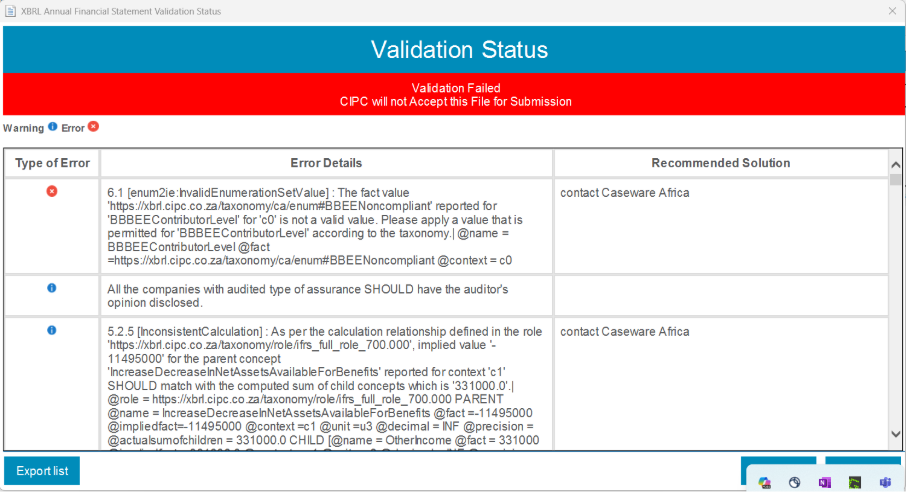
Reproduction steps:
- Checking if the XBRL hotfix was applied since the error starts with “6.1”.
- Checking the section of the error from the Mandatory Information and confirmed that the issue is with the wording of the field next to “Declaration of BBBEE contributor level”
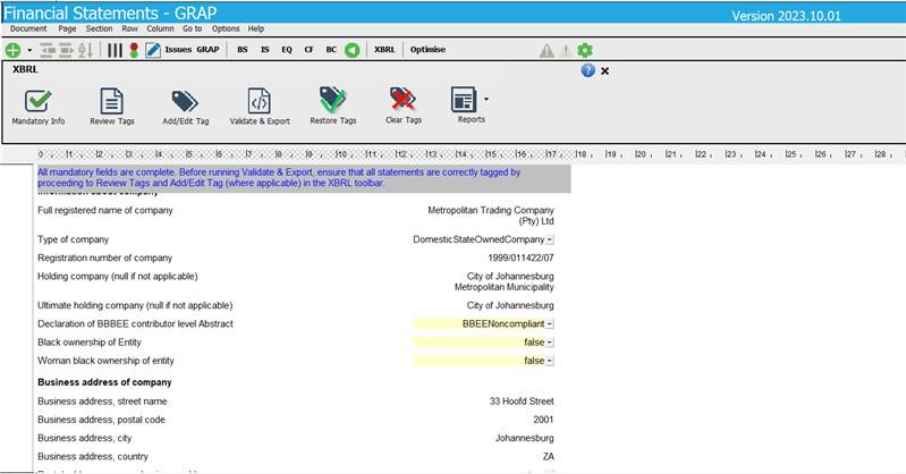
- Checking if the issue arises from both the GRAP 2024_2 and GRAP 2024_3, and it was infrastructure related
Solution:
- Manually correct the wording of the filed from “BBEENoncompliant” to “BBBEENcompliant”
- Checking and confirming if all tags are correct, then proceeded to validate and export
Rate this article:
|vote=None|
Processing...
(Popularity = 0/100, Rating = 0.0/5)
Related Articles
How to resolve special character XBRL submission error
Caseware Working Papers | GRAP XBRL, what is the deal?
Introduction to the online validation process for XBRL submissions to CIPC
XBRL | How to change security settings for Caseware and when iXBRL "hangs" on CIPC validation
view all...
Search Results
Investec Bank - Corporate Cash Manager (CCM) Audit Confirmation Instructions
Investec Private Bank South Africa Audit Confirmation Instructions
RMB Investment and Corporate Banking South Africa Audit Confirmation Instructions
Nedbank Corporate Banking - Loans and Other Liabilities Audit Confirmation Instructions
ABSA Corporate Bank South Africa Audit Confirmation Instructions
view all...