How to use Easy Import
Instructions:
Easy Import
Use Easy Import to import data extracted with Easy Extract into Caseware IDEA®.
-
You should have a Caseware IDEA® project for this client.
Please open that project now or create a new Caseware IDEA® project.
-
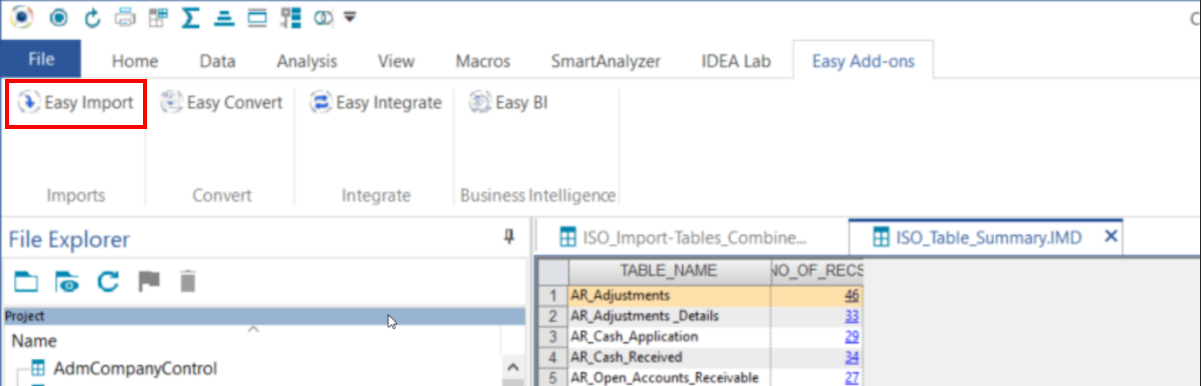
On the Easy Add-Ons ribbon you should see “Easy Import”.
Click this ribbon option. If you do not see the Easy Import option you will need to install the Easy Add-ons package from Caseware Africa. You should find it on your Caseware Africa download page.
-
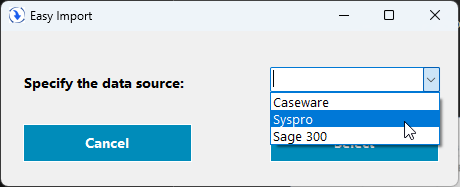
Select the accounting information system you want to import from
-
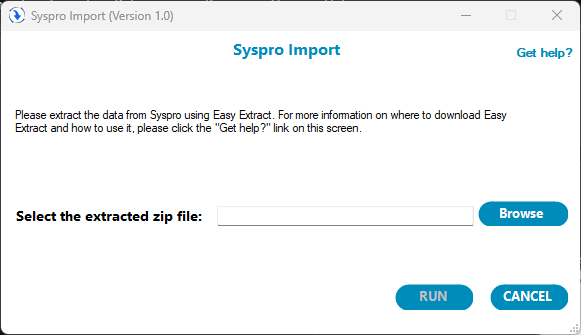
You should see the following screen
-
Browse to the zip folder received in the previous step and click “Run”
a. How long the import will take to complete depends on the size of the data set
b. A 500mb data set takes about 10 minutes to import into Caseware IDEA. The bigger the data set the longer the import will take.
c. You can monitor the progress via the progress bar.
-
This will import the data into Caseware IDEA.
-
If the client created custom SQL tables in IDEA you will get a list of all custom tables and you should…
a. Drag and drop them into Caseware IDEA to import them
b. Ask the client why these tables were created
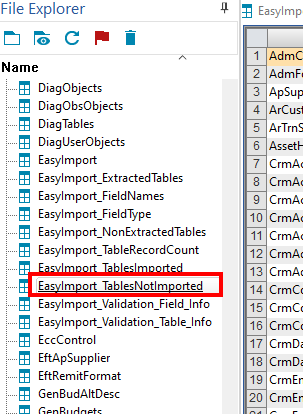
You may also refer to our detailed user guide for additional information and steps on how to use the easy add-ons here.
Rate this article:
|vote=None|
Processing...
(Popularity = 22/100, Rating = 0.0/5)
Related Articles
Easy Extract and Import Overview
Easy Add-ons User Guide
Easy Integrate
Easy Extract
view all...
Search Results
How do I add a new user to my institution (New Version of Confirmation)
What's New | Responders: New version of Confirmation 2025/26
How do I update the Responder Instructions for my institution? (New Version of Confirmation)
How do I remove an inactive clerk or supervisor (New Version of Confirmation)
How do I search for a past confirmation? (New Version of Confirmation)
view all...