Caseware Working Papers fail to install on a Citrix/Terminal Server due to an Install Shield compatibility issue. This is a known issue with Windows Server.
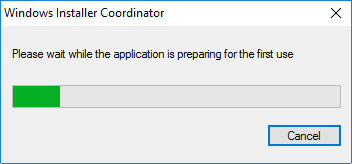
The installation does not proceed beyond the Windows Installer Coordinator dialog.
Answer:
You must either perform a silent installation of Caseware Working Papers or temporarily disable RDS Compatibility for the Citrix/Terminal Server.
To disable RDS Compatibility:
- Click the Windows Start menu and type gpedit.msc. Press Enter.
- In the Local Group Policy Editor, navigate to Computer Configuration | Administrative Templates | Windows Components | Remote Desktop Services | Remote Desktop Session Host | Application Compatibility.
- In the Application Compatibility pane, double-click Turn Off Windows Installer RDS Compatibility.
- In the Turn Off Windows Installer RDS Compatibility dialog, select Enabled | OK
RDS Compatibility is disabled. You can now install Working Papers on the Citrix/Terminal Server.
Note: After installation, you can reset RDS Compatibility if applicable.
Rate this article:
|vote=None|
Processing...
(Popularity = 1/100, Rating = 0.0/5)
Related Articles
How to download install and register Caseware Working Papers software
Caseware Working Papers | Getting Started | Download install and register Caseware Working Papers New
Connector | How to install and register Caseware Connector
Data Store | How do I resolve "LDAP authentication failed"?
view all...
Search Results
What is a User Id?
User Profile for Bank Users Set Up
Password for Bank Users
What if the Account ID requested was closed for the As of Date (New Version of Confirmation)
What do I do if I can't locate the Account ID or Client Name requested? (New Version of Confirmation)
view all...