Confirmation.com - What to do if no figures are pulling through in the financials?
Toggle navigation
Support Escalation
Knowledge Base
Getting Started
eLearning
Training
3
Support Closure | Confirmation - 2026
Confirmation Billing Guides (Effective 1 Nov 2025)
What's New Confirmations 1 Nov 2025
Login
Search
Home
Knowledge Base
What to do if no figures are pulling through in the financials?
What to do if no figures are pulling through in the financials?
Published: 26/03/2021
What to do if your figures are not pulling through in the financials?
Answer:
Step 1 : Complete the following in the CaseWare Working Papers document manager
• Select
Engagement | Consolidate
• Select the entity on the left
• Then click on
Properties
• Insert an
abbreviation for the entity
(This can be anything, e.g abbreviate the name of the company.)
• Then select
OK
• On the next dialog screen, select
Apply | OK
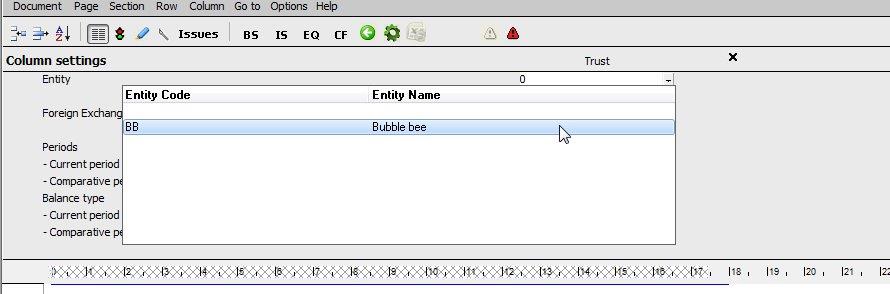
Step 2: Complete the following in CaseView by opening the financial statements
• Select
Options |
Column settings
• Select the abbreviated entity by the drop down across entity
Rate this article:
|vote=None|
Processing...
(Popularity = 1/100, Rating = 3.0/5)
Related Articles
BizSuite | What to do when no figures are pulling through to the financials?
Bizsuite | What must I do if my Financials or Reports are pulling through incorrect period figures?
How to eliminate rounding differences and adjust rounding of figures in the financial statements
How to submit Group / Consolidated figures to CIPC in IXBRL format
view all...
Search Results
Caseware Working Papers | Getting Started | Download install and register Caseware Working Papers
How to download install and register Caseware Working Papers software
Caseware Working Papers | Performing a multiple Year-End-Close
Caseware Working Papers | What to do when opening a CaseWare Working Papers file and you get an Error 2 – File not found error?
Caseware Working Papers | Getting Started | Download install and register Caseware Working Papers New
view all...
Didn't find what you were looking for?
Watch a video
Check out our helpful video guides
Contact Support
Contact our support team
For more information, visit:
www.confirmation.com
Quick Links
Knowledge Base
Privacy Policy
Security
Regulatory
Terms Of Service
Copyright © 2026 | All Rights Reserved