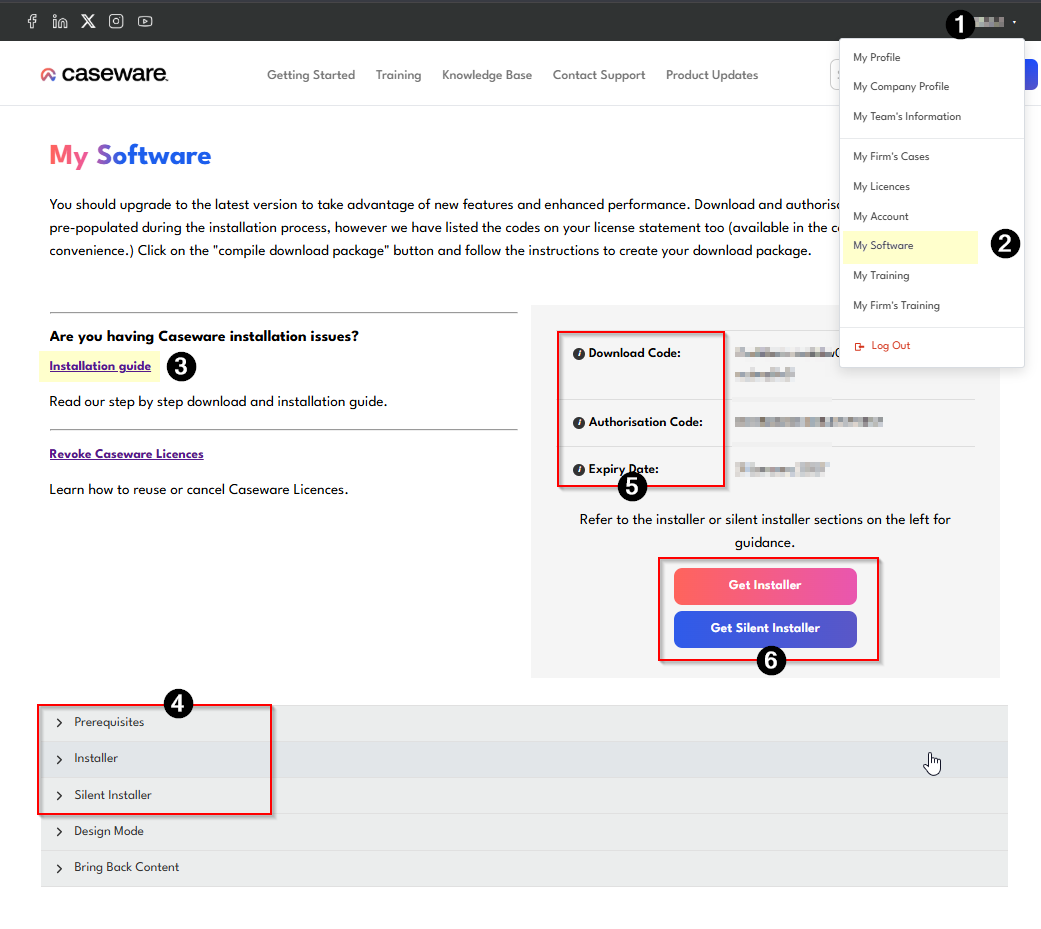
Using the following steps, we briefly demonstrate all the areas you need to effectively use the "My Software" page on the Caseware Africa Success Community:
1. Once you have logged into the Caseware Africa Success Community, the menu will display.
2. Select the Menu and select from dropdown, My Software
3. At the top, we provide you with a link to our installation guide
4. Further down, we provide you with all the prerequisites, distribution scenarios, and silent install collateral.
5. To your right, you will find your download and authorisation codes for Caseware Working Papers.
6. You will also find the links that take you to your download Depending on the installation method you have chosen, you can click here to initiate your Caseware Working Papers installation.
Instructions:
How to use the "My Software" page.
Rate this article:
|vote=None|
Processing...
(Popularity = 0/100, Rating = 0.0/5)
Related Articles
Caseware Africa Success Community | Introduction to the My Software page
How to download install and register Caseware Working Papers software
Caseware Africa Success Community | Where do I go to get the latest versions of my software?
Caseware Africa Success Community | How to identify which options to select from the download packager list when downloading your software
view all...