How to abandon sync copies from Caseware Cloud:
-
Ensure you have the Editor or equivalent role to be able to delete sync copies.
-
From the Cloud menu, select Working Papers.
-
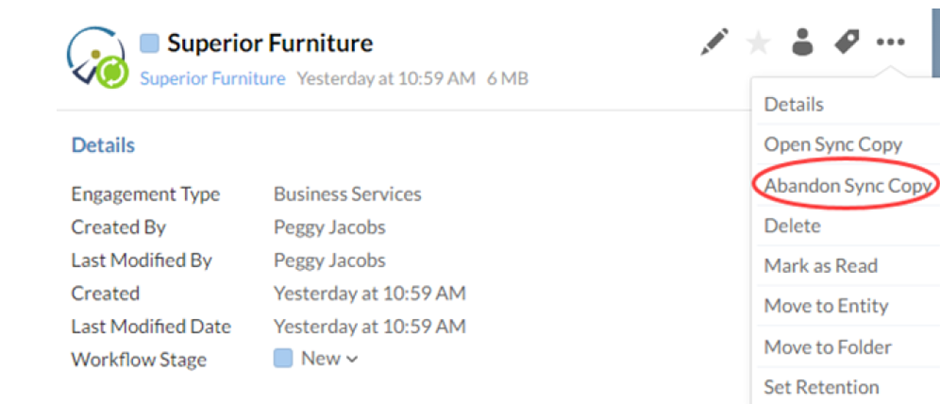
Navigate to the Smart Sync file you wish to abandon. Select it to open the file details pane.
-
Select More Actions (on the 3 dots) | Abandon Sync Copy.
-
Select the Sync copies you wish to abandon and select OK.
NB: You will need to have one child copy link to the parent that is fully synchronised for you to proceed to update.
Answer:
How to abandon sync copies from the Parent in CaseWare Working Papers:
-
Open CaseWare Working Papers.
-
Browse to the parent file location and open the parent file directly.
-
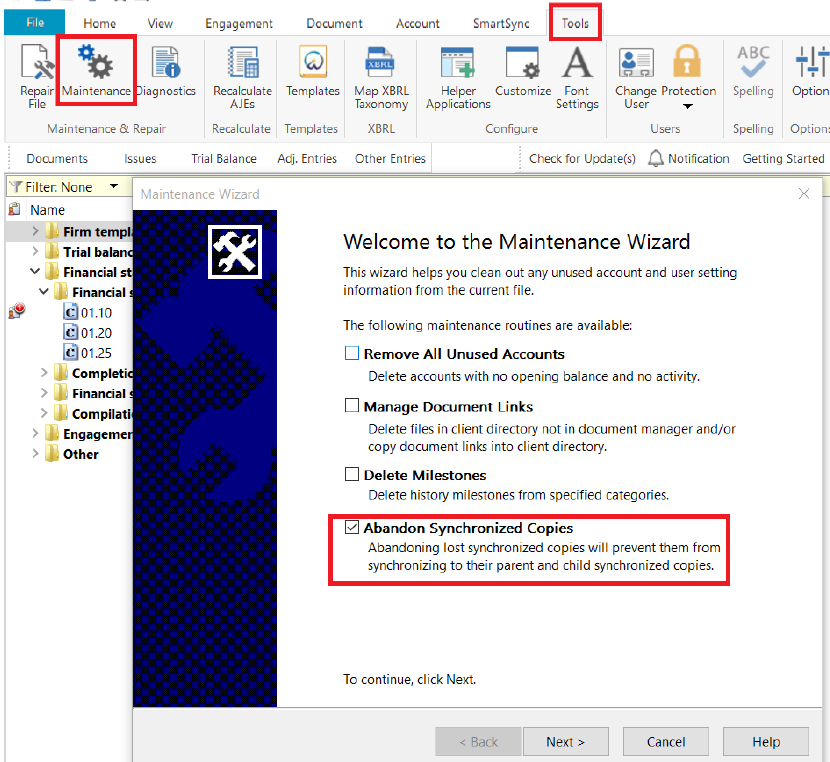
Select the “Tools” tab, click the “Maintenance” button
-
Tick the “Abandon Synchronized Copies” tick box.
-
Click the “Next” button, then select the child copies to Abandon.
-
Click the “Finish” button, CaseWare will now Abandon all the selected child copies.
Rate this article:
|vote=None|
Processing...
(Popularity = 0/100, Rating = 0.0/5)
Related Articles
Caseware Working Papers | Creating a sync copy of your file from the Cloud
Manage Sync Copies
SmartSync | What to do if your child copy is not syncing back to the parent file?
How to copy components from another file or template
view all...
Search Results
How do I know the client signer has authorized the auditor to send requests? (New Version of Confirmation)
I can’t request authorisation from a client signer as the name is greyed out (cannot be selected)?
Can my client signer give authorisation to multiple companies at the same time?
Editing Authorised Signer Details
Who is an authorised signer?
view all...