How to abandon sync copies from Caseware Cloud:
-
Ensure you have the Editor or equivalent role to be able to delete sync copies.
-
From the Cloud menu, select Working Papers.
-
Navigate to the Smart Sync file you wish to abandon. Select it to open the file details pane.
-
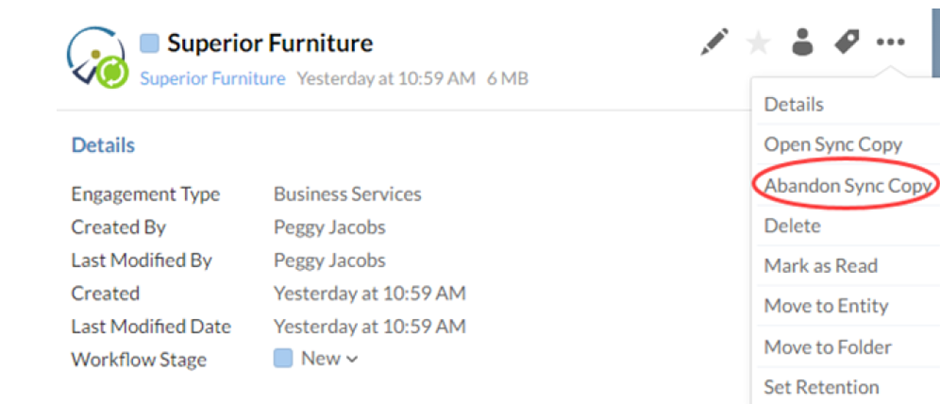
Select More Actions (on the 3 dots) | Abandon Sync Copy.
-
Select the Sync copies you wish to abandon and select OK.
NB: You will need to have one child copy link to the parent that is fully synchronised for you to proceed to update.
Answer:
How to abandon sync copies from the Parent in CaseWare Working Papers:
-
Open CaseWare Working Papers.
-
Browse to the parent file location and open the parent file directly.
-
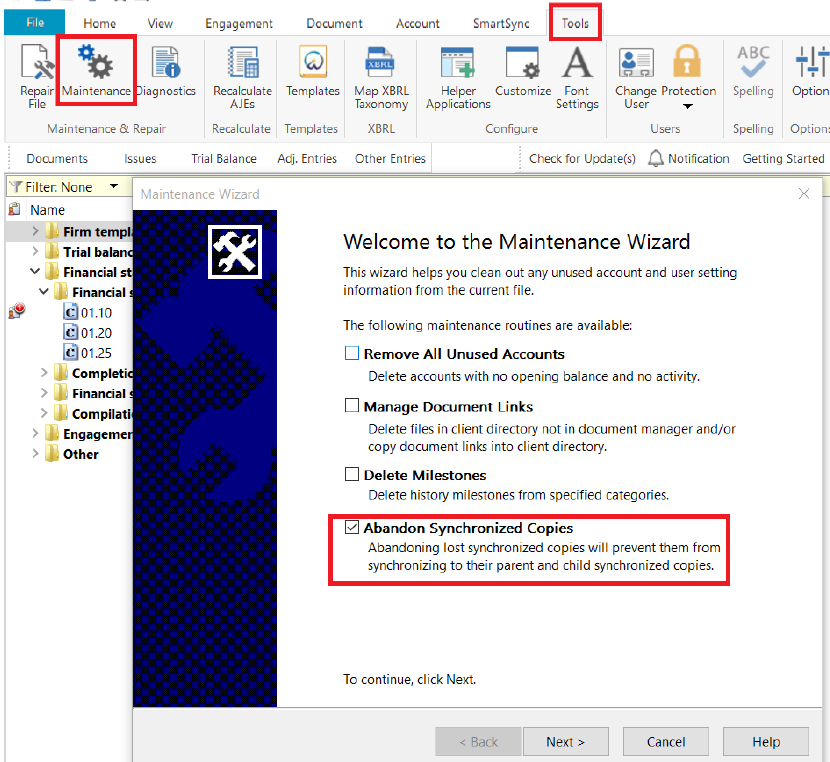
Select the “Tools” tab, click the “Maintenance” button
-
Tick the “Abandon Synchronized Copies” tick box.
-
Click the “Next” button, then select the child copies to Abandon.
-
Click the “Finish” button, CaseWare will now Abandon all the selected child copies.
Rate this article:
|vote=None|
Processing...
(Popularity = 0/100, Rating = 0.0/5)
Related Articles
Manage Sync Copies
Caseware Working Papers | Creating a sync copy of your file from the Cloud
SmartSync | What to do if your child copy is not syncing back to the parent file?
How to copy components from another file or template
view all...
Search Results
Getting Started | Year end close
Principles of mapping the trial balance
Cloud Time | Year End Close
How to perform a Year-End Close
How to perform a multiple year end close
view all...